

6 Best Wireless Mice for Shaky Hands
Struggling with cursor control due to shaky hands? Our top 6 extra-large wireless mice offer a stable grip for enhanced precision and smoother navigation.
Trying to click on a tiny "close" button or highlight a line of text can feel like an impossible task when your hand isn’t perfectly steady. A standard, lightweight mouse can seem to fly across the screen with the slightest unintended movement, leading to daily frustration. For many homeowners, this isn’t just a minor annoyance; it’s a barrier to paying bills online, connecting with family, or enjoying a hobby. The good news is that the right tool can make a world of difference, and choosing a mouse designed for stability can transform your computing experience from a challenge into a simple part of your day.
Improve Cursor Control with the Right Ergonomics
When you’re dealing with shaky hands, the small, feather-light mouse that came with your computer is often working against you. The key is to find a device with ergonomics that provide stability. A larger, heavier mouse is a great starting point. It fills your palm, encouraging a full, secure grip rather than a delicate fingertip hold, and its sheer weight provides physical resistance that helps dampen minor tremors and steady your movements across the desk.
Think of it like trying to write with a flimsy, thin pencil versus a substantial, weighted pen. The heavier tool feels more grounded and easier to control. In the world of mice, this translates to less "jitter" on the screen. Many of these mice also come with software that allows you to lower the DPI, or "dots per inch." Lowering this sensitivity setting means you have to move the mouse a greater physical distance to make the cursor travel across the screen, effectively slowing it down and making it far less reactive to small, involuntary twitches.
Logitech MX Master 3S: A Heavy, Stable Choice
Experience ultimate productivity with the Logitech MX Master 3S. Enjoy ultra-fast, silent MagSpeed scrolling and 8K DPI tracking on any surface, even glass. Its ergonomic design and customizable buttons ensure comfortable, efficient work across multiple devices and operating systems via Bluetooth.


If you’re looking for a substantial, premium mouse that feels planted on your desk, the Logitech MX Master 3S is a leading contender. Its sculpted shape is designed to fit the natural curve of a larger hand, and a prominent thumb rest provides an extra point of contact for a solid, confident grip. Weighing in at around 141 grams, it has a satisfying heft that immediately provides a sense of control and stability. This weight means small jitters are less likely to translate into erratic cursor movement.
This mouse isn’t just about size and weight; its features are thoughtfully designed for controlled use. The main buttons have a soft, quiet click, which can help reduce mis-clicks from pressing too hard. Its signature MagSpeed scroll wheel can be set to a precise, line-by-line "ratchet" mode, preventing you from accidentally flying through a long document. The main tradeoff is the price—it’s an investment. However, for someone who spends hours at their computer for work or personal tasks, its durable build and stability-focused design can be well worth the cost.
Razer Basilisk V3 Pro: Customizable Sensitivity
Dominate your game with the Razer Basilisk V3 Pro wireless mouse, featuring a 30K DPI sensor for precision and a HyperScroll Tilt Wheel for versatile control. Enjoy 13 programmable buttons, 13-zone Chroma RGB lighting, and ultra-responsive Razer HyperSpeed Wireless for an immersive, customizable gaming experience.
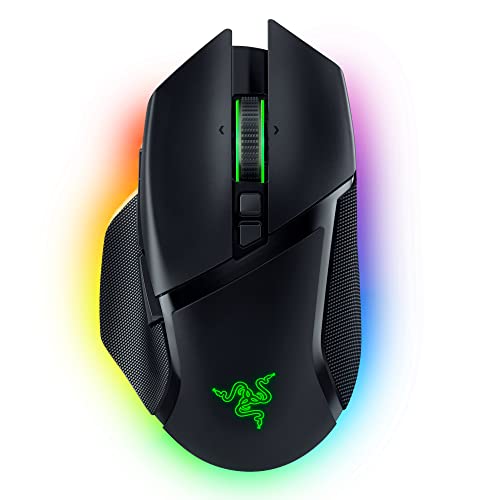
Don’t let the "gaming" label fool you; the features that give gamers a competitive edge can be incredibly beneficial for accessibility. The Razer Basilisk V3 Pro is a large, ergonomic mouse packed with customization options that are perfect for taming a jumpy cursor. Its primary strength lies in its advanced optical sensor and powerful software, which give you granular control over sensitivity settings. You can slow the cursor down to a crawl for detailed work, making it much easier to land on small targets.
One of its most practical features is a customizable "sniper" button, located right where your thumb rests. You can program this button to temporarily drop the DPI to an ultra-low setting whenever you hold it down. This is a game-changer for tasks like selecting a single cell in a spreadsheet or clicking a tiny link in an email. While it costs a premium and its aesthetic might be a bit flashy for a quiet home office, the sheer level of control it offers makes it a powerful tool for anyone who needs to dial in their cursor’s behavior with precision.
Anker Vertical Mouse for a Natural Hand Posture
If you find that gripping a traditional mouse causes your hand and wrist to tense up, which can worsen tremors, a vertical mouse might be the solution. The Anker Vertical Wireless Mouse is an excellent, budget-friendly way to see if this unique ergonomic style works for you. Instead of laying your hand flat, you hold it in a "handshake" position. This aligns your wrist and forearm in a more neutral posture, which can relieve tension and lead to smoother, more controlled movements.
Experience comfortable computing with Anker's vertical ergonomic mouse, promoting a natural handshake position to reduce wrist strain. Enjoy precise tracking with adjustable 800-1600 DPI and convenient navigation with dedicated next/previous buttons.

Because of its upright design, you naturally grip it with your whole hand, providing a large, stable contact area. It’s a substantial mouse without being overly heavy, making it easy to manage. The main consideration here is the adjustment period; it will feel strange for the first day or two. But for a very low cost, it offers a chance to fundamentally change your physical interaction with the computer. It’s a practical first step for anyone in a small apartment or on a tight budget who wants to explore ergonomics beyond the traditional mouse shape.
Logitech MX Vertical: A Premium Handshake Grip
Reduce muscle strain with Logitech MX Vertical's natural handshake position and 57° angle for improved wrist posture. Enjoy advanced 4000 DPI tracking for precise control and seamless cross-computer content transfer.

For those who have tried a basic vertical mouse and are convinced the "handshake" grip is the right fit, the Logitech MX Vertical is a significant step up in quality and refinement. It takes the same core concept as the Anker but executes it with premium materials, a more sculpted shape, and advanced features. The 57-degree vertical angle was specifically chosen to reduce muscle activity and pressure on the wrist, promoting a relaxed posture that can directly contribute to steadier hand movements.
This mouse is designed to be an all-day workhorse. It feels solid and balanced, and its integration with the Logi Options+ software allows for extensive customization of buttons and cursor speed. The tradeoff, similar to other premium Logitech models, is the higher price point. This isn’t the mouse you buy to experiment; it’s the one you invest in when you know that reducing forearm strain is a top priority for improving your cursor control and overall comfort.
Microsoft Sculpt Ergonomic Mouse: A Unique Shape for Stability
Experience natural wrist comfort with the Microsoft Sculpt Ergonomic Mouse. Its sculpted design and thumb scoop promote proper hand positioning, while the 4-way scroll wheel offers efficient navigation for your PC or laptop.

The Microsoft Sculpt offers a unique middle ground between a standard mouse and a fully vertical one. Its distinctive, bulbous shape is designed to fill your palm completely, while a gentle slope and thumb scoop guide your hand into a more neutral and relaxed position. This design encourages you to rest your hand’s weight on the mouse, creating a stable base of operations that can help minimize the effect of tremors.
Unlike a flat mouse that you might steer with your fingers, the Sculpt’s large, rounded body promotes movement from the arm, which can be smoother and more deliberate for some users. It’s a well-built device that feels solid without being excessively heavy. One practical consideration is that it often comes bundled with an ergonomic keyboard and requires a USB dongle for its wireless connection, which can be a drawback if you’re short on USB ports or only need the mouse. However, for those seeking a complete ergonomic setup, it’s a cohesive and comfortable solution.
Kensington Expert Wireless Trackball: No Arm Movement Needed
Experience precise cursor control with a large 55mm ball and patented scroll ring for easy page navigation. Enjoy ergonomic comfort with a detachable wrist rest and customize buttons and speed via software. Connect wirelessly via Bluetooth or USB dongle for broad compatibility.

When moving the entire mouse is the primary challenge, a trackball mouse offers a completely different solution. The Kensington Expert Wireless Trackball stays stationary on your desk. You control the cursor by rolling a large, billiard-sized ball with your fingertips. This fundamentally changes the source of motion; it isolates control to your fingers, completely removing arm, wrist, and hand movements from the equation. For many people with tremors, this is the ultimate solution for precise cursor control.
The large, heavy base is incredibly stable, and the ambidextrous design works for both right- and left-handed users. There is a significant learning curve, as it requires retraining your muscle memory, but the payoff can be enormous. It allows for pinpoint accuracy without any of the sweeping motions that can be difficult to control. While it’s a larger device that takes up a dedicated spot on your desk, it’s an unparalleled tool for anyone who finds that traditional mice, no matter their shape or weight, are simply too difficult to manage.
Key Features to Look For in an Accessible Mouse
Making the right choice comes down to matching the mouse’s features to your specific needs. It’s not about finding a perfect product, but the right tool for your home and routine. As you compare options, keep these key decision-making points in mind.
- Weight and Size: A heavier, larger mouse provides more inertia and a bigger surface for a stable grip. This is often the most important factor for dampening shaky movements. Look for mice over 120 grams and designed for a full palm grip.
- Adjustable Sensitivity (DPI): The ability to slow the cursor down is crucial. Look for mice with dedicated DPI buttons or robust software that lets you set the sensitivity to a very low level for more deliberate cursor movement.
- Ergonomic Shape: The best shape depends on what feels most stable to you. Options include sculpted right-handed designs, "handshake" style vertical mice, or even stationary trackballs. Don’t be afraid to try a shape that seems unconventional.
- Button Customization: Being able to program buttons for common shortcuts (like copy, paste, or back) can reduce the number of precise clicks you need to make, minimizing opportunities for frustration.
Ultimately, the goal is to find a tool that makes your daily life easier, not more complicated. The "best" extra-large mouse is the one that feels like a stable, comfortable extension of your own hand. Whether it’s the heavy and sculpted Logitech MX Master 3S or the completely different approach of a Kensington trackball, the right device can restore precision and turn a frustrating task into a seamless one. Don’t chase perfection; focus on the practical choice that brings you the most control and comfort.
