7 Best USB Hubs With Phone Stands Attached for Desks
Maximize desk space with these 7 USB hubs featuring integrated phone stands. Discover top picks that combine device connectivity with ergonomic viewing angles.
Finding the right balance between a cluttered workspace and a functional digital hub can be a daily struggle for any busy household. Integrating a phone stand directly into your USB hub is a brilliant way to reclaim precious desk real estate while keeping your devices charged and visible. This guide explores seven practical options designed to streamline your setup and simplify your daily routine.
Satechi Aluminum Stand & Hub for MacBook Users
If you are a MacBook user who frequently moves between a home office and the living room, you know how quickly peripheral cables can turn into a tangled mess. This stand is designed specifically to match the aesthetic of Apple products while providing a sturdy, elevated base for your laptop or phone. It effectively turns your device into a mini-workstation without requiring a permanent, bulky footprint.
The build quality here is substantial, utilizing aluminum that dissipates heat better than plastic alternatives. While it sits at a higher price point, the durability ensures it will survive the wear and tear of a shared household desk for years. Keep in mind that this is a premium investment, so it is best suited for those who prioritize long-term hardware reliability over budget-friendly options.
Bottom line: If you want a sleek, cohesive look that complements your existing tech, this is a top-tier choice that justifies its cost through superior material construction.
Anker 551 USB-C Hub for Ergonomic Desk Setups


Neck strain is a common complaint for anyone spending long hours at a desk, especially when constantly glancing down at a flat phone screen. The Anker 551 addresses this by acting as a true ergonomic riser, positioning your device at a comfortable viewing angle. This is a game-changer for students or remote workers who need to keep an eye on notifications without breaking their posture.
Beyond the ergonomic benefits, the hub provides a robust selection of ports, including HDMI and high-speed data transfers. It is a heavier unit, which is a positive attribute because it won’t slide around when you tap your screen or plug in a flash drive. It is a reliable workhorse for a busy household where multiple family members might use the same desk space.
Bottom line: Choose this if you value ergonomic health and need a stable, multi-functional base that won’t budge during heavy daily use.
UGREEN 6-in-1 Hub Stand for Tablets and Phones
This adjustable tablet stand offers wide compatibility for devices 4-11 inches, including iPads and iPhones. Its portable, foldable design and multi-angle viewing make it perfect for hands-free use anywhere.

For households that juggle both tablets and smartphones, the UGREEN 6-in-1 provides a versatile middle ground. Its adjustable hinge is particularly useful, allowing you to switch from a vertical video-call orientation to a lower, flatter angle for typing or sketching. It’s an excellent solution for shared family spaces like kitchen counters or small apartment desks.
The port selection is well-balanced for everyday tasks, offering enough USB-A and USB-C ports to handle external hard drives and charging cables simultaneously. It is compact enough to be tucked away in a drawer when not in use, making it ideal for renters who lack permanent office space. While it isn’t as heavy-duty as some aluminum models, its portability is a significant advantage.

Bottom line: This is the most practical choice for users who need a flexible, portable stand that can transition between different devices and locations with ease.
LISEN Aluminum Phone Stand With Integrated Hub

Sometimes, you just need a straightforward, no-nonsense stand that keeps your phone upright and your accessories connected. The LISEN stand is designed for the "set it and forget it" crowd, featuring a minimalist design that doesn’t overwhelm a small desk. It is particularly effective for those who use their phone as a second screen for communication apps.
Because of its smaller footprint, it’s a perfect fit for crowded bedside tables or narrow shelves where every inch counts. However, because it is lightweight, you may find it tips slightly if you are using a very heavy tablet or a thick protective case. It is best suited for phones and smaller tablets rather than heavy-duty creative gear.
Bottom line: If you have limited space and want a simple, clean look, this stand offers excellent value without the bulk of larger docking stations.
Baseus 7-in-1 Docking Station With Phone Mount

If you are a power user with a variety of peripherals, the Baseus 7-in-1 acts more like a central command center than a simple stand. It offers an impressive array of ports, including card readers that are essential for photographers or anyone managing digital media. The phone mount is integrated directly into the chassis, keeping your device within reach while you manage data.
This unit is slightly larger than others, so it is better suited for a permanent desk setup rather than a mobile one. It is a fantastic way to declutter a house full of cables, as it consolidates everything into one tidy footprint. While the price is higher, the sheer number of ports makes it a cost-effective alternative to buying separate adapters.
Bottom line: This is a robust solution for power users who need to connect multiple drives and peripherals simultaneously while keeping their phone accessible.
Hagibis USB-C Hub Stand for iPad and iPhone
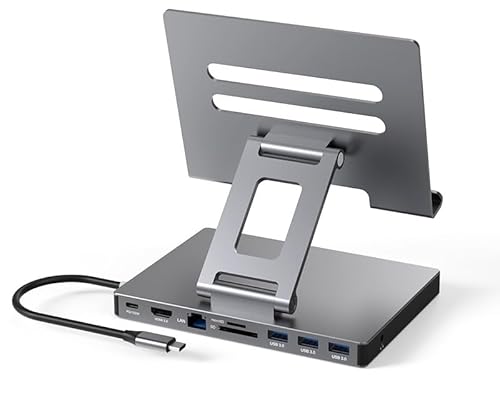
The Hagibis stand is specifically engineered with the iPad user in mind, featuring a magnetic or cradle-style mount that feels very secure. It turns a tablet into a secondary monitor quite effectively, which is a major productivity boost for small-space living. The integrated hub is tucked neatly behind the stand, keeping your workspace looking professional and clean.
Construction-wise, it feels premium and stable, which is necessary when you are mounting a larger, more expensive device like an iPad. The trade-off is that it is less compatible with thick, rugged cases, so you might need to remove your cover to get a perfect fit. It is a specialized tool that excels at what it does but requires a bit of planning for your device’s case.
Bottom line: If your primary mobile device is an iPad, this stand provides the most stable and integrated experience for turning your tablet into a desk workstation.
QGeeM Multiport Hub Stand for Mobile Devices
The QGeeM stand is a reliable, mid-range option that focuses on broad compatibility. It works well with a variety of USB-C devices, making it a safe "community" hub for a household where different family members have different phone brands. The build is solid, and it handles basic data and charging needs without any complicated setup.
While it lacks some of the premium aesthetic finishes of more expensive brands, it prioritizes functionality and price. It is an honest, utilitarian piece of equipment that gets the job done without unnecessary flair. If you are looking to equip a home office on a budget, this is a smart, reliable pick.
Bottom line: This is a great "everyman" hub that offers solid performance and broad compatibility without breaking the bank.
Key Features to Consider Before You Buy a Hub
When shopping, the most important factor is the port selection relative to your actual needs. Don’t just look for the highest number of ports; look for the specific types (HDMI, SD card, USB-A) you use daily. If you only plug in a charger and one flash drive, a 7-in-1 hub will just add unnecessary clutter to your desk.
Stability and weight are equally critical, especially if you plan to use the stand for a tablet. A lightweight, plastic stand might tip over when you tap the screen, which can be frustrating and even dangerous for your device. Look for models with rubberized non-slip pads on the bottom to ensure they stay firmly in place on wood or glass surfaces.
Finally, consider the cable length and orientation. A hub with a very short, stiff cable can be difficult to position on a desk, while a longer, flexible cable gives you the freedom to hide the hub behind your monitor. Always measure your desk space before ordering to ensure the stand won’t interfere with your keyboard or mouse pad.
Optimizing Your Desk Space With Integrated Hubs
The primary goal of an integrated hub is to reduce the "cable spaghetti" that plagues most home offices. By grouping your power delivery and peripheral connections in one spot, you can use cable ties or clips to route everything neatly down the back of your desk. This simple step makes a small apartment desk feel significantly larger and more organized.
Think about your workflow efficiency when deciding where to place the stand. If you are right-handed, place the hub on your right side so that plugging in USB drives or SD cards feels natural and quick. Keeping your phone on the stand at eye level also prevents you from picking it up every time a notification pings, helping you stay focused on your tasks.
Don’t be afraid to use small adhesive clips to anchor the hub’s main cable to the edge of your desk. This prevents the hub from being pulled off the desk if you accidentally snag the cable with your chair or leg. Small, thoughtful adjustments like this turn a collection of gadgets into a professional-grade workspace.
Troubleshooting Common USB Hub Connectivity Issues
Even the best hubs can occasionally act up, and the most common culprit is usually power delivery. If your devices are disconnecting randomly, check if your hub requires an external power supply to function correctly. Many hubs draw power from your computer, and if you have too many peripherals plugged in, the hub may not have enough juice to keep them all active.
Another frequent issue is interference, especially with 2.4GHz wireless mice and keyboards. USB 3.0 ports can sometimes emit radio frequency interference that disrupts wireless signals. If your mouse is lagging, try moving the wireless dongle to a different port on the hub or using a short USB extension cable to move the dongle further away from the hub’s body.
Finally, keep your firmware updated if the hub has a companion app or specific drivers. While most hubs are "plug and play," some high-end models benefit from occasional updates to ensure compatibility with the latest operating system versions. If a device isn’t recognized, always try a different port on the hub first before assuming the hardware is faulty.
Investing in a USB hub with an integrated phone stand is one of the most cost-effective ways to upgrade your daily workspace. By choosing a model that balances your specific port needs with the physical stability required for your devices, you can create a clean, efficient environment that supports your productivity. Start by auditing your current cable mess, pick the stand that fits your most-used devices, and enjoy a much more organized home office.