

7 Best Webcams With Manual Focus Rings for Clarity
Achieve professional sharpness with our top 7 webcams featuring manual focus rings. Control your image clarity and depth for a crisp, high-quality video feed.
Finding the right webcam can feel overwhelming when you are balancing professional video calls, school projects, and family catch-ups from your home office. While most people settle for grainy, automatic focus cameras, those who prioritize clarity often find that manual control makes all the difference. This guide breaks down the most reliable options to help you achieve a crisp, professional look without needing a degree in cinematography.
Logitech BRIO 4K: The Professional Gold Standard
If you are a remote worker managing a home office that doubles as a guest room, you need a camera that handles varying light levels with grace. The Logitech BRIO 4K has long been the go-to for professionals because of its reliable sensor and high-resolution output. It offers a robust software suite that allows you to override the autofocus, giving you the manual control necessary for a steady, sharp image.
The build quality is substantial, making it a permanent fixture for a dedicated desk setup rather than a portable device for a laptop bag. While it requires a bit of configuration within the Logitech software to lock your focus, the result is a consistent, high-end look that prevents the "breathing" effect where the camera constantly hunts for your face.
Keep in mind that this model requires a stable USB 3.0 connection to perform at its peak. If you are working in an older home with limited port options, ensure your hub can handle the data throughput. Bottom line: It is a workhorse for those who want a "set it and forget it" professional image.
Razer Kiyo Pro: Best for Low-Light Environments


Many home offices are tucked into corners or spare rooms that lack ideal natural lighting. The Razer Kiyo Pro excels here, utilizing a large sensor that captures more light than standard webcams, which is vital when you’re working late or in a dim space.
While it lacks a physical ring, its companion software allows for precise manual focus adjustments that stay locked even when you move around. This is particularly helpful for parents who might have kids or pets wandering into the frame, as you can set the focus to your chair and keep it there regardless of background movement.
The mounting system is versatile enough for both thin laptop screens and thicker desktop monitors. It is a fantastic bridge between gaming aesthetics and professional utility. If your workspace lighting is inconsistent, this is the most practical upgrade you can make.
Lumina Webcam: Premium AI-Enhanced Focus Control

For those living in modern apartments with sleek, minimalist aesthetics, the Lumina webcam offers a refined look that matches its high-tech functionality. It uses a unique blend of hardware and AI to give you the granular control usually reserved for mirrorless cameras.
The focus control here is intuitive, allowing you to blur your background naturally without relying on digital filters that often glitch around your hair or shoulders. It is a premium choice, but the metal housing feels durable and adds a touch of sophistication to a home workstation.
Because it is designed for a more curated desk setup, it works best when paired with a clean, organized background. If you value design as much as performance, this is a top-tier choice that justifies its price tag through sheer ease of use.
Insta360 Link: Best Gimbal-Mounted Focus Camera

If your work involves standing up, presenting to a group, or moving around a small studio space, a static camera will often lose focus. The Insta360 Link solves this by mounting the lens on a motorized gimbal that physically tracks your movement.
The "manual" aspect here is handled through software gestures and precise focus zones, ensuring you are always the sharpest part of the frame. It is an excellent tool for teachers or creators who need to move between a desk and a whiteboard.
This camera is compact and easy to store, making it ideal for those who need to clear their desk space quickly at the end of the day. It is a significant investment, but for active presenters, it provides a level of freedom that fixed cameras simply cannot match.
Elgato Facecam: Top Choice for Streamer Clarity
Elgato designed the Facecam specifically for those who care about raw, uncompressed image quality. Unlike other cameras that apply heavy processing that can make skin look waxy, this camera provides a clean, sharp signal that looks like a high-end camera feed.
The software allows you to manually lock your focus, exposure, and white balance, ensuring your video looks the same every single time you sit down to work. It is perfect for homeowners who have invested in dedicated lighting and want the camera to reflect that effort.
Be aware that because it is a "raw" camera, it requires a bit of manual tweaking to get the colors exactly where you want them. It is a tool for the user who enjoys fine-tuning their setup to achieve perfection.
AverMedia PW513: Best for Wide-Angle Broadcasts
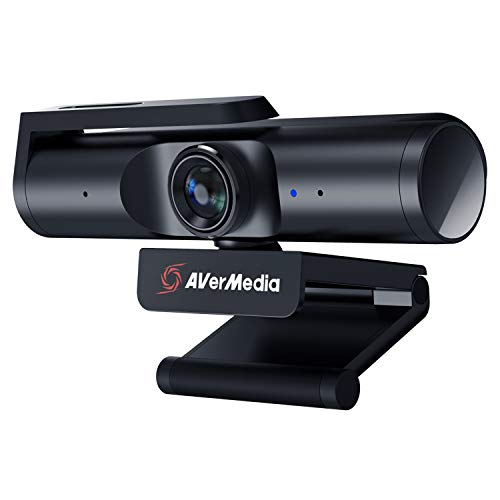
If you share your workspace with a partner or need to fit multiple people into a frame for family video calls, the AverMedia PW513 is a standout. It features a wide-angle lens that captures more of the room, which is helpful in smaller apartments where you cannot sit very far from the camera.
The manual focus options allow you to define the depth of field, so you can keep the foreground clear while letting the rest of your home office stay in the background. It is a robust, well-built device that feels like it will last for years of daily use.
It is particularly well-suited for those who do not want to deal with complex software settings. It offers a solid, reliable image right out of the box with minimal fuss.
Obsbot Tiny 2: Best for Auto-Tracking Precision

The Obsbot Tiny 2 is a compact, AI-powered camera that feels like a personal assistant for your video calls. It uses advanced tracking to keep you perfectly centered and in focus, even if you are moving around a busy home environment.
What sets it apart is the ability to manually override these settings via voice commands or software, giving you the best of both worlds. It is incredibly small, making it perfect for those who live in smaller spaces and need to stow their gear in a drawer when not in use.
The build quality is impressive, and the privacy cover is a thoughtful touch for those concerned about security in their home. It is a smart, modern solution for the busy professional who needs reliable results without constant manual adjustments.
Why Manual Focus Rings Improve Video Quality
The primary reason to choose a camera with manual focus is to eliminate the "hunting" behavior found in most standard webcams. When a camera is set to autofocus, it constantly searches for contrast, which can cause your image to pulse or blur whenever you gesture or lean forward.
- Consistency: Your lighting and focus stay locked, meaning your video quality doesn’t change mid-call.
- Professionalism: A sharp, steady image signals to your audience that you are prepared and professional.
- Creativity: You can choose to keep your background slightly soft, creating a pleasing "bokeh" effect that draws attention to you.
By taking control of the focus, you remove the guesswork from your video setup. It is a small change that yields a massive improvement in how you appear on screen.
Key Features to Consider Before You Purchase
When shopping for your home, consider how much space you have on your desk and how often you plan to move the camera. A heavy, gimbal-mounted camera might be overkill for a small laptop setup, while a compact clip-on might not offer the stability you need for a permanent desktop station.
- Connectivity: Ensure your computer has the necessary USB-C or USB 3.0 ports to support high-resolution streams.
- Mounting: Check if the camera base fits your specific monitor thickness or if you need a separate tripod.
- Privacy: If your office is in a shared living area, look for models with built-in physical privacy shutters.
Always prioritize the hardware that fits your daily routine. If you are a parent with a chaotic schedule, prioritize a camera that is easy to mount and start quickly over one that requires complex software setup.
How to Calibrate Your Webcam for Sharp Focus
Once you have your new camera, spend ten minutes calibrating it to your specific environment. Start by positioning your chair and desk where you usually sit, then open your camera’s software to find the focus slider.
Adjust the focus until your eyes are perfectly sharp, then move your head slightly to ensure the depth of field is forgiving enough for normal movement. Once you find the "sweet spot," save this as a preset so you can return to it instantly.
Finally, check your lighting. Even the most expensive camera will struggle in poor light, so ensure you have a soft light source facing you, rather than sitting with a window directly behind you. A little calibration goes a long way toward making you look your best.
Investing in a webcam with manual focus control is one of the most effective ways to upgrade your home office setup for the long haul. By choosing a device that matches your specific space and routine, you can stop worrying about technical glitches and focus on your work. Remember that the best camera is the one that makes you feel confident and professional every time you click "join meeting."
