
7 Best Multi-device Charging Cables With Multiple Connectors
Simplify your tech setup with our top 7 multi-device charging cables. Discover durable, efficient picks that streamline charging for all your essential gadgets.
We have all experienced the frustration of hunting for the right charger while our devices hover at one percent battery. Managing a household full of different gadgets often leads to a tangled mess of proprietary cords cluttering your nightstand or kitchen counter. Investing in a high-quality multi-device cable is a simple way to streamline your daily routine and reclaim your sanity.
Anker Powerline II 3-in-1: Best Overall Reliability
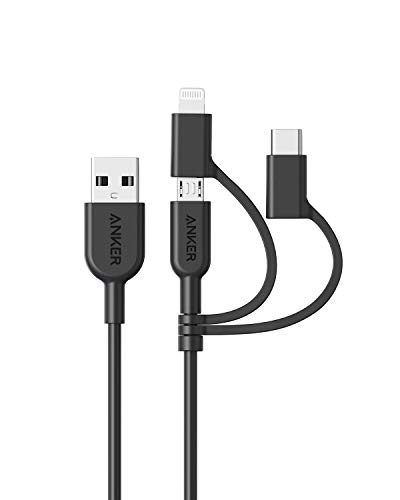

If you are tired of cables that stop working after just a few months of light use, this is the gold standard for your junk drawer. Anker has built a reputation on consistency, and this cable delivers that same peace of mind for families who have a mix of Lightning, USB-C, and Micro-USB devices.
It is designed to withstand thousands of bends, which is vital if you have kids who constantly tug on chargers or if you frequently move your devices from the couch to the bedroom. While it may not have the luxury aesthetic of more expensive brands, it prioritizes pure, unadulterated functionality.
Bottom line: If you want a cable that just works without constant troubleshooting, this is the most reliable choice for a busy household.
Native Union Belt Cable: Best for Premium Durability
Charge and sync your USB-C devices at high speeds with this ultra-strong, 4ft cable. Featuring a durable nylon braid with Kevlar fiber and a leather strap for tangle-free storage, it supports up to 60W Power Delivery.

For those who view their charging setup as part of their home decor, the Native Union Belt Cable offers a sophisticated aesthetic without sacrificing strength. The reinforced nylon braiding is exceptionally resistant to fraying, making it ideal for high-traffic areas like a living room side table.
The included leather strap is a thoughtful touch for keeping the cable neat when it is not in use, preventing the dreaded "rat’s nest" of cords behind your sofa. It is undeniably more expensive than standard plastic cables, but the longevity and visual appeal often justify the extra cost for common areas.
Bottom line: Choose this if you want a cable that looks great on your desk and can survive the daily wear and tear of a bustling home.
Belkin BoostCharge 3-in-1: Best for Fast Charging

When you only have twenty minutes to charge your phone before heading out the door, slow cables become a major bottleneck in your morning routine. The Belkin BoostCharge is engineered to handle the higher power delivery required for modern smartphones and tablets.
This cable is particularly useful for homeowners who have invested in high-wattage wall adapters and want to ensure they are actually getting the speed they paid for. It balances speed with safety, ensuring your devices don’t overheat during the rapid charging process.
Bottom line: Prioritize this cable if your priority is getting back to a full battery as quickly as possible during a busy day.
UGREEN 3-in-1 Nylon Braided: Best Budget Solution

Setting up a charging station in every room of the house can get expensive very quickly, especially if you have multiple teenagers or a home office. UGREEN provides a highly capable, durable, and affordable alternative that performs nearly as well as the premium brands.
The nylon braiding feels sturdy in the hand, and the connectors fit snugly into ports without feeling loose or wobbly. It is the perfect "set it and forget it" cable for guest rooms or secondary spaces where you need convenience without a high financial investment.
Bottom line: If you need to stock multiple rooms on a budget, these cables offer the best value for your money.
Scosche StrikeLine 3-in-1: Best for Travel Utility

Travel can be chaotic, and trying to pack a specific cable for your tablet, phone, and headphones is a recipe for leaving something behind. The Scosche StrikeLine is compact and lightweight, making it the ultimate companion for family vacations or business trips.
Its design is streamlined to take up minimal space in a carry-on or backpack, and the connectors are securely attached to prevent loss. You won’t have to worry about finding an outlet in a hotel room and realizing your cable is too short or the wrong type.
Bottom line: Keep one of these in your travel bag so you are always prepared, no matter where your day takes you.
Nomad Universal Cable: Best for Rugged Environments
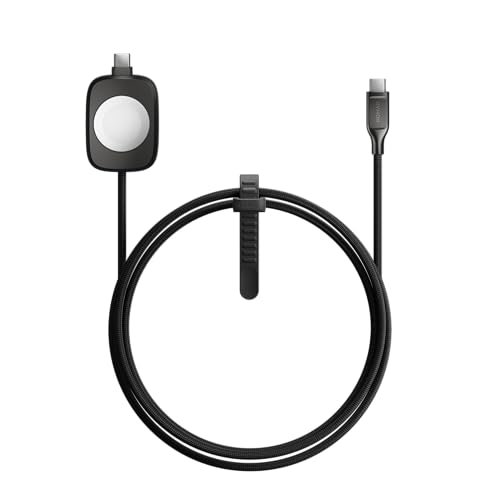
If you have a workshop, a garage setup, or just a very active household, you need a cable that can handle more than just standard indoor use. The Nomad cable is built with a rugged, military-grade exterior that can survive being stepped on or caught under heavy equipment.
It is significantly thicker and stiffer than standard cables, which means it stays exactly where you put it on a workbench or desk. While it might be overkill for a bedside table, its resilience in harsh environments is unmatched.
Bottom line: This is a heavy-duty investment for those who need a cable that can withstand a bit of abuse.
Baseus 3-in-1 Fast Charge: Best for Office Desks
Office desks often become cluttered with monitors, keyboards, and multiple devices, leaving little room for extra cables. The Baseus 3-in-1 features a clean, professional design that manages to keep your workspace looking organized while providing enough length to reach from a wall outlet to your desk surface.
The connectors are well-spaced, allowing you to charge multiple devices simultaneously without the cables tangling or pulling on each other. It provides a clean, minimalist look that helps keep your focus on your work rather than your tech setup.
Bottom line: For a clean, professional desk setup that handles multiple devices, this is the most ergonomic choice.
Key Features to Consider Before You Buy a Cable
Before you click "buy," take a moment to assess your specific household needs. Consider the cable length—a six-foot cable is great for a couch, but it will be a tripping hazard on a small nightstand.
Also, look for MFi certification (Made for iPhone) if you are an Apple user, as this ensures the cable will communicate properly with your device without triggering "accessory not supported" errors. Finally, think about the connector housing; metal housings are generally more durable than plastic, though they can be heavier.
- Length: Match the length to the room size.
- Certification: Look for MFi or USB-IF standards for safety.
- Material: Braided nylon is generally superior to rubber for long-term durability.
How to Properly Coil Cables to Prevent Fraying
Most people ruin their cables by wrapping them tightly around their hand or their power brick. This puts immense stress on the internal copper wires, leading to internal breaks that make the cable stop working even if the exterior looks fine.
Instead, use the "over-under" coiling technique to keep the cable in a natural circle without twisting it. If you are storing the cable, use a simple velcro tie to keep it bundled loosely rather than kinking the ends near the connector.
- Avoid tight kinks: Never bend the cable at a sharp 90-degree angle.
- Use ties: Velcro straps are better than zip ties, which can cut into the cable jacket.
- Store flat: If possible, lay cables flat in a drawer rather than cramming them into a small box.
Understanding Wattage and Fast Charging Standards
Not all "fast charging" cables are created equal, and your cable is only as fast as your wall adapter. If you buy a high-end cable but plug it into an old, low-wattage block, you will not see any improvement in charging speed.
Look for cables that support Power Delivery (PD) if you are charging tablets or laptops, as these can handle the higher wattage required. Understanding the difference between a charging-only cable and a data-transfer cable is also important; if you need to sync files to a computer, ensure your cable supports high-speed data transfer.
- Wattage: Ensure the cable is rated for the wattage your device requires.
- Data vs. Charge: Check the packaging to see if the cable supports data syncing.
- Compatibility: Verify that the cable supports the specific fast-charging protocol of your device (e.g., Quick Charge, PD).
Finding the right multi-device cable is about balancing your specific household layout with the reality of daily use. By selecting cables based on where they will live—whether in a travel bag, a workshop, or on a nightstand—you can eliminate clutter and frustration. Remember that a little bit of care, such as proper coiling, will extend the life of any cable you choose.
