

7 Best Wireless Mice With Usb Receivers That Stay Plugged In
Discover the top 7 wireless mice featuring compact USB receivers designed to stay plugged in, offering seamless connectivity and clutter-free desk space.
We have all been there—you sit down to work at the kitchen island or home office, only to realize your mouse is dead or the Bluetooth pairing has failed again. A wireless mouse with a dedicated USB receiver offers the most reliable "plug and forget" experience for a busy household. These seven selections prioritize consistent connectivity so you can focus on your tasks rather than troubleshooting your hardware.
Logitech M185: Reliable Budget Wireless Mouse


If you are setting up a basic workstation for a student or a secondary computer in a guest room, the Logitech M185 is a classic choice. It is incredibly affordable, which makes it a low-risk purchase if you have multiple family members who tend to misplace peripherals.
The design is straightforward and ambidextrous, meaning it works just as well for left-handed users as it does for right-handed ones. Because it uses a tiny nano-receiver, you can leave it plugged into a laptop port indefinitely without it catching on your laptop bag.
While it lacks the extra programmable buttons found on high-end gaming mice, its simplicity is its greatest strength. It is a no-frills tool that does exactly what it promises without demanding a steep learning curve.
Logitech M705: Best Battery Life Performance
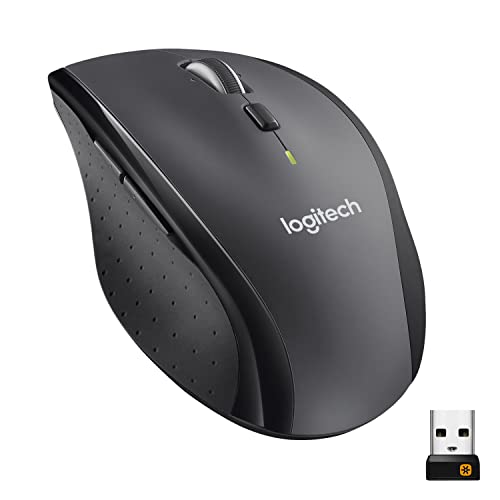
For the power user who manages a home business or spends hours editing photos, the Logitech M705 is a workhorse. The standout feature here is the incredible power efficiency, which can keep this mouse running for up to three years on a single set of batteries.
This model is slightly larger and features a contoured shape that supports your palm during long sessions. It also includes extra buttons that can be customized to perform specific tasks, like switching between browser tabs or opening your most-used applications.
The trade-off for this performance is a slightly higher price point and a physically larger footprint. If you have a dedicated desk where space isn’t at a premium, the comfort and longevity make this a smart, long-term investment.
Logitech M310: Ergonomic Full-Sized Comfort

When you share a computer with others in the house, you need a mouse that fits a wide range of hand sizes. The M310 features a contoured, full-sized design with soft rubber grips that prevent hand fatigue during extended use.
It bridges the gap between a portable travel mouse and a bulky desktop peripheral. The receiver is small enough to stay tucked away in the USB port, keeping your workspace clean and free of unnecessary cord clutter.
This model is a perfect middle-ground option for those who find compact mice too cramped but don’t want a heavy, gaming-style device. It is a balanced, reliable choice for the average family desktop.
Dell WM118: Compact Design for Travel Needs

If you live in a smaller apartment or frequently move your laptop between the kitchen table and the living room, the Dell WM118 is a sensible companion. Its compact, low-profile design slides easily into a slim laptop sleeve or a drawer organizer.
Despite its small size, it maintains a stable 2.4GHz wireless connection that doesn’t suffer from the interference issues that sometimes plague Bluetooth devices. It is a straightforward tool that prioritizes utility over aesthetics.
Because it is so affordable, it is an excellent choice for a household that needs a backup mouse stored in a utility closet. You won’t feel frustrated if it gets tossed around in a backpack or accidentally dropped.
HP 200 Wireless: Simple Plug and Play Setup

The HP 200 is designed for the user who wants to avoid software installation or complex pairing menus. You simply slide the USB receiver into your computer, flip the power switch, and you are ready to start working immediately.
It features a symmetrical design that is easy to navigate, making it a great "house mouse" for anyone in the family to grab. The optical tracking is precise enough for everyday web browsing and document editing on various surfaces.
While it is not designed for high-intensity tasks, its reliability as a basic input device is hard to beat. It is a functional, budget-friendly solution that gets the job done without any fuss.
Microsoft Wireless Mobile 1850 for Portability

Designed specifically for those on the move, the Microsoft 1850 is one of the most portable options on this list. It is very lightweight, making it ideal for students who carry their laptops to and from school every day.
The shape is rounded and comfortable, and it includes a built-in storage slot for the USB receiver. This is a game-changer if you are worried about losing that tiny dongle while traveling between rooms or cafes.
Keep in mind that its smaller size may be less comfortable for people with larger hands during all-day use. However, for short bursts of productivity and general portability, it is a top-tier choice.
Jelly Comb Slim 2.4G: Quiet Click Technology
In a quiet home or a shared bedroom, the "click-click-click" of a standard mouse can become a distraction. The Jelly Comb Slim uses quiet-click switches, making it nearly silent during use, which is a blessing for late-night workers.
The mouse is remarkably thin, allowing it to fit into tight spaces or slim laptop bags without creating a bulge. It also comes in various colors, which can help you identify which mouse belongs to which family member.
It is a specialized tool that solves a very specific household annoyance. If you value a peaceful environment, this mouse is well worth the modest price of admission.
How to Manage Tiny USB Receivers for Laptops
The biggest challenge with these mice is keeping track of the tiny USB receiver once it is removed from the computer. If you have a dedicated home office, consider leaving the receiver plugged in permanently to avoid losing it.
If you are a mobile user, look for a mouse that includes a dedicated storage compartment on the bottom of the device. When you aren’t using the mouse, immediately snap the receiver into that slot so it stays with the peripheral.
For households with multiple wireless devices, you might consider using a small label maker to tag your receivers. This prevents the "which dongle goes with which mouse" confusion that often happens in busy tech-heavy homes.
Battery Maintenance Tips for Wireless Mice
To extend the life of your batteries, always use the physical power switch on the bottom of the mouse when you plan to be away for more than a day. Even when idle, some mice continue to draw power to maintain a ready state.
If you find yourself changing batteries too often, consider switching to high-quality rechargeable AA or AAA batteries. While the initial cost is higher, they pay for themselves quickly and reduce the amount of waste in your household junk drawer.
Always check the battery compartment for corrosion if you are storing a mouse for a long period. If a mouse will sit unused for months, remove the batteries entirely to prevent leakage that could permanently damage the device.
Troubleshooting Connection Issues at Your Desk
If your mouse starts acting sluggish or skipping, the first thing to check is the distance between the mouse and the receiver. USB 3.0 ports can sometimes create radio frequency interference; if you have trouble, try using a short USB extension cable to move the receiver away from the port.
Another common culprit is a cluttered desk surface. Ensure that there are no large metal objects or other wireless devices sitting directly between the mouse and the receiver, as these can block the signal.
Finally, if the mouse stops responding entirely, try plugging the receiver into a different USB port on your computer. Sometimes a port can lose power or encounter a driver glitch that a simple move to a different slot will resolve instantly.
Finding the right wireless mouse comes down to balancing your personal comfort with the realities of your living space. Whether you prioritize silent clicks for a quiet home or massive battery life for a busy office, there is a model here that fits your needs. Choose the tool that makes your daily routine smoother, and don’t worry about finding the "perfect" device—just find the one that works for you.
