

7 Best TV Remotes With Macro Programming for Ease
Simplify your home theater with these 7 programmable remotes. Learn how macro features automate complex tasks for a seamless, one-touch entertainment setup.
We have all experienced the frustration of juggling three different remotes just to watch a simple evening movie. Macro programming transforms this chaos by allowing you to trigger a sequence of commands with a single button press. This guide helps you navigate the best options to reclaim your living room and simplify your daily routine.
Sofabaton U2: Best Universal Remote for Macros
If you live in a household where family members constantly misplace the specific remote needed for the soundbar, the Sofabaton U2 is a game-changer. It replaces multiple controllers with a sleek, ergonomic design that feels substantial in the hand without being bulky.
The standout feature here is the dedicated app, which makes programming complex macros remarkably intuitive for the average user. You can set up a "Movie Night" macro that turns on your TV, switches the input to your streaming box, and powers up your audio system simultaneously.
While it lacks the high-end touchscreen interfaces of more expensive models, its tactile buttons are often more reliable for quick adjustments. It is the ideal middle-ground choice for someone who wants modern convenience without the steep learning curve of professional-grade equipment.
Logitech Harmony Elite: The Gold Standard Pick
Control up to 15 devices with this intuitive universal remote, featuring a full-color touchscreen for easy navigation and one-touch "Activities" like "Watch a Movie." Seamlessly integrate with Alexa for voice control and use the Harmony app to transform your smartphone into a personal remote.


For those who have built an extensive home theater system with hidden components, the Logitech Harmony Elite remains the industry benchmark. Its hub-based system allows you to control devices behind closed cabinet doors, which is perfect for keeping small apartment living rooms looking clutter-free.
The touchscreen interface is highly customizable, allowing you to hide unused buttons and keep your most-used macros front and center. It is an investment, but the ability to integrate smart home lighting—like dimming the lamps when you start a movie—adds a level of polish that cheaper remotes simply cannot match.
Be aware that since these units are no longer in active production, you will be purchasing them on the secondary market. If you are willing to hunt for a unit, the sheer power and reliability of the Harmony ecosystem are still unmatched for complex setups.
One For All Smart Streamer: Best Budget Option

If you are a renter or a student living in a smaller space, you likely don’t have a complex rack of equipment to manage. The One For All Smart Streamer is designed specifically for those who primarily use a smart TV or a single streaming stick like a Roku or Fire TV.
This remote focuses on simplicity, offering a straightforward way to control your television’s power, volume, and input while keeping the streaming interface responsive. It doesn’t offer deep, multi-device macro chains, but it excels at the basic "one-touch" power-on functionality that most people actually need.
It is an honest, no-frills product that respects your wallet and your shelf space. For a basic bedroom or guest room setup, it is often the most practical choice you can make.
Caavo Control Center: Best for Device Switching
The Caavo Control Center is unique because it acts as a central hub that physically connects all your HDMI devices. This is a fantastic solution for households with children or elderly members who find switching inputs on a TV menu confusing or frustrating.
Because the hub manages the video signals, the remote always knows exactly which device you are using. You can simply say "Watch Netflix," and the system handles all the heavy lifting of switching inputs and waking up the correct hardware.
It is a specialized piece of equipment that works best if you keep your devices centralized in one cabinet. If you have a scattered setup with devices in different rooms, this might not be the right fit, but for a single-zone home theater, it is incredibly user-friendly.
Inteset 4-in-1: Top Choice for Media Centers
Control multiple devices like Apple TV, Xbox, and Roku with this backlit universal remote. It features IR learning for custom programming and macro capabilities for up to 15 commands.

For the DIY enthusiast who has built a custom media center PC or a retro gaming console, the Inteset 4-in-1 is a robust, reliable workhorse. It is built to handle specific IR codes that many modern, simplified remotes often ignore or omit.
The button layout is classic and well-spaced, making it easy to navigate by feel in a dark room. It is fully programmable, meaning you can assign specific functions to buttons that don’t match their labels, giving you complete control over your home theater environment.
While it lacks a fancy screen, it makes up for it with sheer durability and consistent performance. It is a fantastic choice for those who prefer physical buttons over touchscreens and want a remote that will last for years.
BroadLink RM4 Pro: Best Smart Home Integration
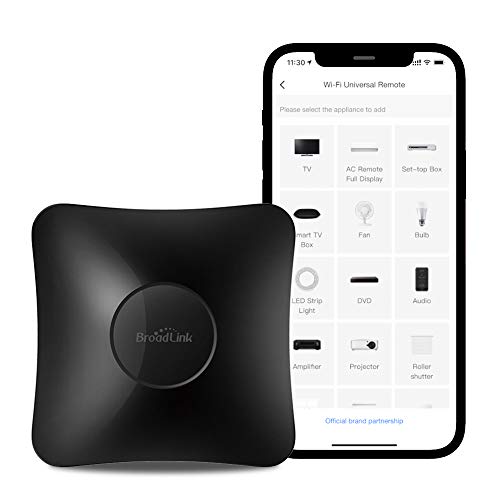
The BroadLink RM4 Pro isn’t a traditional remote in the handheld sense; it is a powerful IR/RF blaster that turns your smartphone into the ultimate controller. This is ideal for homeowners who want to control their entire living room via voice commands or a phone app.
By placing this small device on a shelf, it can communicate with almost any IR-controlled device in your room. It excels at creating complex, automated routines that can be triggered by time of day or even your location.
This option is perfect for the tech-savvy user, though it does require a bit more setup time than a standard remote. If you want to integrate your TV and stereo into a broader smart home ecosystem, this is the most flexible path forward.
GE Universal Remote: Most Reliable Basic Model
Control up to 4 audio/video devices with this sleek, brushed nickel universal remote. Its comprehensive code library ensures compatibility with major brands, and setup is simplified with an easy-to-follow online video.

Sometimes, you just need a remote that works, doesn’t require a smartphone app, and can be set up in under five minutes. The GE Universal Remote is the classic "everyman" solution that has been a staple in living rooms for decades.
It is incredibly affordable and built to survive accidental drops on hardwood floors. While it lacks advanced macro sequencing, it is perfectly capable of handling the essential functions for a TV, DVD player, and cable box.
This is the best choice for a secondary room or for someone who wants to avoid the complexity of modern smart remotes. It is a testament to the idea that sometimes, the simplest tool is the most reliable one.
How Macro Programming Simplifies Your Home Theater
Macro programming essentially acts as a "shortcut" for your home theater. Instead of pressing five buttons across three remotes, a macro sends a string of commands in a specific order to ensure every device is ready to go.
- Power Efficiency: Macros can ensure that unused devices are turned off when you switch to a different activity, saving energy.
- Reduced User Error: By automating the input switching, you eliminate the common problem of a family member accidentally selecting the wrong source.
- Seamless Transitions: You can move from watching the news to playing a game with one button, making the technology feel invisible.
The goal is to move the focus away from the hardware and back to the content you are trying to enjoy. Once you get used to the convenience of a "Watch TV" button, you will find it very difficult to go back to manual switching.
Key Features to Look for in Macro-Capable Remotes
When shopping for a new remote, start by counting how many devices you actually need to control. A remote that handles four devices is usually plenty for most apartments, while larger houses with dedicated media rooms might require more.
- Backlit Buttons: Essential for movie nights where the lights are dimmed.
- IR vs. Bluetooth/RF: IR requires line-of-sight, while Bluetooth/RF can work through cabinet doors.
- Ease of Programming: Look for remotes that offer a web-based or app-based setup, as these are significantly easier than old-school code-entry methods.
- Ergonomics: Ensure the remote fits well in your hand and the buttons you use most are easy to reach with your thumb.
Always consider the "spouse and guest test." If someone else comes over, will they be able to figure out how to turn on the TV without a tutorial?
Troubleshooting Common Remote Connection Issues
If your remote stops responding, the first step is always the simplest: check the batteries. Even if they feel like they have power, a weak battery can cause signal interference or intermittent button failure.
If a specific macro isn’t working, it is often because one of the devices in the chain was already on when it should have been off. Most remotes rely on "toggle" power commands, which can get out of sync if a device misses a signal.
- Clear Obstructions: Ensure nothing is blocking the IR sensor on your TV or media box.
- Reset the Hub: If using a hub-based system, a quick power cycle usually resolves most connectivity glitches.
- Re-pair Devices: If a specific device isn’t responding, delete it from the remote’s memory and re-add it from scratch to clear out any corrupted data.
Finding the right remote comes down to balancing your specific hardware needs with your tolerance for setup complexity. Whether you choose a simple budget model or a sophisticated hub system, the goal remains the same: making your home entertainment system work for you, not the other way around. Choose the option that fits your daily habits, and enjoy the newfound simplicity in your living room.
