7 Best Under-Desk Headphone Hangers for Small Spaces
Maximize your desk space with our top 7 under-desk headphone hangers. Discover durable, space-saving designs that keep your workspace organized and tidy.
Finding a dedicated home for your headphones is one of the quickest ways to reclaim precious desk real estate in a cramped workspace. Whether you are working from a small apartment or balancing a busy family office, keeping gear off the desktop prevents accidental drops and reduces visual clutter. These seven under-desk solutions offer a variety of ways to keep your audio setup tidy, accessible, and protected.
Elevation Lab Anchor: Best Adhesive Mount


If your desk is made of a material that cannot be clamped, or if you simply prefer a sleek, hidden look, the Elevation Lab Anchor is an excellent starting point. It uses high-strength 3M adhesive to bond directly to the underside of your desk, meaning you won’t need any tools or hardware for installation.
This mount is incredibly low-profile, making it perfect for minimalist setups where you don’t want bulky metal brackets protruding from your workspace. Because it is made of durable silicone, it won’t scratch your headphones, and it provides a soft landing for your headband after a long day of work.
Keep in mind that adhesive mounts require a clean, flat surface to hold securely over time. If your desk has a textured laminate or a heavily oiled wood finish, the tape may struggle to maintain a long-term bond. Always clean the surface thoroughly with rubbing alcohol before applying to ensure the best possible hold.
Lamicall Headphone Stand: Best Clamp Design
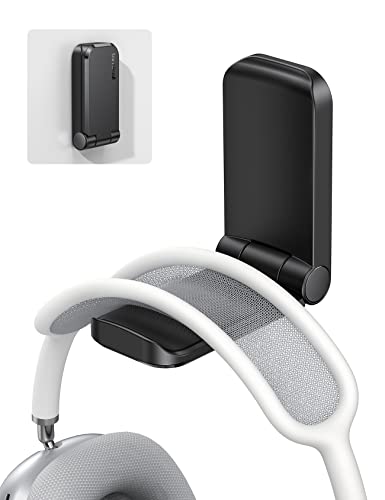
For those who frequently rearrange their workspace or live in a rental where drilling holes is strictly forbidden, a clamp-style hanger is the gold standard. The Lamicall mount features a sturdy screw-down mechanism that grips the edge of your desk, providing a rock-solid foundation for even the heaviest studio-grade headphones.
The beauty of this design is its portability; you can move it from your main desk to a side table or bookshelf in seconds. It also includes protective padding on the contact points, which is essential if you want to keep your desk surface free from scratches or pressure marks.
When choosing a clamp, always measure the thickness of your desk surface first. While these are highly adjustable, they do have a maximum opening width, and you want to ensure the screw mechanism has enough clearance to tighten comfortably.
Brainwavz Truss: Best Dual-Headphone Hanger
If you share your workspace with a partner or juggle both a gaming headset and a professional pair for video calls, the Brainwavz Truss is a lifesaver. This sturdy metal mount features two distinct hooks, effectively doubling your storage capacity without taking up any extra desk edge.
It is a fantastic choice for households with multiple tech users who need a centralized place to store their gear. Because it is built from high-grade metal, it feels substantial and won’t sag under the weight of two sets of headphones, provided you install it securely.
However, consider your legroom before mounting a double hanger. Having two pairs of headphones hanging side-by-side can be bulky, so place it toward the back or side of your desk to avoid bumping your knees when you shift in your chair.
Razer Base Station V2: Best With USB Hub
Elevate your setup with the Razer Base Station V2 Chroma, featuring customizable RGB lighting and a taller, anti-slip design for secure headphone storage. Enjoy convenient USB charging and a built-in DAC for enhanced audio.

Sometimes your desk setup is limited by the number of available ports on your computer, especially if you are working on a laptop. The Razer Base Station V2 solves two problems at once by acting as both a sturdy headphone hanger and a powered USB hub.
This is a great upgrade for anyone who frequently plugs in microphones, external drives, or charging cables. By consolidating these connections under your desk, you keep the surface clear of tangling cords while keeping your peripherals within easy reach.
While this option is more expensive than a simple hook, the convenience of added connectivity often justifies the price for busy professionals. Just ensure you have a nearby power outlet to support the hub if it requires external power for your devices.
Mekuula Under-Desk Mount: Best Rotating Arm
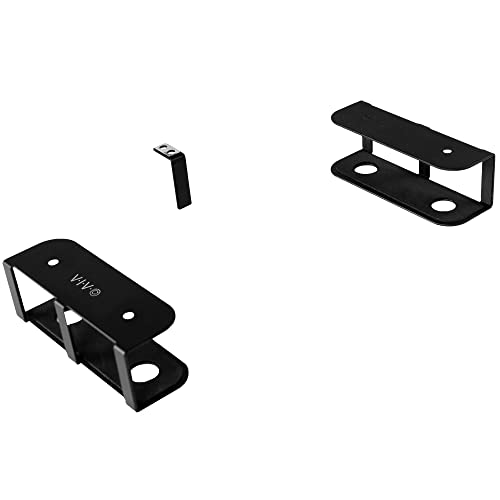
The Mekuula mount features a clever rotating arm that allows you to swing your headphones out from under the desk when you need them and tuck them away completely when you don’t. This is perfect for small desks where every inch of clearance matters.
The rotating action feels premium and adds a level of functionality that static hooks simply cannot match. It’s a great way to keep your headphones protected from dust and accidental spills while keeping them hidden from view during video calls.
Be aware that moving parts require a bit more care over time. Periodically check the tension screw on the pivot point to ensure it hasn’t loosened, which will keep the arm swinging smoothly without drooping.
Avantree Universal Hanger: Best Budget Pick

If you just need a simple, functional solution that doesn’t break the bank, the Avantree Universal Hanger is a reliable workhorse. It is a no-frills, durable metal hook that gets the job done without any unnecessary bells or whistles.
It is incredibly easy to install and works well for students, renters, or anyone looking to organize on a strict budget. Despite the lower price point, the build quality is surprisingly robust, making it a better investment than cheap plastic alternatives that are prone to snapping.
Don’t let the simplicity fool you; sometimes the most basic tool is the one that lasts the longest. It is the perfect "set it and forget it" solution for a home office that needs a quick organizational win.
Walnut Wood Mount: Best Aesthetic Choice
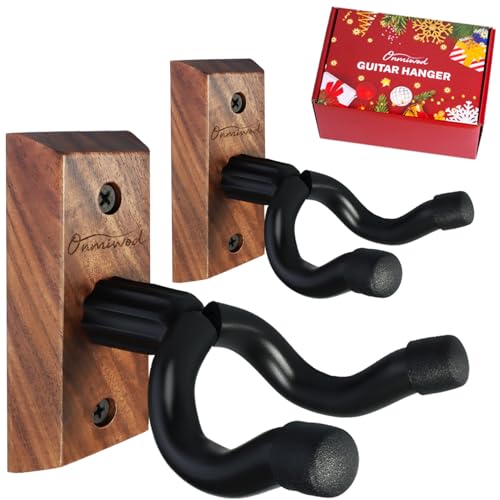
If your home office is also a living space, you might not want a piece of industrial-looking plastic or metal clashing with your decor. A wood-finish mount, often crafted from walnut or similar hardwoods, offers a warm, sophisticated look that blends seamlessly with wooden furniture.
These mounts are often just as functional as their metal counterparts, but they prioritize visual harmony. They are an excellent choice for homeowners who take pride in their interior design and want their desk accessories to feel like a natural extension of their home.
Keep in mind that wood mounts may be slightly larger than metal ones, so check the dimensions to ensure they fit your specific desk profile. They are a small investment in style that makes your workspace feel less like a "tech zone" and more like a curated home office.
Key Factors for Choosing Your Desk Mount
When shopping for a mount, the most important factor is the weight of your headphones. High-end, heavy planar magnetic headphones require a sturdier, metal-based mount, while lightweight wireless earbuds or standard headsets can easily live on an adhesive plastic hook.
Consider the "reach" of the mount as well; you want the headphones to hang low enough to be accessible, but high enough that you don’t accidentally knock them with your legs. If you have a desk with a drawer or a shallow lip, ensure the mount design doesn’t interfere with your ability to sit comfortably.
Finally, think about your long-term plans. If you move frequently, a clamp-on or screw-in model is far more durable and reusable than an adhesive one, which may lose its stickiness or damage the desk finish upon removal.
Adhesive vs. Clamp: Which Is Best for You?
The choice between adhesive and clamp mounts usually comes down to your living situation and desk material. Adhesive mounts are perfect for glass, metal, or finished wood desks where you don’t want to leave marks or deal with bulky hardware.
Clamps are the superior choice for durability and flexibility, especially if you move your desk around or change your setup often. They are generally stronger and can support more weight, making them the safer bet for expensive, heavy gear.
Ultimately, if you are a renter or move every few years, prioritize the clamp. If you are in a permanent home and value a clean, "floating" look, the adhesive mount is likely the better fit for your needs.
Tips for Organizing Your Desk Cable Setup
Once you have your headphones mounted, you will likely notice that the cable dangling from them is still a bit of an eyesore. Use small adhesive cable clips along the underside of your desk to route the wire neatly toward your computer or audio interface.
If your headphones are wireless, consider keeping a magnetic charging cable near the mount so you can plug them in immediately after hanging them up. This ensures your gear is always charged and ready for the next day.
Lastly, don’t be afraid to bundle your headphone cable with other desk cords using Velcro ties. Keeping all your power and audio cables in one "lane" under the desk will make your workspace feel significantly more organized and professional.
Investing in an under-desk headphone hanger is a small change that yields immediate benefits for your daily workflow and desk tidiness. By choosing the right mounting style for your specific desk and headphone weight, you can protect your gear while creating a more serene environment. Pick the solution that best fits your space, and enjoy the satisfaction of a clutter-free desk.