

7 Best Basic Black Ink Cartridges for Text-only Printing
Maximize efficiency with our guide to the 7 best black ink cartridges for text-only printing, focusing on crisp performance, reliability, and cost-savings.
Finding the right black ink cartridge is often the difference between a smooth morning routine and a last-minute scramble before a school or work deadline. While it is easy to get overwhelmed by complex printer specifications, most households simply need a reliable, crisp output for letters, forms, and assignments. This guide focuses on the practical, budget-conscious choices that keep your home office running without unnecessary headache.
HP 67 Black: Best Overall for Home Documents
If you have a busy household where someone is always printing permission slips or shipping labels, the HP 67 is likely the cartridge you need. It is designed for the modern, compact printers found in many apartments and home offices, offering a balance of reliability and accessibility.
Because this cartridge uses a thermal inkjet system, the ink dries almost instantly on standard copy paper. This is a massive benefit for parents who need to grab a document off the printer and head out the door immediately without worrying about smudges.
The main trade-off here is the standard capacity, which isn’t meant for heavy-duty printing. If you print more than a few dozen pages a month, you will find yourself swapping this out frequently, so keep a spare on hand.
Canon PG-245XL: High-Yield Choice for Students


Students living in shared housing or small dorms know the pain of running out of ink right before a major paper is due. The "XL" designation on the Canon PG-245XL indicates a high-yield capacity, which is a smart investment if you want to minimize the number of trips to the store.
This cartridge is particularly effective for text-heavy documents like essays or research papers. The ink formulation is optimized for sharpness, ensuring that fine print remains legible even if you are printing in "draft" mode to save time.
While the upfront cost is higher than the standard version, the cost-per-page is significantly lower over the life of the cartridge. For a student on a budget, this is the most practical way to manage long-term printing costs.
Brother LC3011BK: Reliable Pick for Daily Text

Brother printers are often the workhorses of the home office, and the LC3011BK is the standard companion for their entry-level inkjet models. It is a no-nonsense cartridge that does exactly what it promises: delivers consistent, dark black text for everyday correspondence.
One of the best features of this cartridge is its ease of installation; it snaps into the printer carriage with a satisfying click, reducing the risk of alignment errors. For homeowners who aren’t tech-savvy, this simplicity is a major advantage.
However, be aware that this cartridge is part of a multi-cartridge system. If you run out of one color, the printer may pause, so keep an eye on your dashboard to ensure you aren’t caught off guard.
Epson 212 Black: Best Value for Basic Printing

If your printing needs are limited to the occasional utility bill or a printed recipe, the Epson 212 is a wallet-friendly solution. It is designed for the casual user who doesn’t want to spend a premium on professional-grade ink supplies.
This cartridge is compact and easy to store in a desk drawer, making it ideal for those living in smaller spaces where storage is at a premium. It performs well on standard office paper, providing a clean look for basic administrative tasks.
The downside is that it is not designed for heavy volume, and the ink can dry out faster if the printer sits idle for long periods. If you only print once a month, consider running a quick test page every few weeks to keep the nozzles clear.
HP 63 Black: Consistent Quality for Older Units

Many households are still using reliable, older HP printers that have stood the test of time. The HP 63 is the go-to choice for these machines, offering a level of compatibility that is hard to beat for legacy hardware.
The ink quality remains high, ensuring that your documents look professional even on older printer models. It is a dependable choice for those who prefer to keep their existing tech running rather than upgrading to the latest model.
Because these printers are older, the software might be a bit slower to communicate with the cartridge. Ensure you keep your printer drivers updated on your computer to avoid any "cartridge not recognized" errors.
Lexmark 18C1523: Durable Ink for Sharp Output
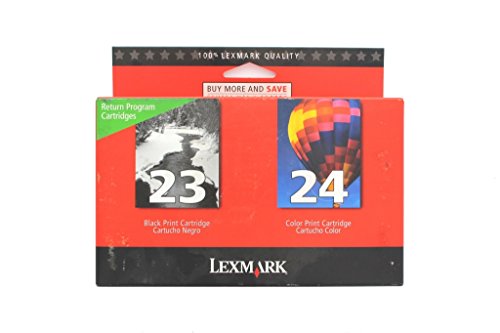
Lexmark cartridges are known for their robust build quality, and the 18C1523 is no exception. It is a solid choice for homeowners who prioritize text clarity for legal documents or important records where readability is non-negotiable.
The ink is formulated to resist fading, which is an important consideration if you store your documents in a home filing cabinet for long periods. It provides a crisp, dark black that stands out clearly against the page.
While these cartridges are built to last, they are sometimes harder to find in big-box stores than HP or Canon options. It is a good idea to order a replacement as soon as you see the "low ink" warning on your screen.
Dell Series 21: Dependable Ink for Office Text

For those who use older Dell printers, the Series 21 cartridge provides a reliable, high-contrast output that is perfect for office-style text. It handles dense blocks of text well, making it a great option for printing out long articles or meeting notes.
The cartridge is straightforward to maintain and rarely suffers from leaking issues. It is a practical choice for a home office where you need the printer to work every single time you hit "print."
Since these printers are less common today, double-check your printer model number before purchasing. Always keep your printer in a cool, dry place to ensure the ink inside the cartridge remains in optimal condition.
How to Extend Your Ink Cartridge Page Yield
Most people waste ink by printing at higher quality settings than necessary for everyday text. You can easily extend your cartridge life by changing your printer’s default settings to "Draft" or "Economy" mode for internal documents.
Additionally, avoid turning your printer off and on repeatedly. Every time the printer cycles, it uses a small amount of ink to clean the print heads, which adds up to significant waste over a year.
Finally, store your spare cartridges in a cool, dark place. Extreme temperatures can cause the ink to settle or the internal seals to degrade, leading to poor print quality or premature failure.
Standard vs High-Yield Cartridges Explained
The choice between standard and high-yield cartridges comes down to how frequently you print. Standard cartridges are cheaper upfront, but they contain less ink and need to be replaced more often, which can be a hassle.
High-yield cartridges (often marked with an "XL" or "HC") contain more ink in the same physical footprint. While they cost more at the register, they almost always offer a better value per page, saving you money and time in the long run.
If you are a student or a remote worker, always opt for the high-yield version if it is available. You will avoid the frustration of running out of ink during an important task and reduce the amount of plastic waste you generate.
Troubleshooting Common Ink Smudging Issues
If your printer is leaving streaks or smudges on your documents, the first step is to run the "Print Head Cleaning" utility from your computer’s printer settings. This clears out dried ink or dust that may be obstructing the flow.
Check the paper you are using as well; extremely thin or low-quality paper can absorb too much ink, leading to bleeding and smudging. Switching to a standard 20lb bond paper often solves the problem instantly.
If the issue persists, ensure the cartridge is seated correctly in the carriage. Sometimes a simple removal and re-insertion is all it takes to fix a connection issue that is causing uneven ink distribution.
Maintaining a functional home printer doesn’t require an advanced degree in technology, just a bit of consistency and the right supplies. By choosing the cartridge that matches your specific volume needs, you can keep your home office running efficiently and avoid unnecessary stress. Remember that the best choice is the one that keeps your documents clear and your printing routine simple.
