
7 Best Wireless Charging Power Banks for Newer Phones
Discover the 7 best wireless power banks for modern phones. This guide evaluates charging speed, battery capacity, and portability to help you stay powered.
We have all experienced the frustration of a dying phone battery right when we need to navigate home or coordinate a family schedule. Wireless charging power banks offer a convenient, cable-free solution to keep your devices powered throughout your daily routine. Choosing the right one balances your specific needs for capacity, portability, and device compatibility.
Anker 622 Magnetic Battery: Best for Portability
If you are constantly moving between the office, school runs, and errands, you know the struggle of carrying bulky gear. The Anker 622 is designed specifically for those who prioritize a slim profile over massive power reserves. Its magnetic snap-on design ensures it stays attached to your phone without needing a tangle of cords in your bag or pocket.
Because it is so thin, it easily slides into a small purse, a jacket pocket, or even a glove box. It is ideal for quick top-offs during a commute rather than trying to charge your phone from zero to full multiple times.
The main trade-off here is the smaller capacity, which is a conscious choice for the sake of weight. If you are looking for a "set it and forget it" companion for your daily transit, this is a top-tier choice.
Belkin BoostCharge Pro: Best for Apple Devices
Charge your Qi2-enabled devices at up to 15W with magnetic alignment. This 5000mAh power bank offers extended battery life and a convenient built-in kickstand for hands-free use.


For households deeply integrated into the Apple ecosystem, compatibility and speed are non-negotiable. The Belkin BoostCharge Pro is built with official MagSafe certification, which ensures your iPhone charges at the fastest wireless speeds possible. It also features a clever built-in kickstand, making it perfect for watching videos or checking recipes while you cook.
This power bank feels substantial and well-engineered, reflecting the premium nature of the devices it supports. It is a great choice for a home office setup where you want to keep your desk clutter-free while maintaining a full battery.
While the price point is higher, the peace of mind that comes with official certification is worth it for many users. You are paying for reliability and the assurance that your expensive device is being charged safely and efficiently.
Samsung 25W Wireless Battery: Best for Android

If your household relies on Samsung Galaxy devices, you likely want a charger that supports the proprietary "Super Fast Charging" protocols. This Samsung battery is designed to play nicely with the specific power requirements of Android flagships, ensuring you aren’t stuck waiting hours for a charge.
It is a robust unit that feels sturdy enough to handle the wear and tear of a busy family household. The ability to charge multiple devices at once—one wirelessly and one via cable—is a huge plus when you are sharing power with a partner or child.
It is a bit larger than some pocket-friendly options, so it’s better suited for a backpack or a tote bag. If you prioritize speed and device-specific optimization, this is the most practical tool for your kit.
Mophie Powerstation Wireless: Best for Durability
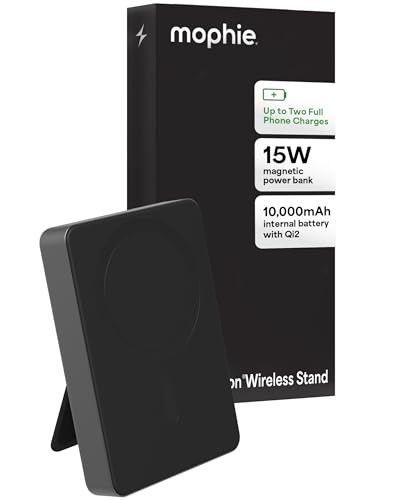
In a household with active kids or a workshop environment, tech gear takes a beating. The Mophie Powerstation Wireless is built with a rugged exterior that resists scratches and minor impacts, making it a reliable workhorse for those who aren’t always gentle with their electronics.
This unit excels because it provides a consistent, reliable charge without any unnecessary bells and whistles. It is the kind of device you can throw in the bottom of a hiking pack or a kitchen junk drawer and trust that it will work when you finally pull it out.
The trade-off is that it is slightly heavier and less "sleek" than other options on this list. If your priority is a device that can survive the occasional drop or rough handling, the extra weight is a small price to pay.
Satechi Quatro Wireless: Best for Multi-Device
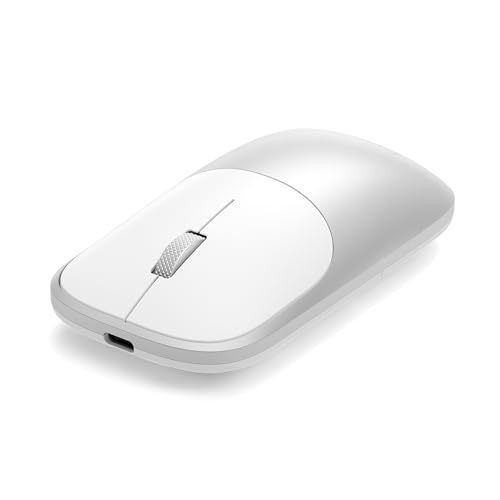
Managing multiple devices—like a phone, a pair of wireless earbuds, and a smartwatch—can turn your nightstand into a nightmare of wires. The Satechi Quatro is a clever solution that acts as a portable charging hub, allowing you to top off all your essential accessories simultaneously.
It is particularly useful for travelers or those who work in shared spaces where outlet access is limited. Having one device that can handle your phone, watch, and buds saves you from packing three different chargers.
Because it handles so many tasks, it is naturally larger and heavier than a standard power bank. It is best treated as a "base station" that you can pack away easily when you head out for a weekend trip.
Baseus Magnetic Power Bank: Best Budget Option
Not everyone needs a high-end, premium-branded charger to keep their phone running. The Baseus Magnetic Power Bank offers a fantastic balance of features and affordability, making it accessible for students or those on a tighter budget.
It provides a strong magnetic connection and decent charging speeds that satisfy the needs of most average users. You don’t get the fancy materials or extra ports found in more expensive models, but you get a functional, reliable piece of equipment.
This is an excellent option for a secondary power bank to keep in a guest room or a secondary bag. It proves that you don’t have to overspend to get a reliable, everyday solution for your power needs.
OtterBox Wireless Power Bank: Best for Protection

OtterBox is synonymous with device protection, and their power bank follows that same philosophy. This unit is built to withstand the rigors of daily life, featuring a durable casing that protects the internal battery cells from drops and everyday mishaps.
It is an excellent choice for anyone who worries about the longevity of their tech investments. The power bank itself is designed to last through years of use, which makes it a smart, long-term household purchase.
It is a bit bulkier than the competition, which is a direct result of its protective construction. If you have the space in your bag, the trade-off for a device that won’t break after a few months is well worth it.
How to Check Wireless Charging Compatibility
Before you buy, it is essential to ensure your phone supports the Qi wireless charging standard. Most modern smartphones made in the last five years do, but it is always worth a quick check in your phone’s settings or user manual.
- MagSafe vs. Qi: If you have an iPhone 12 or newer, look for "MagSafe" compatible chargers to ensure the magnets align perfectly.
- Case Thickness: Very thick or metal-backed cases can block wireless charging. If you use a heavy-duty case, check if your charger can penetrate that thickness.
- Charging Speed: Verify if your phone requires a specific wattage (like 15W or 25W) to achieve "fast" wireless charging.
Always verify your specific model number on the manufacturer’s website to avoid compatibility headaches. A little research upfront saves you from the hassle of returning a product that doesn’t fit your needs.
Capacity Explained: mAh Ratings and Real Use
You will see power banks labeled with "mAh" (milliampere-hours), which indicates the total energy storage. However, don’t expect a 10,000mAh battery to charge a 5,000mAh phone twice. Energy is lost as heat during the wireless charging process, which is less efficient than a wired connection.
- 5,000mAh: Best for one full charge or quick top-offs; very portable.
- 10,000mAh: The "sweet spot" for most users; provides 1-2 full charges.
- 20,000mAh+: Large and heavy; ideal for camping or long travel where outlets are scarce.
Think of the mAh rating as a rough estimate of total "fuel" rather than a precise mathematical guarantee. Always opt for a slightly higher capacity than you think you need to account for this natural energy loss.
Safety Tips for Charging Lithium-Ion Batteries
Lithium-ion batteries are powerful but require responsible handling to ensure they last a long time. Never leave your power bank charging in extreme heat, such as on a car dashboard in the sun, as this can degrade the battery chemistry.
- Avoid Overcharging: Most modern banks have auto-shutoff features, but it is still good practice to unplug them once they reach 100%.
- Monitor Temperature: If the power bank gets uncomfortably hot to the touch while charging, unplug it and let it cool down before trying again.
- Storage: If you aren’t using the bank for a long period, store it at about 50% charge in a cool, dry place rather than completely empty or full.
Treat your power bank with the same care you give your smartphone. By keeping it away from extreme temperatures and physical damage, you ensure it remains a safe and reliable tool for your home for years to come.
Finding the right wireless power bank is all about matching your daily habits to the right balance of size, speed, and durability. Whether you need a slim battery for your commute or a rugged unit for the family, there is an option that fits your budget and lifestyle. By prioritizing reliability over marketing hype, you can keep your devices charged and your household running smoothly.
