
7 Best Anti-static Cleaning Brushes For Electronics
Keep your sensitive gear safe. Discover the 7 best anti-static brushes to safely remove dust and debris from delicate electronics without causing damage.
Keeping your electronics free of dust is the single most effective way to extend the lifespan of your home devices. Using the right anti-static brush prevents the buildup of harmful static electricity that can cause permanent damage to sensitive components. This guide will help you select the right tool to keep your home tech running smoothly without breaking the bank.
ESD Safe Tech Brush Set for Delicate Components


If you have a home office or a workstation shared by multiple family members, you likely deal with a variety of gadgets ranging from mice to complex controllers. A multi-piece set is the most practical choice for households that need versatility without purchasing multiple specialized tools. These sets typically include various head shapes, allowing you to reach into tight gaps where dust loves to settle.
The primary benefit here is the range of sizes, which makes them perfect for quick cleanups of shared gaming consoles or family laptops. While these sets are often affordable, keep in mind that the plastic handles may not be as durable as professional-grade metal alternatives. For most household users, however, the convenience of having the right brush for every nook and cranny far outweighs the need for industrial-strength construction.
Bottom line: Buy a multi-piece set if you want a "one-and-done" solution for general household electronics maintenance.
KOTTO Anti-Static Brush for Circuit Board Repair

When you are feeling adventurous enough to crack open an old remote or a malfunctioning toy, you need a tool that can handle more than just surface dust. The KOTTO brush is designed for those who want to get into the nitty-gritty of circuit board repair. Its stiff bristles are excellent for brushing away stubborn debris that has been trapped inside a device for years.
Because these brushes are conductive, they safely dissipate static charges that could otherwise fry a delicate chip. They are particularly useful if you live in a dry climate where static electricity is a constant nuisance during the winter months. While they might be overkill for simple surface dusting, they are a fantastic investment for the "fix-it" enthusiast who enjoys DIY projects.
Bottom line: Choose this if you plan on doing internal repairs or deep cleaning of older, neglected hardware.
Mudder ESD-Safe Cleaning Brushes for Keyboards

Keyboards are notorious for being the dirtiest peripheral in any home, often collecting crumbs and hair from daily use. The Mudder brushes are shaped specifically to navigate between keycaps, making them an essential tool for anyone who eats at their desk. They are gentle enough not to scratch the finish on your keys but firm enough to dislodge sticky buildup.
For families with kids or pets, a keyboard brush is a small but mighty tool that keeps shared computers hygienic. These brushes are generally inexpensive, meaning you can keep one in your desk drawer and another in your laptop bag without much financial strain. They are a low-cost, high-reward purchase that makes a noticeable difference in your daily typing experience.
Bottom line: This is a budget-friendly essential for anyone who wants to keep their keyboard clean and sanitary.
HAKKO Electronics Brush for Precision Dusting
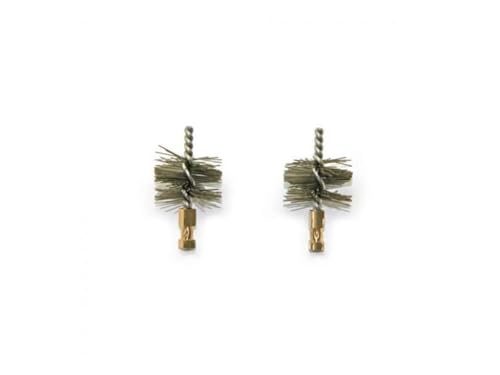
If you own high-end audio equipment or sensitive camera lenses, you know that even a tiny speck of dust can be frustrating. The HAKKO brush is a favorite for those who prioritize precision over everything else. Its bristles are engineered to be soft yet effective, ensuring that you don’t accidentally leave micro-scratches on delicate surfaces.
While these brushes come at a higher price point than generic options, the quality of the materials is evident in the feel and longevity of the tool. They are perfect for the homeowner who treats their tech with extreme care and wants a tool that will last for years. If your collection of electronics includes expensive, precision-engineered items, this is the tool that matches that level of quality.
Bottom line: Invest in this if you have high-value, sensitive electronics that require a gentle, expert touch.
Relife Anti-Static Brush for Motherboard Cleaning
Desktop PC owners understand the struggle of managing dust inside a computer case, especially in homes with pets. The Relife brush features a design that is particularly adept at cleaning around motherboard components and cooling fans. It is firm enough to push through thick dust bunnies but safe enough that you won’t worry about damaging a capacitor or a connection.
This brush is ideal for the annual "spring cleaning" of your PC setup. Because it is designed for heavy-duty internal work, it is a bit more robust than your average cosmetic brush. It is a practical choice for anyone who builds or maintains their own computers and wants a reliable tool that won’t fail during a deep cleaning session.
Bottom line: A reliable, sturdy choice for deep-cleaning PC interiors and cooling systems.
Vetus ESD Brushes for Sensitive Internal Parts

Sometimes you need a brush that can reach into the deep, dark corners of a device without you having to disassemble the entire unit. The Vetus brushes offer a slim profile that is perfect for reaching into ventilation slots or small ports. They are exceptionally useful for cleaning out the charging ports of tablets or the vents of a game console.
These brushes are compact, making them easy to store in a small apartment or a crowded junk drawer. They strike a great balance between being compact enough for tight spaces and durable enough for regular use. For the renter or homeowner with limited storage space, these small, effective tools are a smart addition to your cleaning kit.
Bottom line: Perfect for those living in small spaces who need a compact tool for tight gaps and ports.
SRA Soldering Products ESD Brush for PC Builds

Building a PC is a satisfying project, but it leaves behind residues and dust that need to be managed to keep the system running cool. The SRA brush is a staple in the soldering community, which makes it a fantastic tool for PC builders who want professional-grade maintenance. It is designed to withstand the rigors of a workbench environment.
Whether you are removing thermal paste residue or clearing out fan blades, this brush is built to handle the task. It is a bit more industrial in appearance, but its performance is unmatched when dealing with the fine dust that accumulates inside a PC case. It is a great choice for the serious hobbyist who wants their workstation to stay in peak condition.
Bottom line: The go-to tool for PC builders who want a professional-grade cleaning experience.
Why Anti-Static Materials Protect Your Hardware
Many people assume that a standard paintbrush from a craft store will work just as well as an ESD brush. Unfortunately, standard brushes often generate static electricity through friction, which can create a tiny spark that is invisible to the human eye but deadly to a circuit board. Anti-static materials are specifically engineered to conduct that static safely away from the components.
When you use an ESD-safe brush, you are essentially grounding the dust and the brush itself, preventing an electrostatic discharge (ESD) event. This is especially critical in winter months or in carpeted rooms where static builds up easily. By spending a few extra dollars on an ESD-safe tool, you are effectively buying insurance for your expensive electronics.
Bottom line: Never use non-conductive brushes on internal electronics; the risk of an invisible static discharge is simply not worth the savings.
How to Safely Clean Dust From Sensitive Circuits
Before you start cleaning, always power down your device and unplug it from the wall to ensure there is no residual current. Use your brush with light, sweeping motions, starting from the center of the board and moving outward to push the dust away. Avoid using a vacuum cleaner directly on the board, as the plastic nozzle can generate its own static charge.
If the dust is stubborn, you can pair your brush with a small amount of high-purity isopropyl alcohol, provided the component is not water-sensitive. Always work in a well-lit area so you can see exactly where the dust is accumulating. Remember, the goal is to gently lift the dust, not to scrub the components aggressively.
Bottom line: Patience is your best friend; use light, consistent strokes and always ensure the device is completely powered down first.
Essential Tips for Maintaining Your Brush Tools
Your cleaning brushes are tools just like any other, and they require their own maintenance to stay effective. After each use, tap the brush against your hand or a clean surface to dislodge the dust you have collected. If the bristles become matted or dirty, you can wash them with a mild soap and water, but ensure they are 100% dry before using them on electronics again.
Store your brushes in a dedicated container or a small pouch to keep the bristles from getting bent or crushed. If you notice the bristles starting to fray or lose their shape, it is time to replace the brush to avoid leaving behind stray fibers. A clean, well-maintained brush is far more effective at protecting your hardware than a worn-out, dusty one.
Bottom line: Treat your brushes with care, keep them clean, and replace them once the bristles lose their integrity.
Investing in a quality anti-static brush set is a small price to pay for the long-term health of your home electronics. By choosing the right tool for your specific needs, you can easily maintain your devices and avoid costly repairs. Keep your tools clean and your workspace grounded, and your gadgets will reward you with years of reliable service.