

7 Best HDMI Cables For Gaming Consoles For Speed
Boost your gaming with our top 7 HDMI cables. Discover which high-speed cords ensure 4K resolution, low latency, and smooth frame rates for your console setup.
Upgrading your gaming setup often starts with the console, but the connection between your machine and your TV is the unsung hero of a smooth experience. If you’ve ever dealt with screen flickering or audio dropouts during a high-stakes match, you know that the right cable is essential for peace of mind. Here are the top seven HDMI cables that balance speed, reliability, and value for your home gaming environment.
AudioQuest Pearl: Best for Signal Reliability


When you have a dedicated gaming room or a high-end home theater setup, you want a cable that feels as premium as the equipment it connects. The AudioQuest Pearl is designed for those who prioritize long-term signal stability over flashy aesthetics. It uses high-quality materials to minimize interference, which is a common headache in homes crowded with Wi-Fi routers and smart devices.
Because this cable is built with solid long-grain copper conductors, it prevents the internal distortion that can plague cheaper, thinner wires. If you live in an apartment where electronic interference is high due to proximity to neighbors, this is a smart, reliable choice. It provides a clean, consistent feed that ensures your console and display are always communicating perfectly.
The main trade-off here is the price point, as you are paying for the brand’s engineering expertise and build quality. It is a fantastic "set it and forget it" solution for homeowners who don’t want to troubleshoot their connections every few months. If you value peace of mind and want to avoid the "is it the cable or the console?" guessing game, this is a solid investment.
Zeskit Maya 8K: Best for Universal Compatibility
If your household is a mix of different consoles, streaming devices, and older monitors, you need a cable that plays nice with everything. The Zeskit Maya is widely recognized for its strict adherence to the HDMI 2.1 standard, making it a "gold standard" for compatibility. It works seamlessly whether you are plugging a PlayStation 5 into a new OLED or connecting a PC to a gaming monitor.
This cable is particularly great for families who move their consoles between rooms or take them to a friend’s house. Its flexible design makes it easy to route behind tight media consoles or through wall-mounted cable management channels. You won’t have to worry about the cable being too stiff to bend into place behind a slim wall-mounted TV.
While it lacks the heavy-duty shielding of some audiophile-grade cables, it hits the perfect sweet spot for 99% of gaming households. It is consistently reliable and widely available, which makes replacing it or adding more to your home setup a breeze. For most users, this is the most practical, no-nonsense cable you can buy.
Monoprice 8K Certified: Best Budget Performance
Experience stunning visuals with this 8K certified Ultra High Speed HDMI cable. It supports 8K@60Hz and 4K@120Hz resolutions with 48Gbps bandwidth, Dynamic HDR, and eARC for immersive audio.
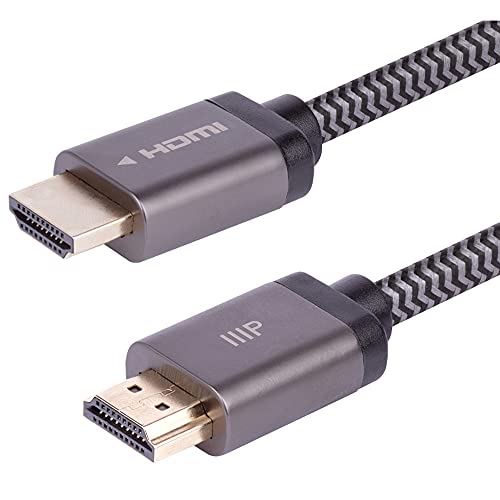
We’ve all been there: you just spent hundreds on a new console and don’t want to drop a fortune on accessories. Monoprice has built a reputation for providing professional-grade performance at a fraction of the cost of big-name brands. Their 8K Certified cable is the go-to choice for budget-conscious gamers who refuse to sacrifice speed.
These cables are officially "Ultra High Speed" certified, meaning they are tested to handle the full 48Gbps bandwidth required for 4K at 120Hz gaming. This is perfect for renters who might be upgrading their hardware piecemeal and need a cable that won’t become obsolete in a year. You get the same technical performance as the expensive brands without the marketing markup.
The only downside is the aesthetic; these cables are utilitarian and lack the premium braiding found on more expensive options. However, if your cable is hidden behind a TV stand or tucked away in a media cabinet, this is irrelevant. It is a purely functional choice that keeps your wallet happy while keeping your frame rates high.
Belkin Ultra HD: Best for Apple TV and Consoles

Sometimes you need one cable that can bridge the gap between your gaming console and your living room media hub. The Belkin Ultra HD cable is a favorite for those who use their TV for both intense gaming sessions and high-end streaming. It is built to handle the high data rates required by top-tier gaming consoles and 4K HDR streaming devices alike.
Because Belkin works closely with major tech companies, these cables are often the ones you’ll find in official retail displays. This gives them a level of "guaranteed compatibility" that can be reassuring if you’ve had bad luck with generic cables in the past. It’s an excellent choice for a main living room setup where you need absolute reliability for the whole family.
Keep in mind that these cables are typically shorter than some of the "long-reach" options on the market. They are best suited for setups where the console is located directly beneath or beside the television. If you have a custom home theater with long cable runs, you might need to look elsewhere for length.
Cable Matters 48Gbps: Best Multi-Pack Option

If you are setting up a new entertainment center or upgrading every room in your house, buying cables one by one gets expensive quickly. Cable Matters offers a multi-pack solution that is perfect for families or roommates who need to outfit multiple consoles. It takes the stress out of managing different brands and ensures all your devices are running at peak performance.
These cables are robust and feature a sturdy design that holds up well to frequent plugging and unplugging. If you have a household where kids or teenagers are constantly moving equipment around, the durability of these cables is a major plus. They are built to withstand the wear and tear of a busy, active home environment.
The value proposition here is hard to beat, especially when you consider the cost per cable. You aren’t getting luxury materials, but you are getting a reliable, high-speed connection that is certified for the latest gaming standards. It’s the pragmatic choice for anyone who needs to stock up without breaking the bank.
UGREEN 8K HDMI 2.1: Best for Durable Braiding

If you have pets or kids, you know that cables are often prone to fraying or being stepped on. The UGREEN 8K HDMI 2.1 cable features a braided nylon exterior that provides a significant layer of protection against physical damage. This is a game-changer for anyone who has lost a cable to a curious puppy or a vacuum cleaner mishap.
Beyond the physical durability, the internal shielding is top-notch, preventing the cable from becoming a point of failure in your setup. It feels substantial in your hand, which provides a sense of quality that thin, plastic-coated cables often lack. It’s a great choice for high-traffic areas like a living room or a shared gaming den.
While the braiding makes the cable slightly stiffer, it’s a fair trade-off for the added protection. This cable is designed to last, meaning you won’t be digging behind your entertainment center to replace a broken wire anytime soon. It is an ideal blend of rugged build quality and modern performance.
IVANKY 8K HDMI Cable: Best for High-Speed Value
Experience stunning 8K visuals and smooth 4K@120Hz gaming with this 48Gbps HDMI 2.1 cable. Enjoy enhanced audio with eARC and HDR for vibrant picture quality, all within a durable, braided design.

When you want a high-performance cable that looks good and performs even better, IVANKY is a strong contender. They offer a great balance of speed, build quality, and price that appeals to the average gamer. It provides a clean, 48Gbps signal that ensures your console is outputting the best possible picture quality to your screen.
What stands out about this cable is its attention to detail, such as the zinc-alloy shells on the connectors. These aren’t just for show; they help dissipate heat and provide a secure fit that doesn’t wiggle loose over time. It’s a small detail that makes a big difference in a household where the TV might get bumped or shifted during cleaning.
If you are looking for a mid-range option that feels like a premium product, this is the one to pick. It’s reliable enough for serious gaming but affordable enough that you won’t feel guilty buying one for every console in the house. It’s a balanced, sensible choice for any modern home.
Understanding HDMI 2.1 Specs for Gaming Needs
To truly get the most out of your console, you need to understand what "HDMI 2.1" actually does for you. In short, it is the standard that allows for higher bandwidth—specifically 48Gbps—which is necessary for 4K resolution at 120 frames per second. Without a cable that supports this, your console will automatically throttle its performance to fit the lower bandwidth of an older cable.
Think of it like a highway: an older HDMI cable is a two-lane road, while an HDMI 2.1 cable is an eight-lane superhighway. If you try to push 4K 120Hz data through an older cable, you’ll experience "bottlenecking," which results in lower frame rates or resolution drops. For gaming, this is the difference between a fluid, responsive experience and one that feels sluggish.
When shopping, always look for the "Ultra High Speed" certification logo on the packaging. This is the only way to be 100% sure the cable can handle the heavy data demands of modern gaming. Don’t be fooled by marketing terms like "4K ready" on older cables; if it isn’t HDMI 2.1 certified, it isn’t going to give you the full performance your console is capable of.
Why Certified Cables Matter for 4K 120Hz Play
Certification isn’t just a marketing gimmick; it’s a rigorous testing process that ensures the cable meets the HDMI Forum’s strict standards. When a cable is "Ultra High Speed Certified," it means it has been tested for electromagnetic interference (EMI) and signal integrity at the full 48Gbps speed. This is crucial for gaming because even a tiny bit of interference can cause your screen to go black for a second or drop the signal entirely.
In a typical home, you have dozens of devices emitting signals that can interfere with your cables. A certified cable is shielded effectively enough to ignore this "noise" and keep your game running smoothly. If you’ve ever had your screen flicker during a boss fight, a non-certified cable is often the hidden culprit.
For your peace of mind, choosing a certified cable is the most practical way to ensure you aren’t fighting your hardware. It removes one major variable from your setup, allowing you to focus on the game rather than the technology. Always check for the QR code on the packaging that verifies the certification; it’s the best way to avoid knock-off products.
Length vs. Signal Integrity for Gaming Setups
One of the most common mistakes homeowners make is buying a cable that is far too long for their needs. While it might seem convenient to have extra slack, every additional foot of cable introduces a tiny bit of potential signal loss. For high-speed gaming, shorter is almost always better, so measure the distance between your console and TV before you buy.
If you absolutely need a long cable—for example, if your console is in a media closet in another room—you must be even more selective. Standard copper cables lose signal integrity over long distances, which can lead to artifacts or total signal failure. In these cases, look for "Active" HDMI cables, which use built-in chips to boost the signal over the longer run.
For most people, a 3-foot or 6-foot cable is the "sweet spot" for performance and cable management. It’s long enough to connect your devices without creating a tangled mess behind your furniture. Keep your cables tidy with velcro ties to prevent stress on the connectors, which is the most common cause of premature cable failure in any home.
Choosing the right HDMI cable doesn’t have to be a complicated or expensive ordeal. By focusing on HDMI 2.1 certification and matching the cable length to your specific living space, you can ensure your gaming setup runs flawlessly. Pick the option that best fits your budget and durability needs, and get back to enjoying your games with the confidence that your connection is as strong as your console.

