

7 Best HDMI Cables For RV Entertainment Systems
Upgrade your RV setup with our top 7 HDMI cable picks. We analyze durability, signal stability, and length to ensure seamless entertainment on the open road.
Setting up a reliable entertainment system in your RV requires more than just picking a cable off the shelf at a big-box store. Because your home-on-wheels faces constant movement, heat fluctuations, and tight spaces, the quality of your signal path is critical. These seven selections balance durability and performance to ensure your movie nights on the road go off without a hitch.
AudioQuest Pearl: Best Overall for RV Systems


When you are parked at a remote campsite, the last thing you want is a signal dropout during the climax of a movie. The AudioQuest Pearl is a solid choice because it features high-quality solid conductors that prevent the "skin-effect" interference common in cheaper wires. Its build quality is robust enough to handle the occasional tug or vibration that occurs while your RV is in motion.
While it sits at a higher price point than basic cables, the shielding is superior, which is vital when running cables near the electrical hum of an RV’s power converter. It strikes a perfect balance between professional-grade shielding and a flexible jacket that is easy to snake through tight cabinetry.
Bottom line: If you want a "set it and forget it" solution that won’t fail after a bumpy drive, this is your best investment.
Zeskit Maya 8K: Best for High-Speed Gaming
If you travel with a gaming console, you know that high frame rates and quick response times are non-negotiable. The Zeskit Maya 8K is widely recognized for its "Ultra High Speed" certification, meaning it can handle the heavy data throughput required for modern gaming consoles.
The cable is incredibly reliable for maintaining a steady connection, even when your RV’s voltage fluctuates slightly. Its construction is dense and sturdy, which provides peace of mind when you are frequently plugging and unplugging devices during setup and teardown.
Bottom line: This is the gold standard for gamers who refuse to compromise on visual fidelity while living on the road.
Monoprice Certified Premium: Best Budget Pick

You don’t always need to spend a fortune to get a reliable signal for your living room TV. Monoprice has built a reputation on providing "Certified Premium" cables that undergo rigorous testing to ensure they actually meet the advertised speeds.
These cables are perfect for the average RVer who just wants to watch local news or a streaming show without spending their entire vacation budget on accessories. They are simple, functional, and surprisingly durable for the price.
Bottom line: Buy these in bulk to keep spares in your RV storage bay; you won’t feel guilty if one gets pinched or lost during a trip.
Cable Matters Active HDMI: Best Long Cable Run
![[Designed for Xbox Certified] Cable Matters Unidirectional Active 8K @60Hz Fiber Optic HDMI Cable 32.8 ft / 10m - Supporting 8K@60Hz 4K@120Hz HDR - Designed for Xbox, Compatible with PS5, Apple TV, PC](https://m.media-amazon.com/images/I/41NHun8Y7LL._SL500_.jpg)
RV layouts often require running a signal from a bedroom TV to an external entertainment bay or across a long slide-out. Passive cables lose signal strength over long distances, which is where "Active" cables like this one come in.
The internal chipset boosts the signal, ensuring your picture remains crisp even at 25 or 30 feet. Because they are active, they are directional—meaning you must plug the "source" and "display" ends into the correct ports.
Bottom line: If you are trying to extend your entertainment system to an outdoor kitchen or a secondary bedroom, don’t settle for a standard cable that will result in a flickering screen.
Rocketfish 4K Ultra HD: Best for Durability

RV life is hard on equipment, and cables often get bent around sharp metal edges inside entertainment consoles. Rocketfish is known for its heavy-duty jacket and reinforced connectors that resist fraying and internal wire breakage.
These cables feel substantial in your hand, giving you confidence that they won’t snap if they get caught in a cabinet hinge. They are a staple in many retail stores, making them an easy pickup if you have an emergency during a road trip.
Bottom line: If you are prone to accidentally yanking cables or have a tight, awkward setup, the extra physical protection here is worth the premium.
Amazon Basics Braided: Best Value Multi-Pack
For the family RV where kids are constantly plugging in tablets, portable consoles, and DVD players, you need a cost-effective solution. The braided exterior of these cables adds a layer of protection against the daily wear and tear of a busy household.
Buying these in a multi-pack ensures you have a spare for every device in the RV. They aren’t designed for extreme high-end home theater systems, but for standard 1080p or 4K streaming, they perform flawlessly.
Bottom line: Keep a pack of these in your junk drawer; they are the most practical solution for high-traffic, multi-user environments.
UGREEN 8K HDMI 2.1: Best for Sharp Displays

If you have invested in a high-end OLED or QLED TV for your RV, you need a cable that can keep up with its resolution and color depth. The UGREEN 8K HDMI 2.1 supports dynamic HDR, which makes the colors on your screen pop even in the varying light conditions of an RV interior.
The design is sleek and the connectors fit snugly into ports, which is essential for preventing the cable from wiggling loose while driving. It is a modern, high-performance cable that treats your display with the respect it deserves.
Bottom line: If you are a visual enthusiast who wants the best possible picture quality while parked, this is the cable to get.
Why RV Vibration Requires Specialized Cables
Standard home cables are designed to sit behind a wall and never move. In an RV, your entertainment system is essentially experiencing a localized earthquake every time you drive down the highway.
- Connector Strain: Constant vibration can loosen the solder joints inside cheaper HDMI heads.
- Flex Fatigue: Cables that are forced into tight, sharp bends to fit in RV cabinets will snap internally over time.
- Shielding Integrity: High-quality shielding prevents the cable from acting as an antenna for the electrical noise generated by your RV’s inverter and water pump.
Always look for cables with reinforced strain relief at the neck of the connector. This prevents the internal copper wires from snapping when the cable is pulled at an angle.
How to Properly Route Cables Behind RV Walls
Routing cables in an RV is notoriously difficult because walls are often filled with insulation or structural framing. Whenever possible, use existing chase-ways or look for gaps behind the electrical outlet boxes.
Avoid running HDMI cables directly alongside high-voltage AC power lines, as this can cause electromagnetic interference. If you must cross them, try to do so at a 90-degree angle rather than running them parallel for long distances.
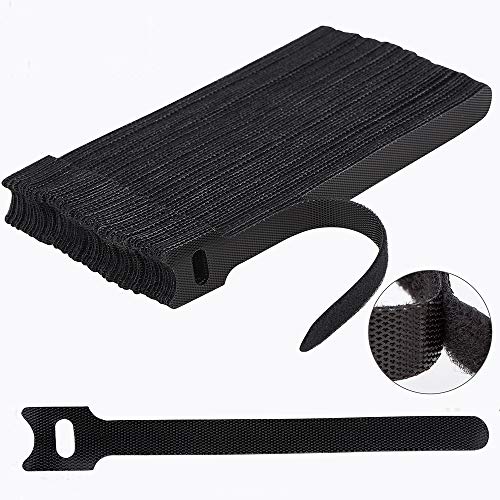
Use Velcro ties instead of zip ties to bundle your cables. Zip ties can be overtightened, which crushes the internal insulation and ruins the cable’s ability to transmit high-speed data.
Common RV Entertainment Setup Mistakes to Avoid
The most common mistake is using a cable that is too long for the job, creating a "rat’s nest" of wires that are impossible to troubleshoot. Measure your run precisely and add only a foot or two of slack to accommodate the movement of slide-outs.
Another frequent error is ignoring the "bend radius" of the cable. If you force a thick, high-speed cable into a 90-degree turn, you risk damaging the delicate internal wiring, which leads to intermittent black screens.
Finally, never leave your cables hanging by their own weight from the back of a TV. Use cable clips or adhesive mounts to support the cable’s weight, ensuring the pressure is on the mount rather than the delicate HDMI port on your expensive television.
Building a reliable RV entertainment system is all about choosing components that can withstand the unique rigors of mobile living. By focusing on build quality, proper routing, and avoiding unnecessary cable clutter, you can ensure your system remains stable for years to come. Choose the cable that fits your specific travel habits, and you will spend less time troubleshooting and more time enjoying the view.
