
7 Best Touch-control Desk Lamps for Arthritis
Struggling with stiff joints? Discover our top 7 touch-control desk lamps designed for arthritis, offering easy, pain-free lighting for your workspace.
Finding the right desk lamp can transform a workspace, especially when managing the daily challenges of arthritis. These touch-control options are designed to eliminate the strain of twisting switches or fumbling with small knobs. This guide will help you select a reliable, accessible light source that makes your home office or hobby space more comfortable.
TaoTronics LED Desk Lamp: Best Overall Choice
When you’re juggling paperwork or working on a craft project, the last thing you want is to fight with a stiff light switch. The TaoTronics LED lamp is a favorite for its sheer consistency and wide, responsive touch-control base. It provides a flat surface area that registers a light tap, meaning you don’t need a firm grip to turn it on or adjust the brightness.


This model is particularly excellent for those who appreciate a "set it and forget it" approach to lighting. The base is heavy enough to stay put, so you won’t need to hold the lamp down with one hand while adjusting the light with the other. It’s a reliable, mid-range investment that balances cost with a very high level of tactile comfort.
The bottom line is that the TaoTronics offers the most balanced experience for the average household. It’s sturdy enough for a shared family desk but simple enough for anyone with limited dexterity to operate without frustration.
Lepro Eye-Care Lamp: Gentle Touch Controls
If your eyes are as sensitive as your joints, the Lepro Eye-Care lamp is worth a close look. It features an incredibly soft-touch interface that requires almost zero pressure to activate. For someone with joint inflammation, this lack of resistance is a massive quality-of-life improvement.
The lamp’s design focuses on flicker-free light, which helps prevent the eye strain that often accompanies long hours of reading. Because the touch sensors are integrated smoothly into the base, there are no raised edges or buttons to catch on your skin or cause irritation. It is a sleek, modern choice that fits well in both minimalist apartments and traditional home offices.
Just keep in mind that the lightweight design means you should place it on a stable surface where it won’t be bumped. It’s a fantastic entry-level option for those who want high-tech convenience without a high-tech price tag.
Globe Electric Architect: Easy-Adjust Arm
Many traditional lamps require you to tighten wingnuts to keep the arm in place, which is a nightmare for arthritic hands. The Globe Electric Architect lamp solves this by using a balanced swing-arm mechanism that stays exactly where you put it. You simply move the head to your desired position, and it holds firm without needing any manual tightening.

This lamp is perfect for hobbyists who need to move their light frequently to focus on small details. Whether you are sewing, painting, or reading, the reach of this lamp covers a large area of your desk. It’s a practical, utilitarian tool that prioritizes movement and flexibility over fancy digital settings.
While the touch control is straightforward, the real value here is the mechanical design of the arm. It’s a robust choice for a dedicated home office where you need a lamp that works as hard as you do.
Brightech Litespan: Arthritis-Friendly Base
Illuminate your tasks with the Brightech Litespan LED floor lamp, featuring a flexible gooseneck for precise light direction and natural daylight for reduced eye strain. Its energy-efficient design and stable base make it perfect for reading, crafts, or professional detail work.
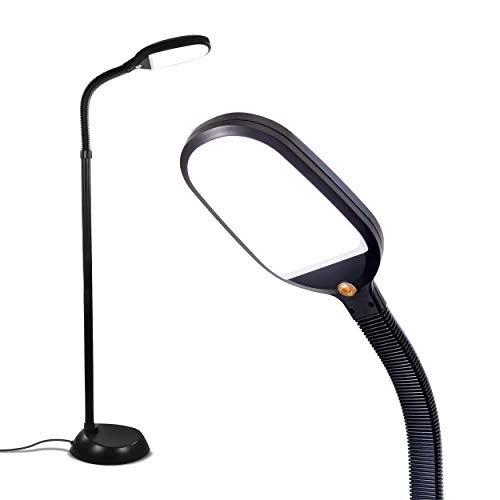
The Brightech Litespan is a standout because it features a weighted base that provides incredible stability. When you have arthritis, you want to avoid lamps that wobble or tip when you touch them. This lamp feels anchored, giving you the confidence to tap the controls without worrying about the unit sliding across your desk.
The touch interface is located conveniently on the neck, which is a great design choice for those who prefer not to reach across the desk surface. By placing the controls higher up, you can adjust the light while keeping your hand in a more natural, relaxed position. It’s a thoughtful ergonomic detail that makes a significant difference during long sessions.
This is a slightly larger lamp, so it works best in spaces where you have a bit of desk real estate. However, the trade-off for that size is a level of durability and ease of use that is hard to beat.
Wanjiaone LED Lamp: Sensitive Touch Sensor

Sometimes, the simplest solution is the best one, especially when you are dealing with persistent hand pain. The Wanjiaone LED lamp is known for having a highly sensitive touch sensor that responds even to a very light, glancing contact. You don’t need to press or "click" anything; just a gentle brush of your finger is enough to cycle through the brightness levels.
This lamp is quite compact, making it an ideal choice for a small apartment or a crowded bedside table. Because it occupies such a small footprint, it’s easy to tuck into a corner without losing valuable workspace. It’s an inexpensive, no-nonsense tool that delivers exactly what it promises.
If you are a renter who moves often, you will appreciate how lightweight and portable this lamp is. It’s a great "starter" lamp for anyone looking to transition from traditional switches to a touch-based system.
Joly Joy Swing Arm: Ergonomic Light Control
The Joly Joy lamp is designed for those who need precise control over where their light falls. The swing arm is exceptionally smooth, allowing you to position the light head with minimal effort. This is crucial for those who find that repetitive, forceful movements cause joint flare-ups.
The touch controls are integrated into the top of the lamp head, which keeps the base clear and clutter-free. While reaching for the top of the lamp might be a reach for some, the touch-sensitive surface is so responsive that it requires very little effort to activate. It’s an elegant solution for a desk that needs to remain organized and tidy.
This lamp is a bit more of an investment, but the build quality reflects the price. It’s a durable choice that will likely last for many years in a busy household.
Miroco LED Lamp: Simplest Dimming Interface

The Miroco LED lamp earns its place on this list by offering the most intuitive dimming interface available. Instead of cycling through multiple buttons, it uses a simple touch-and-hold mechanism to slide through brightness levels. This is much easier on the hands than repeatedly tapping a button to find the right intensity.
The design is clean and unobtrusive, fitting seamlessly into any room decor. It’s a great choice for a living room side table or a home office where you want your lighting to be functional but not distracting. The base is wide and stable, ensuring that you won’t have to struggle to keep it upright.
If you find that complex settings confuse your workflow, choose this model. It’s all about removing barriers and providing light exactly when and how you need it.
Key Features for Arthritis-Friendly Lighting
When shopping for a lamp, look for a weighted base to ensure the unit stays put during use. A lamp that slides away when you try to turn it on is a common source of frustration and strain. You want a base that feels solid and immovable on your desk surface.
Consider the placement of the controls carefully. Some people prefer base-mounted controls because they don’t have to reach up, while others prefer neck-mounted controls to keep the desk surface clear. Test your own range of motion to see which position feels more natural for your shoulders and hands.
Finally, prioritize dimming ranges that are easy to navigate. Avoid models that require a "double tap" or complex sequences to change brightness. A simple, single-touch dimming system is always the most arthritis-friendly option.
How to Position Lamps to Reduce Hand Strain
Positioning is just as important as the lamp itself. Try to place your lamp on the side of your dominant hand if you are right-handed, or vice-versa, to minimize the distance your hand has to travel. This reduces the repetitive reaching that can aggravate wrist and shoulder joints.
Ensure that the light head is positioned to cover your entire workspace without you needing to move the lamp constantly. If you find yourself adjusting the angle every ten minutes, the lamp is likely in the wrong spot or the arm reach is insufficient. A little bit of experimentation with placement can save your joints a lot of work.
- Keep the lamp at a height where the light illuminates the task but doesn’t create glare.
- Use a desk mat to provide a stable, non-slip surface for the lamp base.
- If you have a small desk, consider a clamp-style lamp to free up surface area.
Maintenance Tips for Touch-Control Surfaces
Touch-control lamps are sensitive to oils and dust, which can eventually interfere with their responsiveness. Wipe the touch sensor area with a dry, microfiber cloth once a week to keep it clean. Avoid using harsh chemical cleaners, as these can strip the finish or damage the sensor electronics over time.
If you find the lamp isn’t responding as well as it used to, check the power connection first. Sometimes a loose plug can cause the sensor to behave erratically, mimicking a hardware failure. A simple reset—unplugging the lamp for 30 seconds—can often recalibrate the touch interface.
Always ensure the lamp is on a level surface; a tilted lamp can sometimes interfere with the internal weight sensors or balance. Regular, gentle maintenance will keep your lamp operating smoothly for years to come.
Investing in a touch-control lamp is a small change that yields significant comfort for those managing arthritis. By prioritizing stability, responsive sensors, and ergonomic arm movement, you can create a workspace that supports your health rather than hindering it. Choose the model that best fits your specific desk layout and daily routine to start enjoying a more accessible home environment today.