
7 Best Printable CD/DVD Labels and Inserts for Media
Organize your media collection with ease. Discover the 7 best printable CD/DVD labels and inserts, focusing on print quality, adhesive durability, and layout.
Organizing your physical media collection is a rewarding way to reclaim your shelves and protect your memories from dust and damage. Whether you are archiving family photos or digitizing old home movies, choosing the right label can make the difference between a chaotic pile and a curated library. This guide will help you navigate the best labeling solutions for your specific household needs.
Avery CD/DVD Labels: Best for Professional Finishes


If you are preparing a digital portfolio for a client or creating a polished gift for a relative, you want a label that looks like it came straight from a retail store. Avery is the industry standard for a reason, offering a high-gloss finish that makes colors pop and text incredibly crisp.
The primary advantage here is the sheer volume of templates available in their free online design software. Even if you are not tech-savvy, you can drag and drop your photos into a professional layout in minutes.
Keep in mind that these labels are slightly thicker than generic brands. While this provides a premium feel, ensure your printer handles heavier stock well to avoid jams.
Memorex Matte Labels: Best for Inkjet Printers
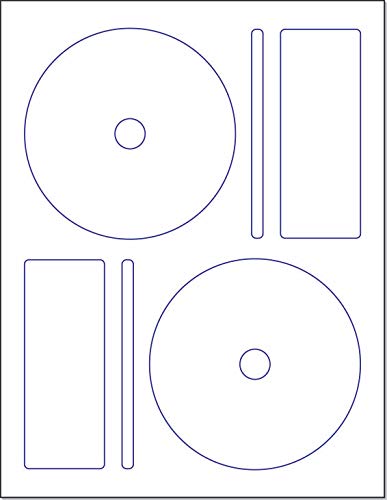
For those of you printing text-heavy labels—like tracklists for a music mix or detailed dates for home archives—the glare of a glossy label can actually make reading difficult. Memorex matte labels provide a soft, non-reflective surface that is much easier on the eyes.
These labels are particularly forgiving when using standard inkjet printers. The matte coating absorbs ink quickly, preventing the smearing that often happens when you use high-gloss paper on a basic home printer.
If you are working in a small space or a shared home office, these are a reliable, low-fuss choice. They dry almost instantly, meaning you can label your stack and get back to your day without waiting around.
Neato Media Labeling Kit: Best for Precise Layouts

We have all experienced the frustration of placing a label slightly off-center, only to have the disc wobble in the player. The Neato kit solves this common household headache by including a physical applicator tool that centers the label perfectly every single time.
This is an excellent investment for families with children or anyone who frequently creates discs for school projects. The kit typically comes with a centering base that holds the disc in place while you lower the label onto it.
While the upfront cost is higher than just buying a pack of labels, the reduction in wasted, misaligned stickers makes it worth the price. It turns a tedious, precision-heavy task into a simple mechanical motion.
Fellowes CD/DVD Labels: Best for High Compatibility
If you are the household "tech support" person, you likely deal with a variety of printers and older hardware. Fellowes labels are designed to be universally compatible, working reliably across a wide range of inkjet and laser printers without clogging the rollers.
These labels are known for their strong adhesive, which is a double-edged sword. It ensures your label stays put for years, even if your media storage area experiences slight temperature fluctuations, like a garage or basement.
Because the adhesive is so robust, take your time when applying them. Once they touch the disc, they are meant to stay there, so focus on a slow, steady application to avoid air bubbles.
Staples Inkjet CD Labels: Best for Budget Projects
When you have a massive backlog of old discs to organize, the cost of premium labels can add up quickly. Staples brand labels are the workhorse of the home office, offering a functional, no-frills solution at a fraction of the cost of name brands.
They are perfectly adequate for simple labeling needs, such as identifying backup files or utility discs. You won’t get the high-end photo quality of a glossy Avery label, but for internal organization, they get the job done efficiently.
These labels are ideal for renters or students who need to organize their belongings on a strict budget. They provide the necessary structure to keep your media organized without breaking the bank.
Memorex Jewel Case Inserts: Best for Organization

A disc label is only half the battle; if you store your media in jewel cases, you need a clear way to identify them from the side. Memorex inserts are designed specifically to fit standard cases, allowing you to print clear, readable titles for your spines.
This is a game-changer for anyone with a large collection stored on bookshelves. Instead of pulling every case out to see what is inside, you can simply scan the spines as you would with a book collection.
Consider these an essential part of your storage strategy if you want your media to look like a permanent, organized library. They help maintain a clean, aesthetic look in your living room or study.
Avery Spine and Face Inserts: Best for Case Layouts

When you want to go beyond simple text and create a cohesive look for your media cases, Avery’s spine and face insert sets are the gold standard. These allow you to print a front cover and a spine label as a single, continuous piece.
This is the best way to make your home media look uniform. It is particularly useful for people who enjoy digitizing family history, as it allows you to create a "box set" feel for your personal collections.
Be aware that these require a bit more design time to get the dimensions exactly right. However, the final result—a professional-looking collection on your shelf—is well worth the extra effort.
Choosing the Right Label Finish for Your Media Type
Selecting the right finish isn’t just about aesthetics; it’s about the longevity of the media. Glossy labels are fantastic for display, but they can be prone to fingerprints and smudges if handled frequently.
Matte labels are generally more durable and easier to write on with a permanent marker if you need to add a quick note later. If your discs are going to be handled often by multiple family members, matte is almost always the more practical choice.

- Glossy: Best for display, photo-heavy designs, and gifting.
- Matte: Best for frequent handling, text-heavy labels, and budget-conscious projects.
- Clear: Best for a minimalist look, though they can be harder to read against the disc surface.
Essential Tips for Perfect Label Alignment Every Time
The biggest mistake people make is rushing the application process. Always clean the surface of the disc with a soft, lint-free cloth before applying any label to remove dust or oils that prevent the adhesive from bonding.
If you don’t have a centering tool, try using a simple coffee mug as a guide. Place the disc on the table, and use the rim of the mug to help you guide the label down steadily.
- Work in a clean environment: Dust is the enemy of a smooth label application.
- Smooth from the center out: Always press down in the middle first and work your way to the edges to push out trapped air.
- Let the ink cure: Wait at least 30 minutes after printing before applying the label to ensure the ink is fully dry.
How to Safely Remove Old Labels From Optical Discs
Sometimes, a label becomes damaged or the information on the disc is no longer relevant, and you need to start fresh. Never use a metal blade to scrape a label off, as you will almost certainly scratch the data layer of the disc.
Instead, use a small amount of a citrus-based label remover or even a drop of vegetable oil on a paper towel. Gently rub the label until the adhesive softens, then wipe it away in a circular motion.
After removing the residue, clean the disc thoroughly with isopropyl alcohol to ensure no oily film remains. This process takes patience, but it is the only way to save a disc without damaging it.
Organizing your media collection is a small task that pays off with years of easy access and peace of mind. By choosing the right labels and taking your time with the application process, you can transform your disorganized discs into a functional, professional-looking library. Remember that the best system is the one that you will actually maintain, so choose the options that fit your budget and your lifestyle.