

7 Best Low-Profile Monitor Stands for Limited Desk Space
Maximize your workspace with our top 7 low-profile monitor stands. Discover ergonomic, space-saving designs that keep your desk organized and clutter-free today.
Finding the right monitor stand is a simple yet transformative upgrade for anyone struggling with a cramped desk. By reclaiming vertical space, you can turn a cluttered workstation into a productive hub without the need for a larger table. These seven picks focus on balancing functionality, footprint, and your specific daily needs.
Grovemade Walnut Stand: Best Premium Aesthetic
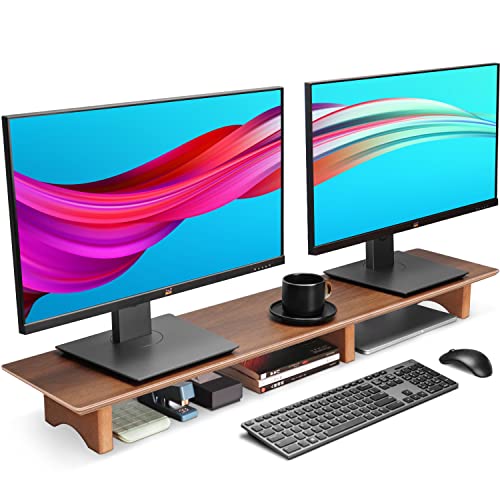

If your desk is a focal point in your home—perhaps tucked into a living room corner or a shared office space—you want equipment that looks like furniture, not just plastic hardware. The Grovemade Walnut Stand brings a warm, organic feel to a sterile tech environment.
The solid wood construction offers a level of durability that synthetic materials simply cannot match. It sits firmly on your desk without the need for clamps or complex assembly, making it a perfect choice for renters who need to avoid damaging their surfaces.
While it carries a premium price tag, you are paying for craftsmanship and the longevity of natural materials. It is an investment piece that ages beautifully, though it lacks adjustable height features. If you value aesthetics and stability over modularity, this is a standout choice.
WALI Aluminum Riser: Best Minimalist Design

For those who prefer a "less is more" approach, the WALI Aluminum Riser provides a clean, industrial look that disappears into the background. Its slim profile is ideal for tiny desks where every square inch of surface area counts.
The brushed aluminum finish is surprisingly resilient against scratches and fingerprints, which is a big plus if you have kids or pets around. Because it is so lightweight, it is incredibly easy to move or store if you need to clear your desk for other activities like crafting or sewing.
Keep in mind that the minimalist design means there is no built-in cable management or drawer storage. It is strictly for elevating your screen to a comfortable height. It is the perfect "set it and forget it" solution for a tidy, professional look.
Huanuo Monitor Stand: Best Budget-Friendly Pick
Elevate your workspace with this adjustable monitor stand, offering 3 height settings for ergonomic comfort. Its ventilated design promotes airflow for device cooling, while the integrated organizer keeps your desk clutter-free.
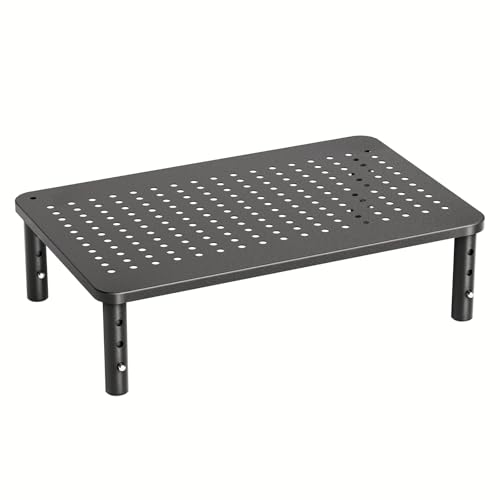
When you are setting up a home office on a shoestring budget, you do not need to sacrifice ergonomics. The Huanuo stand is a workhorse that proves you can get a functional, adjustable product without spending a fortune.
This stand is particularly useful for students or those in temporary housing who need a quick, reliable solution. Its modular design allows you to adjust the height to suit your specific eye level, which is a feature often missing in cheaper fixed-height models.
The tradeoff here is the material quality; it is primarily made of durable plastic rather than metal or wood. While it won’t win design awards, it is perfectly capable of supporting standard monitors and keeping your neck strain at bay.
Mount-It! Glass Riser: Best Modern Workspace Fit

If your home office features glass or metal accents, the Mount-It! Glass Riser provides a sophisticated, seamless look. The tempered glass top is incredibly easy to wipe down, which is helpful if you frequently eat or drink at your desk.
The transparency of the glass creates an optical illusion of more space, making it a clever choice for very small apartments or narrow nooks. It keeps your setup feeling light and airy rather than heavy and cluttered.
Be aware that the glass surface shows dust and smudges more readily than wood or metal. If you are a perfectionist about cleaning, this might require a quick wipe-down every few days. It is a stylish, modern choice that prioritizes visual openness.
Kensington SmartFit: Best for Ergonomic Support
Ergonomics isn’t just a buzzword; it is essential for preventing long-term neck and back pain during long work hours. The Kensington SmartFit system takes the guesswork out of setup by using a color-coded height adjustment system.
This is the best option for households where multiple people might share the same desk. Because the adjustment mechanism is so intuitive, you can swap between users in seconds, ensuring everyone is working at their optimal height.
The build is sturdy and professional, designed to handle daily adjustments without wearing out. While it occupies a slightly larger footprint than a basic riser, the health benefits of proper posture make it a highly practical choice for the daily grind.
VIVO Steel Riser: Best for Heavy-Duty Stability

If you use a larger, heavier monitor or a professional-grade setup, you need something that won’t wobble under the weight. The VIVO Steel Riser is built like a tank, offering a rigid platform that stays firmly in place.
This is an excellent option for a permanent home office setup where you don’t plan on moving your gear often. The steel construction provides a sense of security, especially if you have a high-end monitor that you want to keep safe from accidental bumps.
Because it is heavy, it is not the most portable option for those who frequently rearrange their living spaces. However, if your priority is absolute stability and long-term durability, the steel construction is worth the extra weight.
Mind Reader Metal Stand: Best for Desk Storage
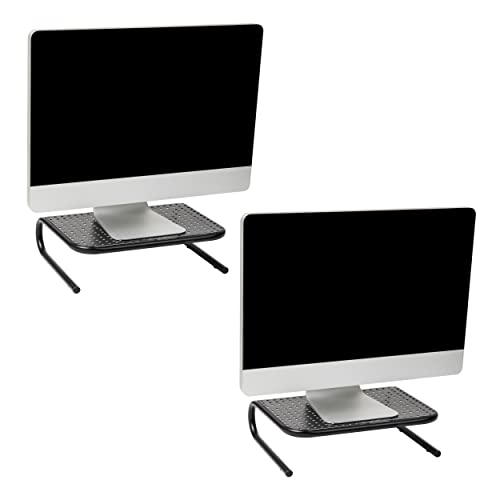
In a small home, you often have to make your furniture pull double duty. The Mind Reader stand features a built-in mesh drawer, which is a godsend for organizing small items like pens, sticky notes, or external hard drives that usually clutter up your workspace.
The mesh design is not just for storage; it also allows for excellent airflow, which is helpful if you keep a laptop or other electronics under the stand. It prevents your devices from overheating, a common issue in cramped, poorly ventilated desk setups.
The drawer mechanism is simple and functional, though it may not be as smooth as high-end office furniture. If you are struggling with a lack of desk drawers, this stand acts as a mini-organizer that clears your surface instantly.
How to Measure Your Desk for a Monitor Stand
Before buying, always measure the depth of your desk to ensure the stand’s feet don’t hang over the edge. A stand that is too deep will make your monitor sit too close to your face, causing eye strain.
Consider the width of your monitor base as well. You want the stand to be slightly wider than the base of your screen to ensure the monitor sits flat and secure.
- Check weight limits: Always verify the weight capacity of the stand against your monitor’s weight.
- Clearance: Check if your keyboard will fit underneath the stand when you are done working.
- Surface: If you have a glass desk, ensure the stand has rubberized feet to prevent slipping and scratching.
Ergonomic Benefits of Proper Screen Elevation
The primary goal of a monitor stand is to align the top third of your screen with your eye level. When your screen is too low, you tend to hunch forward, which puts immense pressure on your cervical spine.
By elevating the screen, you naturally encourage a more neutral, upright posture. This simple change can significantly reduce tension headaches and shoulder fatigue after a long day of typing.
Even a few inches of height can make a massive difference in how you feel at 5:00 PM. It is a small physical adjustment that yields significant long-term health dividends for anyone working from home.
Essential Tips for Organizing Small Workspaces
When you have limited desk space, verticality is your best friend. Use your monitor stand as a base, but consider adding wall-mounted shelves or pegboards to clear your desk surface entirely.
Keep only the essentials on your desk; if you haven’t touched an item in a week, it probably doesn’t need to be within reach. Use cable ties or clips to bundle cords, as loose wires are the fastest way to make a small desk look chaotic.
- Group items: Keep similar items together in small trays or containers.
- Hidden storage: Use the space under your monitor stand for items you use daily but don’t need to see.
- Routine: Spend two minutes at the end of each day clearing your desk so you start fresh the next morning.
Investing in a monitor stand is about more than just elevation; it is about reclaiming your workspace and your comfort. Whether you prioritize the warmth of walnut, the utility of a storage drawer, or the simplicity of steel, there is a stand that fits your specific daily routine. Take a moment to measure your desk, choose the feature that solves your biggest clutter problem, and enjoy a more organized, ergonomic way to work.
