7 Best Laptop Battery Replacement Tool Sets Reviewed
Need to swap your laptop battery? We review the 7 best tool sets, evaluating precision, durability, and value to help you make the right DIY repair choice.
Replacing a laptop battery is a rite of passage for any homeowner looking to extend the life of their tech without breaking the bank. With the right set of tools, you can transform a frustrating, sluggish device into a reliable machine for your daily tasks. This guide breaks down the best tool kits to help you handle this repair safely and confidently right at your kitchen table.
iFixit Pro Tech Toolkit: The Gold Standard Set
Repair electronics, smartphones, and tablets with this comprehensive 64-piece toolkit. It includes a precision bit driver, specialized opening tools, and an anti-static wristband, all organized in a secure magnetic case.


When you want a "one-and-done" purchase that handles every repair in your home, the iFixit Pro Tech Toolkit is the industry benchmark. It features high-quality steel bits and specialized opening tools that are designed to last through years of household projects.
While the price point is higher than generic sets, you are paying for the precision of the bits and a lifetime warranty. For homeowners who value durability and plan to tackle other electronics repairs, this is a wise long-term investment.
The kit comes in a well-organized roll that fits easily into a junk drawer or a small toolbox. It is the perfect choice for those who dislike clutter and want a single, reliable solution for all their household device maintenance.
Kingsdun 130-in-1 Precision Screwdriver Kit
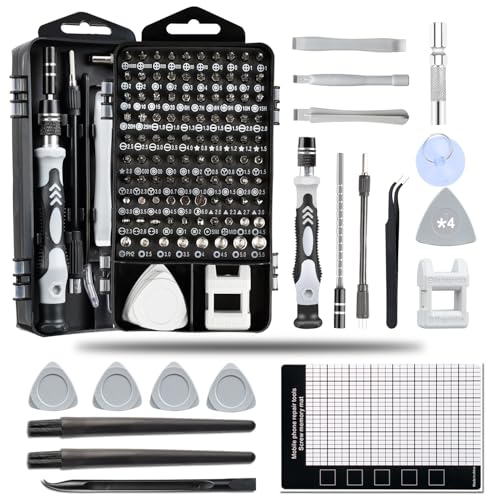
If you live in a household with multiple laptop brands—perhaps a mix of work PCs and personal MacBooks—the Kingsdun 130-in-1 kit offers unmatched versatility. It covers nearly every screw type imaginable, meaning you won’t get halfway through a repair only to realize you lack the right bit.
The sheer volume of bits can be overwhelming for a beginner, but the clear labeling makes it manageable. It is an excellent value for families or shared living spaces where different people might need to repair different devices.
Because the case is quite comprehensive, it does take up more shelf space than smaller sets. However, if you have a dedicated utility closet or a home office, the convenience of having every possible size at your fingertips is hard to beat.
Jakemy JM-8127 Repair Kit for Laptop Battery
For those tackling a specific battery replacement project, the Jakemy JM-8127 is a focused, no-nonsense option. It avoids the "feature creep" of massive kits, providing just the essential drivers and prying tools needed to safely open a laptop chassis.
This set is particularly great for apartment dwellers with limited storage space who don’t want a massive tool chest. It gets the job done efficiently without the extra weight or bulk of bits you will never actually use.
The build quality is solid, striking a nice balance between affordability and performance. If you are a renter who prefers to keep your toolkit compact and portable, this is a highly practical choice.
ORIA 86-in-1 Precision Tool Set for Repairs

The ORIA 86-in-1 set is a "middle-of-the-road" hero that provides a great balance of variety and price. It includes a flexible shaft extension, which is a lifesaver when you encounter those awkwardly placed screws deep inside a laptop casing.
This kit is ideal for the average homeowner who does occasional repairs but doesn’t need professional-grade equipment. It is robust enough for several battery swaps and won’t leave you frustrated by stripped screws.
The storage case is compact enough to tuck into a drawer, making it an excellent "just in case" tool to have on hand. It proves that you don’t need to spend a fortune to get a toolset that is more than capable for standard home maintenance.
Wera Kraftform Kompakt 25 Driver Set Review
This Wera Kraftform Kompakt 25 set features a two-position telescopic bayonet blade with a Rapidaptor quick-release chuck for fast bit changes and convenient storage. The ergonomic Kraftform handle ensures comfortable, high-torque driving, even in tight spaces.
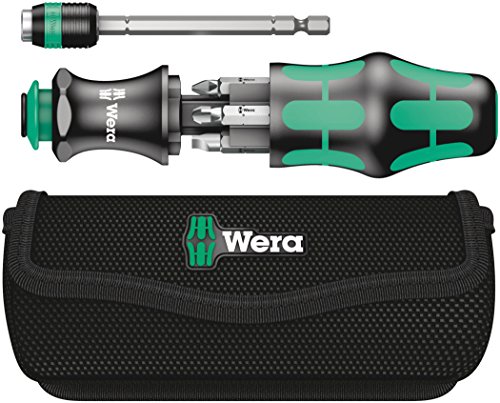
Wera is famous for its ergonomic handles, and the Kraftform Kompakt 25 is a dream to hold during a long, delicate repair. If you have any hand strain or arthritis, the comfortable grip on this driver will make the battery replacement process much more pleasant.
This is a premium, German-engineered tool that focuses on quality over quantity. You get fewer bits than the massive 100-piece sets, but every single piece is crafted to an incredibly high standard.
It is a fantastic choice for the homeowner who prefers to buy one high-quality tool that will last a lifetime. While it lacks some of the specialized prying tools found in other kits, it is the most reliable driver you will ever own.
Vastar 45-in-1 Magnetic Repair Tool Kit

The Vastar 45-in-1 kit is the ultimate budget-friendly option for those who want to get the job done without overspending. It includes magnetic tips, which are essential for keeping tiny laptop screws from disappearing into your carpet or floorboards.
This set is perfect for college students or those on a budget who need to perform a one-time repair. It provides all the basics without the premium price tag of professional-grade brands.
While the materials aren’t as hardened as the iFixit or Wera sets, they are perfectly adequate for occasional use. If you only plan on swapping a battery once every few years, this kit is more than sufficient for your needs.
E-Durable 16-Piece Laptop Opening Tool Set

Sometimes you already have a set of screwdrivers, but you lack the specialized plastic spudgers and suction cups needed to pry open a modern laptop safely. The E-Durable 16-piece set is designed specifically to fill that gap.
This is a fantastic "add-on" kit for the homeowner who has a basic household toolset but needs the delicate plastic tools to prevent scratching or damaging their laptop casing. It saves you from using butter knives or flathead screwdrivers, which often cause permanent damage.
Because it is small and inexpensive, it is an easy purchase to justify for any household. Keep this in your desk drawer alongside your primary screwdriver set for a complete repair solution.
Essential Tools for Safe Battery Replacement
- Plastic Spudgers: Essential for prying open clips without scratching the plastic chassis.
- Magnetic Mat: A lifesaver for organizing tiny screws so you don’t lose them mid-repair.
- Precision Tweezers: Necessary for handling delicate ribbon cables and small battery connectors.
- Suction Cup: Often needed to lift screen panels or specific laptop covers safely.
- Microfiber Cloth: Always wipe down your workspace to ensure no metal filings or debris enter the machine.
How to Identify Your Laptop Screw Head Type
Identifying the correct screw head is the most important step before you apply any torque. Most laptops use Phillips (#00 or #000) or Torx (T5 or T6) screws, but some manufacturers use proprietary "Pentalobe" or "Tri-point" screws to discourage DIY repairs.
Always look closely at the screw head under a bright light before inserting your driver. If the bit feels loose or wobbly, stop immediately—you are likely using the wrong size and risk stripping the screw head, which makes future repairs nearly impossible.
If you are unsure, search your specific laptop model online alongside the phrase "teardown guide." Most manufacturers have exploded-view diagrams available that explicitly state which screw types are used in each section of the device.
Safety Tips for Handling Lithium-Ion Cells
Lithium-ion batteries are powerful, but they require respect; never puncture, drop, or bend a battery during the removal process. If the battery is swollen or "puffy," handle it with extreme caution and take it to a local electronics recycling center immediately rather than trying to force it out.
Always power down your laptop completely and, if possible, discharge the battery to below 25% before starting. This reduces the risk of a thermal event if the battery is accidentally punctured during removal.
Finally, never throw old laptop batteries in your regular household trash. They are fire hazards in garbage trucks and landfills, so always drop them off at designated battery recycling kiosks found at most home improvement or office supply stores.
Replacing your own laptop battery is a rewarding way to save money and keep your devices running longer. By choosing the right toolset for your budget and storage needs, you can turn a daunting task into a simple afternoon project. Remember to take your time, organize your screws, and always prioritize safety when handling lithium-ion cells.