

8 Best USB Hubs for Genealogy Scanning Equipment
Optimize your genealogy workflow with our top 8 USB hubs. Discover reliable connectivity options to streamline scanning documents, photos, and family records.
Digging through boxes of family heirlooms often reveals a mountain of photos and documents waiting to be digitized. To keep your workflow moving, you need a reliable USB hub that can handle multiple scanners without dropping connections. These picks will help you organize your workspace and preserve your history efficiently.
Anker 7-Port USB 3.0 Hub: Best for Data Transfers
When you are scanning high-resolution family portraits or fragile documents, you don’t want to wait around for files to crawl onto your hard drive. The Anker 7-Port hub is a powerhouse for those working with large batches of high-DPI images. It handles data transfers with impressive speed, ensuring your computer doesn’t lag while processing heavy files.
This hub is a great choice if you have a dedicated "genealogy corner" in your home office. It features a solid, industrial build that stays planted on your desk, even if you have several thick cables pulling at it. Because it includes a dedicated power adapter, it provides enough juice to keep multiple scanners running simultaneously without risking a connection drop.
The bottom line is that if you prioritize speed and stability, this is the gold standard. It might be slightly bulkier than travel-sized options, but for a permanent home setup, that weight is an asset.
Sabrent 4-Port USB 3.0 Hub: Best for Portability
Maybe you aren’t scanning at home, but rather helping a relative organize their attic in another state. The Sabrent 4-Port hub is incredibly compact, fitting easily into a laptop bag or a small storage bin alongside your portable document scanner. It is a no-frills tool designed to get the job done without taking up precious desk space.
Because it is so small, it doesn’t require a bulky power brick, which is perfect for working in cramped quarters like a kitchen table or a library study room. However, keep in mind that it draws power directly from your computer, so it is best suited for lighter, bus-powered portable scanners rather than heavy-duty flatbeds.
If you value a minimalist footprint, this is your best bet. It is an honest, affordable solution for the genealogist on the move who needs to connect a scanner and a flash drive at the same time.
Satechi Aluminum USB 3.0 Hub: Best for Aesthetics


If your workspace is also your living room or a shared family area, you might want equipment that doesn’t look like a tangle of plastic wires. The Satechi hub features a sleek, metallic finish that complements modern laptops and monitors perfectly. It feels premium to the touch and blends right into a tidy, organized home office.
Beyond the looks, it offers a slim profile that tucks neatly behind a monitor stand or under a laptop riser. It is sturdy enough that it won’t slide around when you plug and unplug your cables. It is a fantastic option for renters who want to keep their temporary workspaces looking polished and professional.
While it is a bit more expensive than basic plastic models, you are paying for the durability of the aluminum housing. It is a worthwhile investment if you want a hub that looks as good as it performs for years to come.
TP-Link 7-Port USB 3.0 Hub: Best for Reliability

Genealogy projects can take months, and the last thing you want is a hub that disconnects in the middle of a delicate scanning session. The TP-Link 7-Port hub is widely respected for its consistent performance and long-term reliability. It provides a steady stream of power that prevents the "device not recognized" errors that plague cheaper hubs.
This hub includes individual power switches for each port, which is a clever feature for managing your equipment. You can keep your flatbed scanner, slide scanner, and external hard drive plugged in at all times, only turning on the specific device you are currently using. This saves energy and reduces wear on your ports.
For the homeowner who wants to "set it and forget it," this is an excellent choice. It offers a balance of safety and control that makes it a staple for any serious scanning station.
Plugable 7-Port USB 2.0 Hub: Best for Older Scanners

Sometimes the best scanner for the job is an older, reliable model from a decade ago that still produces beautiful scans. Many of these legacy devices only support USB 2.0, which can occasionally cause compatibility issues with modern USB 3.0 hubs. The Plugable 7-Port hub is designed specifically to handle these older connections with grace.
This hub is a lifesaver if you are digitizing a large collection and rely on a mix of vintage and modern hardware. It is built to be robust and provides the consistent power older scanners often demand. It is an essential piece of hardware for anyone who believes in keeping older, high-quality equipment running rather than replacing it.
If your scanning suite includes older peripherals, don’t force them into a modern hub that might struggle with the signal. Choose this reliable workhorse to keep your legacy equipment running smoothly.
Cateck USB 3.0 Hub with Card Reader: Best All-in-One
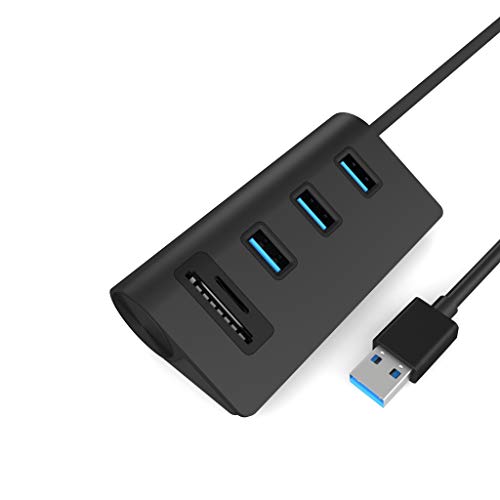
Genealogists often deal with a variety of media, from loose photos to digital images stored on old SD cards from previous projects. The Cateck hub streamlines this by including built-in slots for SD and MicroSD cards alongside its USB ports. This eliminates the need for a separate card reader, saving you one extra cable and one extra USB port.
This is a space-saving genius for those living in apartments or small homes where every inch of desk space counts. You can plug in your scanner, your mouse, and your camera’s memory card all into one central hub. It simplifies your workflow significantly, allowing you to move files from your camera to your computer without any hassle.
The tradeoff here is that the card reader slots are a bit more fragile than the USB ports, so handle them with care. Overall, it is an incredibly practical tool for consolidating your digital workflow.
Amazon Basics 4-Port USB 3.0 Hub: Best Budget Pick
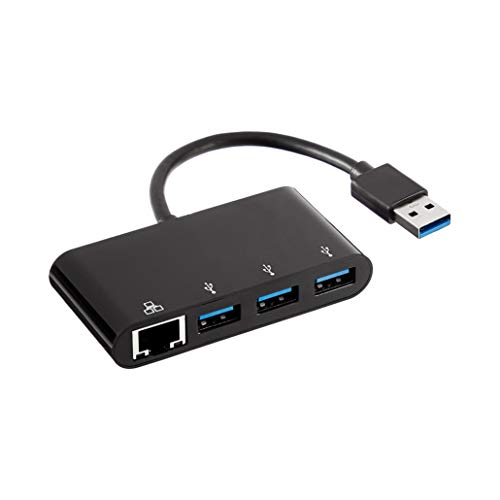
You don’t always need a high-end hub to get your family history digitized. The Amazon Basics 4-Port hub is the definition of a practical, budget-friendly solution that does exactly what it promises. It is lightweight, simple to use, and gets your scanner connected to your computer without any unnecessary bells or whistles.
This is perfect for the occasional genealogist who only scans a few photos on the weekend. It won’t take up much room, and if you eventually decide to upgrade your setup, you won’t feel guilty about the low initial cost. It is a great way to test your workflow before committing to a more expensive, permanent hub.
While it lacks the power switches and heavy-duty casing of premium models, it is perfectly capable for standard scanning tasks. Sometimes, the simplest tool is the best one for the job.
UGREEN 4-Port USB 3.0 Data Hub: Best for Stability

Stability is the most important factor when you are scanning a hundred photos in a single sitting. The UGREEN 4-Port hub features a thoughtful design that keeps connections tight and secure. You won’t have to worry about a slight bump to your desk causing your scanning software to crash or lose its connection.
The cable length is generous, allowing you to position the hub exactly where you need it, even if your computer tower is tucked away under your desk. It is compatible with a wide range of devices, making it a versatile choice for any home office setup. It is a reliable, mid-range option that bridges the gap between budget and professional-grade gear.
If you are tired of hubs that feel loose or "wobbly," this is the upgrade you have been looking for. It offers a solid, dependable connection that keeps your focus on your family history, not your hardware.
Essential Features for Genealogy Scanning Setups
When building your scanning station, always prioritize powered hubs over bus-powered ones. A powered hub has its own wall plug, which ensures that your scanners receive consistent voltage regardless of how many other devices are connected. This is non-negotiable for flatbed scanners, which often require more power than a standard laptop port can provide.
- Port Count: Aim for at least 4 ports, but 7 is better if you plan to keep your scanner, card reader, and external hard drive connected simultaneously.
- Cable Length: Ensure the hub’s main cable is long enough to reach your computer comfortably without being stretched tight.
- Individual Power Switches: These are incredibly helpful for preventing power drain and managing your devices without constantly unplugging cables.
- Build Quality: Look for hubs with a weighted base or rubber feet to prevent them from sliding around your desk.
Remember that while USB 3.0 is the standard for speed, USB 2.0 devices will still work fine in 3.0 ports. Focus on the power delivery and the build quality above all else, as these will have the biggest impact on your daily scanning sessions.
How to Manage Multiple Scanners and USB Cables
A cluttered desk is the enemy of a productive genealogy project. Use cable ties or Velcro straps to bundle the cords from your scanners together, creating a clean path from your equipment to the hub. If you are working in a small space, consider using adhesive cable clips to run the wires along the back edge of your desk.
Label your cables if you have multiple scanners that use the same type of connection. A simple piece of masking tape on the plug end can save you from accidentally unplugging the wrong device. Keeping your workspace organized prevents the frustration of "cable spaghetti" and makes it much easier to clean your desk after a long day of scanning.
Finally, keep your hub in an accessible spot so you can easily reach the ports. Avoid hiding it in a drawer or behind heavy equipment, as you will likely need to plug and unplug things occasionally. An organized, accessible hub is the heart of a successful genealogy scanning setup.
By choosing the right USB hub, you are setting yourself up for a much smoother and more enjoyable digitization process. Whether you need portability for travel or a rock-solid hub for your home office, these options provide the reliability you need. Now, you can focus on preserving your family’s precious history instead of troubleshooting your tech.

