
7 Best Pop Sockets With Extra-long Extension For Tablets
Discover the 7 best tablets-friendly PopSockets with extra-long extensions. Improve your grip, stability, and viewing angles with these essential accessories.
Finding the right grip for a tablet can transform how you use your device for everything from morning recipe reading to late-night streaming. A reliable, extended-reach grip reduces hand fatigue and prevents those accidental drops that happen during busy household chores. These seven options provide the stability and ergonomic support needed for long-term comfort in any living space.
PopSocket PopGrip for Tablets: Best All-Rounder


If you frequently switch between holding your tablet while lounging on the couch and propping it up on the kitchen counter, this is the industry standard for a reason. Its collapsible design means it stays low-profile when you’re sliding your device into a bag, yet it expands enough to offer a secure hold for larger hands.
The beauty of the PopGrip is its versatility across different tablet sizes, from compact e-readers to full-sized tablets. Because it uses a specialized adhesive, it works well on most smooth surfaces, though you may need a plastic adapter for textured cases.
Keep in mind that while it is the most popular choice, it isn’t a permanent mechanical fixture. If you rotate your device heavily, the adhesive may eventually wear down, so it is best for users who prefer a balance of portability and reliable grip.
Syncwire Phone Ring Holder: Best Extra Extension

For those who find that standard grips don’t quite provide enough leverage for a heavy tablet, the Syncwire ring offers a distinct mechanical advantage. Its dual-hinge design allows for a significantly longer extension than a standard pop-style grip, making it easier to hook your fingers through for a firm hold.
This model is particularly useful in busy households where the tablet is passed between family members with different hand sizes. The metal construction adds a bit of weight, but it provides a rigid feel that plastic alternatives often lack.
Because it extends further, it acts as a more stable kickstand for watching videos on a desk or coffee table. Just be aware that the extra metal parts can make the tablet slightly bulkier when stored in a tight sleeve or drawer.
Sinjimoru Extended Grip: Best for Tablet Stability

If you use your tablet for professional tasks or long reading sessions, stability is likely your top priority. The Sinjimoru grip uses a unique silicone strap design that conforms to your fingers, providing a more natural, tension-based hold than a hard ring.
This grip is excellent for reducing the strain on your wrist, especially if you hold your tablet at odd angles for extended periods. It feels secure and soft against the skin, which is a major plus during long weekend browsing sessions.
The tradeoff here is that the strap is not a kickstand; it is purely for ergonomic holding. If you need a device that sits upright on a table, you will need to pair this with a separate stand or case.
Lamicall Tablet Ring: Best Adjustable Reach Design
Enhance your phone's usability with this magnetic ring grip, offering a secure 4.4lbs hold for MagSafe iPhones and up to 9.9lbs with the included metal ring. Enjoy 360° rotation for comfortable one-handed use, hands-free viewing as a kickstand, and seamless integration with magnetic car mounts.
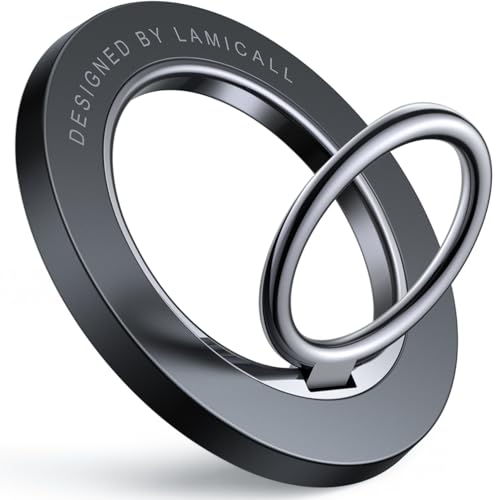
The Lamicall ring stands out because of its 360-degree rotation and 180-degree flip capability, giving you the most freedom to find the perfect angle. It is a fantastic choice for home offices where you might be switching between portrait and landscape modes frequently.
The design is slim and sleek, making it one of the least intrusive options for your tablet’s aesthetic. It feels solid in the hand, and the hinge tension is tight enough to hold its position even after months of daily use.
However, because the ring is made of metal, it can feel a bit cold or sharp if you have sensitive skin. It is best suited for users who prioritize mechanical durability and precise positioning over soft-touch comfort.
Spigen O-Mag Ring: Best Magnetic Extended Support
If you own a tablet that supports magnetic accessories, the Spigen O-Mag is a game-changer for convenience. It snaps onto the back of your device effortlessly, allowing you to remove it whenever you want to use a wireless charger or a slim folio case.
This is the perfect solution for renters or those who don’t want to deal with sticky residue on their expensive tech. The magnetic connection is surprisingly strong, provided you have a MagSafe-compatible case or ring installed on your tablet.
The main consideration here is the strength of your magnetic case; if the case is too thick, the grip may slide. Always ensure your tablet case is rated for magnetic accessories before investing in this type of grip.
Humixx Ring Holder: Best for Heavy Tablet Models
Heavy-duty tablets, especially those used in workshops or high-traffic family areas, require a grip that won’t snap under pressure. The Humixx ring is built with reinforced hinges and a wider base, specifically designed to handle the weight of larger, heavier devices.
It feels significantly more robust than entry-level plastic grips, offering a sense of security that is worth the extra cost. The ring itself is large enough to accommodate thicker fingers, which is a common pain point with standard rings.
While it is excellent for durability, the larger base means it takes up more space on the back of your tablet. Make sure you have enough flat, clear surface area on your device or case before purchasing.
ESR HaloLock Ring: Best for MagSafe Compatibility
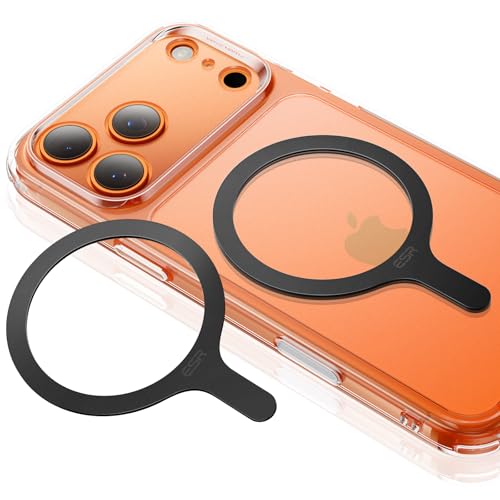
The ESR HaloLock is the gold standard for those who want a magnetic grip that doesn’t sacrifice stability. It features a strong magnetic ring that aligns perfectly with your tablet’s internal magnets, ensuring it stays centered and secure while you hold it.
This model is incredibly easy to move around, making it ideal for households that share a tablet. You can snap it on when you need to read the news and snap it off to keep the tablet flat for drawing or typing.
The biggest takeaway here is the convenience of the magnetic ecosystem. Just remember that this requires a magnetic-compatible surface, so if you have a non-magnetic case, you will need to add a metallic ring sticker to your setup.
Key Factors for Choosing Tablet Grip Extensions
- Weight Capacity: Check if the grip is rated for your tablet size; heavy models need metal hinges, while lightweight e-readers are fine with plastic.
- Adhesive vs. Magnetic: Choose adhesive if you want a permanent, "set it and forget it" solution; choose magnetic if you frequently use other accessories like chargers or mounts.
- Ergonomic Shape: Consider whether you prefer a ring, a strap, or a collapsible button; test your preferred hand position before committing to a design.
- Surface Compatibility: Note that textured or silicone cases often repel standard adhesives, requiring a specific mounting plate or a different case material.
How to Properly Attach Grips to Tablet Surfaces
Before applying any adhesive grip, clean the back of your tablet or case with an alcohol wipe to remove oils and dust. A clean surface is the single most important factor in preventing the grip from peeling off after a few weeks.
Once clean, let the surface air dry completely, then press the grip firmly onto the center of the device for at least 30 seconds. Avoid using the grip for at least 24 hours to allow the adhesive to fully bond with the surface.
If you are using a magnetic ring or a stick-on adapter, ensure it is centered to keep the tablet balanced. Proper alignment prevents the device from feeling lopsided or top-heavy when you are holding it.
Maintenance Tips for Long-Lasting Tablet Grips
Over time, hinges may become loose or collect lint from your bag or pockets. A quick wipe with a damp cloth and a drop of silicone lubricant on the hinge can keep a metal ring moving smoothly.
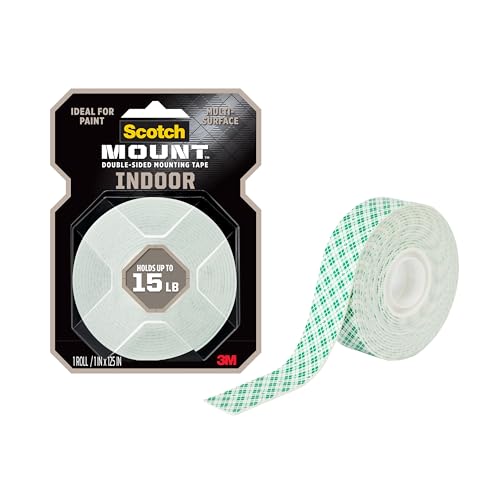
If an adhesive grip starts to lose its stickiness, do not try to re-glue it with super glue, as this can damage your tablet case. Instead, remove the old adhesive residue with a specialized remover and apply a fresh double-sided mounting tape.
Finally, avoid leaving your tablet in extreme heat, such as inside a car during summer, as this will degrade the adhesive on almost any grip. Treat the grip as a wearable component of your device, and it will serve you well for years.
Selecting the right tablet grip is all about balancing the weight of your device with your specific daily habits. By choosing a model that matches your lifestyle—whether it’s magnetic for quick swaps or heavy-duty for durability—you can make your tablet much more comfortable to use. Take your time to consider these factors, and you’ll find a solution that makes your tech feel like a natural extension of your hand.
