

7 Best Heavy-Duty Webcams With Metal Construction
Discover the 7 best heavy-duty webcams featuring durable metal builds. These reliable, high-quality cameras offer superior longevity for professional setups.
Whether you are juggling remote work in a shared apartment or coordinating family video calls from your home office, a reliable webcam is no longer a luxury. Cheap plastic cameras often crack, overheat, or lose their focus after just a few months of daily use. Investing in a heavy-duty, metal-constructed webcam ensures your equipment survives the hustle of a busy household.
Logitech Brio 4K: The Gold Standard for Clarity


If you are a professional who spends hours on video calls, you know the frustration of a grainy image during an important presentation. The Logitech Brio 4K is a staple in many home offices because it offers exceptional resolution that makes you look sharp even in dim lighting. Its sturdy metal-and-glass construction feels substantial, signaling that it is built to withstand years of daily mounting and unmounting.
The Brio is particularly great for households where the office space doubles as a guest room or hobby area. Because it is compact and durable, you can easily tuck it away in a drawer without worrying about the casing snapping or the lens getting scratched. While it carries a premium price tag, the longevity of the hardware often justifies the cost for those who need a "set it and forget it" solution.
- Best for: Professionals who need high-fidelity video for remote work.
- Tradeoff: It lacks some of the newer AI-tracking features found in budget-friendly competitors.
Elgato Facecam: Pro-Grade Optics in Aluminum
For those who have turned a corner of their living room into a dedicated streaming or content creation station, the Elgato Facecam is a standout. The chassis is crafted from aircraft-grade aluminum, which acts as a heat sink to keep the internal components cool during long sessions. This is a massive improvement over plastic webcams that often suffer from performance drops once they heat up.
Because this camera is designed for creators, it offers manual control over settings like shutter speed and ISO. If you are a renter who struggles with inconsistent natural lighting from your windows, this level of control is a game-changer. It is a heavier unit, so ensure your monitor or tripod mount is stable enough to hold the extra weight securely.
- Best for: Streamers and creators who demand technical control over their image.
- Tradeoff: Requires a bit of a learning curve to get the software settings dialed in perfectly.
Razer Kiyo Pro: Robust Build for Streamers
If your home office is also a high-traffic area, you need equipment that can handle a few accidental bumps. The Razer Kiyo Pro features a thick, durable housing that feels like it could survive a tumble off your desk. It is famously known for its "Adaptive Light Sensor," which adjusts brightness automatically, making it perfect for people who work late into the night.
The build quality here is focused on utility rather than just aesthetics. It is a slightly larger unit, so it might not be the most discreet option if you are trying to keep your desk looking minimalist. However, for a household with kids or pets, the rugged nature of this camera provides peace of mind that your gear will keep working despite the chaos.
- Best for: Households with high activity levels where equipment might get bumped.
- Tradeoff: The size is bulkier than most standard webcams, requiring a solid mounting surface.
Insta360 Link: Premium Metal Gimbal Design

The Insta360 Link is a unique piece of hardware that physically moves to track your movement. Its metal base houses a motorized gimbal, which is impressive for homeowners who like to stand up or walk around during presentations. The build quality is exceptional, with a sleek, industrial feel that looks professional in any setting.
This camera is an excellent choice for teachers or tutors who need to demonstrate physical objects on a desk while moving around their room. Because it is a motorized device, it is more delicate than a static webcam, so treat it with a bit more care. If you have the budget, the AI-tracking capabilities make it the most "future-proof" option on this list.
- Best for: Presenters who move around and need automatic camera tracking.
- Tradeoff: The motorized components make it more expensive and slightly more fragile than fixed cameras.
Poly Studio P15: Durable Video Bar Solution

If you are looking for an all-in-one solution that includes a high-quality speaker and microphone, the Poly Studio P15 is a heavy-duty powerhouse. This isn’t just a camera; it is a video bar designed to replace your messy desk setup with a single, durable unit. The metal grill and solid frame are built for the rigors of an enterprise environment, which translates perfectly to a home office.
This is ideal for homeowners who want to clear clutter off their desks. By combining your audio and video needs into one sturdy bar, you save space and reduce the number of cables snaking behind your monitor. It is a significant investment, but it effectively consolidates three different pieces of hardware into one robust, high-performing device.
- Best for: Minimalists who want to consolidate audio and video gear.
- Tradeoff: It is a large, permanent fixture that isn’t easily portable.
AverMedia PW513: Sturdy Frame for Creators
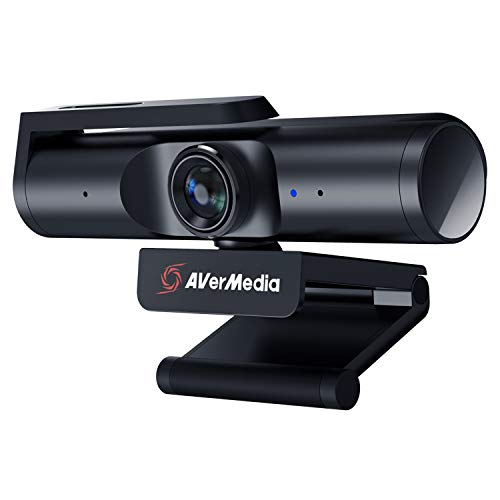
The AverMedia PW513 is a workhorse that brings a wide-angle lens to your home office, making it perfect for group calls or showing off your workspace. The frame is solid and features a built-in privacy shutter, which is a must-have for anyone living in a shared space. It feels like a piece of professional broadcast equipment rather than a disposable consumer gadget.
This camera is particularly well-suited for families who share a single computer for both work and school. Its wide field of view means you can fit multiple people in the frame without having to crowd around the monitor. The metal construction ensures that the privacy shutter won’t break off after the hundredth time you slide it open and closed.
- Best for: Group video calls and family-shared computers.
- Tradeoff: The wide-angle lens can cause slight distortion at the edges of the frame.
OBSBOT Tiny 2: Compact Metal-Body AI Camera

The OBSBOT Tiny 2 is a marvel of engineering, packing a high-end AI sensor into a compact, metal-bodied frame. It is small enough to fit in your palm, making it the best option for people who move between different rooms or work from a laptop in a coffee shop. Despite its tiny size, the metal casing provides the weight and heat dissipation needed for consistent performance.
The gesture control feature is a standout, allowing you to zoom or track yourself without touching the camera. This is incredibly helpful if you are working in a tight space where you can’t easily reach your monitor. It is a sophisticated piece of tech that bridges the gap between portability and professional-grade durability.
- Best for: People who need a portable, high-tech camera for hybrid work.
- Tradeoff: Its small size makes it easier to misplace or knock over if not mounted securely.
Why Metal Build Quality Matters for Webcams
When you buy a webcam, you are often paying for the internal sensor, but the external housing is what determines the lifespan of that investment. Plastic housings are prone to warping from the heat generated by the lens, which can cause the focus to drift over time. Metal-constructed webcams act as natural heat sinks, keeping the image stable and the internal circuitry cool.
Beyond heat management, metal is simply more resistant to the wear and tear of a busy home. If you move your laptop frequently or share your desk with family members, plastic mounts often crack or lose their grip. A metal-bodied webcam provides the structural integrity needed to survive the daily transition from "work mode" to "home life."
Key Factors to Consider Before You Buy
Before committing to a high-end webcam, assess your specific environment. If you live in a small apartment, look for a camera with a low-profile mount that won’t interfere with your monitor’s bezel. If you have a large home office, consider whether you need a wide-angle lens to capture more of the room or a narrow lens to keep the focus strictly on you.
Think about your "cable management" situation as well. Some metal webcams are heavier and may require a dedicated tripod rather than a simple monitor clip. Always check the weight of the camera against the stability of your monitor, especially if you are using an ultra-thin screen or a laptop lid.
Maintaining Your Webcam for Longevity
To keep your metal webcam in top shape, treat it like any other piece of precision optical equipment. Use a microfiber cloth to gently clean the lens, and avoid using harsh household chemicals that could strip the finish or damage the anti-reflective coating. If your camera has a privacy shutter, keep it closed when not in use to prevent dust from settling on the glass.
Finally, manage your cables carefully to avoid putting tension on the USB port. Even the most durable metal camera can fail if the cable is constantly pulled or bent at a sharp angle. By keeping the cord organized with a simple Velcro tie, you ensure that the connection remains solid for years to come.
Choosing a heavy-duty, metal-constructed webcam is a smart move that pays off in both image quality and peace of mind. By prioritizing durable materials over cheap plastic, you ensure your setup remains a reliable part of your home routine for years. Take your time to match the camera’s features to your specific workspace, and you will find that a solid piece of gear is well worth the investment.
