

7 Best Heavy Weighted Mice For Stability Tested
Seeking precision? We tested 7 heavy weighted mice for superior stability. Discover which models offer the best control and build quality for your setup.
Finding the right mouse weight can transform your daily computer use from a source of wrist fatigue into a seamless, controlled experience. Whether you are managing spreadsheets in a home office or navigating complex gaming sessions, the physical weight of your peripheral dictates your accuracy and comfort. This guide explores seven heavy-weighted mice that provide the stability and tactile feedback necessary for a professional-grade workspace.
Logitech G502 HERO: Best Overall Weighted Mouse


Many homeowners find that a mouse which feels too "floaty" leads to accidental clicks and erratic cursor movement. The Logitech G502 HERO addresses this by including a set of five 3.6g weights, allowing you to customize the heft to match your desk surface. It is a staple in many home setups because it balances high-end performance with a price point that doesn’t break the bank.
This mouse is particularly useful for those who share a workstation with family members, as the adjustable weight system accommodates different hand sizes and grip styles. If you are working in a tight apartment office, its robust build quality ensures it can withstand the wear and tear of daily life. While it is wired, the lack of battery charging makes it a "set it and forget it" tool for busy households.
Bottom line: The G502 HERO is the gold standard for versatility, offering a reliable, customizable experience that fits almost any desk environment.
Razer Basilisk V3: Best for Ergonomic Control
If your home office setup involves long hours of data entry or creative work, you know the importance of a thumb rest. The Razer Basilisk V3 provides a comfortable shelf for your thumb, which helps reduce strain during repetitive tasks. Its weight is substantial enough to feel premium, providing a grounded sensation that makes precise movements easier to manage.
The ergonomic design is especially beneficial for those with larger hands who find standard mice feel cramped or flimsy. Because it is built with high-quality materials, it holds up well even in households with kids or pets where equipment might be bumped or moved frequently. It is an excellent choice for someone who prioritizes long-term wrist health over extreme portability.
Bottom line: Choose the Basilisk V3 if you want a heavy, ergonomic mouse that prioritizes comfort and wrist support above all else.
Corsair Nightsword RGB: Best for Custom Balance
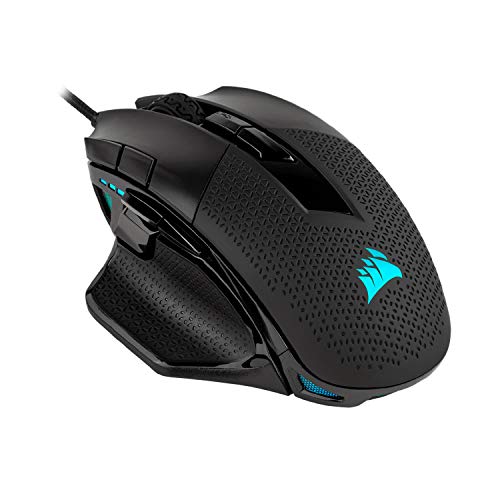
For the detail-oriented user, the Corsair Nightsword RGB is a revelation in weight distribution. It doesn’t just let you add weight; it allows you to adjust the center of gravity by swapping out specific weights in different slots. This is perfect if you find your mouse feels "back-heavy" or "front-heavy" during your daily workflow.
This level of customization is a great solution for those who have unique desk setups, such as uneven surfaces or limited mousepad space. While the software can be a bit complex for beginners, the physical stability it offers is unmatched. It is a heavier mouse by default, making it ideal for users who prefer a solid, substantial tool that stays exactly where they place it.
Bottom line: The Nightsword is the best pick for power users who want total control over how their mouse feels in the hand.
Logitech G903 LIGHTSPEED: Best Wireless Option
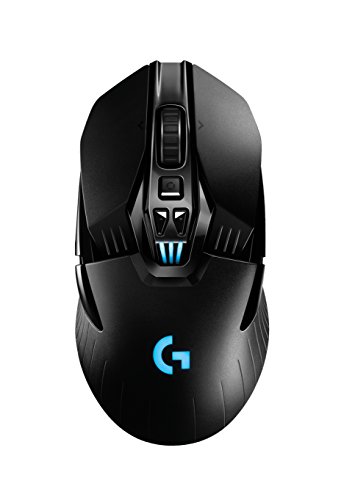
Wireless mice are a godsend for keeping a small desk tidy and free of cable clutter. The G903 LIGHTSPEED provides the freedom of a wireless connection without sacrificing the weight and stability required for high-precision tasks. It comes with an optional 10g weight, allowing you to add a bit of mass if the base model feels too light for your preference.
This mouse is a fantastic choice for modern homes where you might move your laptop between the kitchen island and a dedicated desk. Because it uses a high-quality sensor, you won’t experience the lag or connectivity issues often found in cheaper wireless alternatives. Just remember to keep the charging cable nearby, especially if you use your computer for many hours each day.
Bottom line: If you value a clean, cable-free workspace, the G903 offers the perfect blend of wireless convenience and weighted stability.
SteelSeries Rival 600: Best Modular Weight System
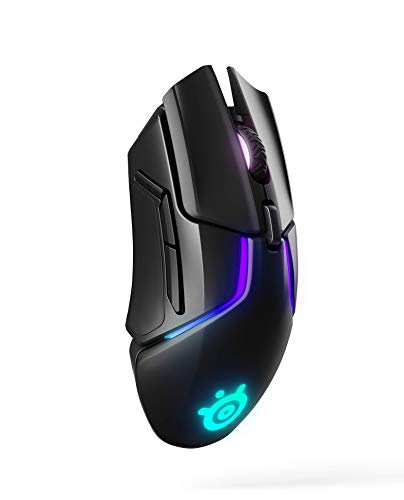
The SteelSeries Rival 600 features a unique side-panel weight system that allows you to change the weight distribution on the fly. This is incredibly helpful if you use your computer for different activities, such as switching from a fast-paced game to a precision-heavy design program. You can easily pop the sides off and adjust the magnets to get the perfect feel.
For households with multiple users, this modularity is a massive advantage. You can quickly adjust the weight to suit your spouse or child’s needs without needing to dive into complicated software settings. It is a sturdy, well-engineered piece of hardware that feels built to last for years, even in a high-traffic home environment.
Bottom line: The Rival 600 is perfect for those who want a tactile, physical way to customize their mouse without relying on digital adjustments.
Corsair M65 RGB Ultra: Best for Precision Aiming

The Corsair M65 RGB Ultra is famous for its aluminum frame, which gives it a distinct, premium feel that plastic mice simply cannot replicate. It is designed specifically for precision, making it a favorite for those who perform detailed photo editing or work with complex graphical interfaces. The added weight helps dampen small, shaky movements, ensuring your cursor goes exactly where intended.
This mouse is quite compact, making it an excellent choice for homeowners with limited desk space or smaller storage drawers. While the metal construction makes it durable, it also means it is a bit heavier than your average office mouse. It is a specialized tool that rewards those who need consistent, reliable accuracy in their daily tasks.
Bottom line: The M65 is the best choice for users who need a compact, rock-solid mouse that excels at precision and fine-tuned movements.
ASUS ROG Spatha X: Best for Large Hand Comfort

If you find that standard-sized mice make your hand cramp, the ASUS ROG Spatha X might be the solution you’ve been looking for. It is a large, heavy mouse that fills the palm, providing excellent support for those with bigger hands. The added weight is a natural byproduct of its large frame, giving it a very grounded and secure feel on the desk.
This mouse is a great investment for someone who spends their entire day at a computer and needs to avoid the "claw grip" that often leads to repetitive strain. While it is on the pricier side, the build quality and the sheer amount of surface area it covers make it a worthwhile upgrade. It is a substantial piece of equipment that demands a bit of desk real estate but pays off in comfort.
Bottom line: For those with larger hands, the Spatha X provides the necessary bulk and support to make long sessions much more comfortable.
How to Find Your Ideal Mouse Weight Preference
Finding your ideal weight isn’t about following trends; it is about observing how your hand moves naturally. If you tend to flick your wrist quickly, you might prefer a lighter mouse to avoid fatigue. If you make slow, deliberate movements, a heavier mouse will provide the friction and stability needed to keep your cursor on target.
Start by testing your current mouse and asking yourself if you find yourself "lifting" it too often. If you are constantly picking it up to reset its position, a heavier mouse with a better sensor might keep it grounded. You can also experiment with "weight testing" by taping a small coin to your current mouse to see how a few extra grams change your comfort level.
- Light (under 80g): Best for fast, repetitive movements and preventing wrist strain.
- Medium (80g–100g): The "sweet spot" for most general users and office tasks.
- Heavy (100g+): Best for precision, steady control, and users with larger hands.
Why Weight Impacts Your Gaming and Work Accuracy
The weight of your mouse acts as a physical stabilizer for your hand’s micro-movements. In a professional setting, such as architectural drafting or video editing, a heavier mouse prevents the "jitter" that occurs when you are trying to select tiny pixels or drag fine lines. It essentially acts as a shock absorber for your hand, filtering out the natural tremors that occur during long work hours.
Conversely, a mouse that is too heavy can lead to muscle fatigue if you are constantly pushing it across a large desk. The goal is to find the heaviest weight that you can move comfortably for an hour without feeling any tightness in your forearm. When the weight is balanced correctly, your mouse becomes an extension of your hand rather than a tool you are fighting against.
Essential Tips for Cleaning Your Weighted Mouse
Because weighted mice often have gaps or modular parts, they can collect dust and skin oils faster than standard models. Every few months, take a moment to remove any adjustable weights and use a microfiber cloth to wipe down the internal chambers. Keeping these areas clean prevents gunk from accumulating, which can eventually throw off the balance of the device.
For the exterior, a slightly damp cloth with a tiny drop of mild dish soap works wonders on plastic and aluminum surfaces. Avoid using harsh chemicals or alcohol wipes, as these can strip the finish or damage the rubberized grips over time. Always ensure the mouse is completely dry before reinserting any weights to prevent internal corrosion or sensor interference.
Choosing a heavy-weighted mouse is a practical way to improve your daily comfort and control at the computer. By focusing on your specific grip style and desk usage, you can select a tool that minimizes strain and maximizes precision. Remember that the best mouse is one that feels invisible in your hand, allowing you to focus on your work or play without distraction.
