7 Best Refurbished Label Makers at Budget Prices
Save money without sacrificing quality. Discover our top 7 refurbished label makers that offer professional organization features at unbeatable budget prices.
Keeping a home organized often feels like a losing battle against the clutter of cables, pantry items, and storage bins. Investing in a label maker can transform a chaotic junk drawer into a streamlined system that actually saves you time during your morning routine. Choosing a refurbished model allows you to gain these professional-grade organizational benefits while keeping your household budget firmly intact.
Brother P-touch PTD210: Best for Home Office Use
Organize your home and office with this easy-to-use label maker. Quickly create custom labels with one-touch keys, previewing on the display before printing. Includes 4 durable Brother TZe tape cartridges for immediate use.


If you are currently working from a corner desk or a shared kitchen table, you know how quickly paper clutter can spiral out of control. The Brother P-touch PTD210 is a desktop staple that excels at creating crisp, clear labels for file folders, power cords, and storage boxes. Its intuitive QWERTY keyboard makes it feel like typing on a laptop, which is a major plus when you are labeling a dozen folders in one sitting.
Because it sits flat on your desk, it is perfect for people who need to label items frequently without hunting for a lost handheld device. While it lacks some of the advanced connectivity features of high-end models, its simplicity is its greatest strength for everyday home office management. You won’t waste time navigating complex menus when you just need to mark a binder.
The trade-off here is the size; it occupies more desk real estate than a handheld unit and requires batteries. However, for a stationary office setup, it is a reliable workhorse that rarely jams. If you value a clean, labeled workspace but don’t want to spend a fortune, this is your best starting point.
DYMO LetraTag 100H: Best Handheld Label Maker
Easily create custom labels anywhere with this portable DYMO LetraTag 100H Plus. Preview text effects on its graphical display and choose from multiple font and box styles. Includes paper, clear plastic, and magnetic label tapes for versatile organization.
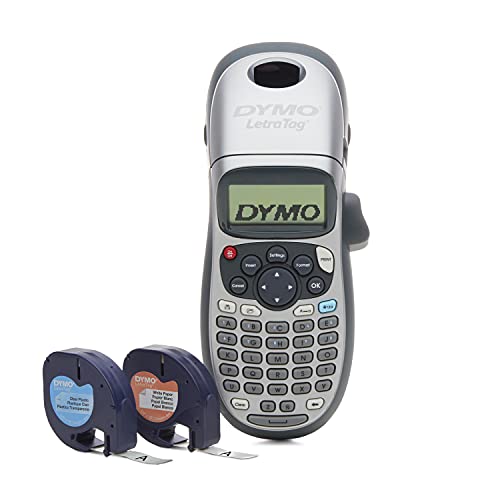
For those living in smaller apartments or homes where storage space is at a premium, the DYMO LetraTag 100H is a lifesaver. Its compact, ergonomic design fits comfortably in one hand, allowing you to walk from the kitchen to the linen closet without needing a flat surface to work on. It is ideal for labeling spice jars, plastic bins, or children’s school supplies on the fly.
The device offers several font styles and sizes, giving you enough variety to make labels look intentional without overwhelming you with options. It is lightweight enough to toss into a junk drawer when you are finished, keeping your surfaces clear of extra gadgets. Its vertical design also means it can stand upright on a shelf when not in use.
Keep in mind that this model uses specific LetraTag tapes, which are often more affordable than standard industrial labels but offer slightly less durability in extreme weather. It is the perfect balance of portability and function for the average renter or homeowner. If you prioritize convenience and easy storage over heavy-duty labels, this is the right choice.
Brother P-touch PT-H110: Best Portable Labeler
The Brother PT-H110 is the go-to choice for homeowners who tackle organizational projects room by room. Its slim profile and rubberized grip make it easy to carry around, whether you are labeling garage storage bins or organizing a basement workshop. It is rugged enough to handle being moved around, yet precise enough to create labels that look clean and professional.
One of the standout features is the preview screen, which lets you see exactly what your label will look like before you commit to the tape. This saves a significant amount of money on wasted tape—a common frustration with cheaper, non-preview models. It offers a wide variety of symbols and frames, which is helpful if you like color-coding or categorizing by visual icons.
While the battery compartment can be a bit snug, the overall build quality is excellent for the price. It is a fantastic middle-ground option for anyone who wants more features than a basic handheld but doesn’t need the bulk of a desktop machine. It is a reliable, no-nonsense tool that gets the job done efficiently.
DYMO LabelManager 160: Best for Simple Projects
Easily create professional labels with the DYMO LabelManager 160. Its QWERTY keyboard and one-touch smart keys simplify text entry, while the large display shows your text before printing. This portable label maker bundle includes three D1 label cassettes for immediate organization.

If you are the type of person who wants a label maker that works the moment you pick it up, the DYMO LabelManager 160 is designed for you. It features a straightforward, "type and print" interface that removes the learning curve entirely. It is perfect for one-off tasks like labeling a new set of food storage containers or marking items for a garage sale.
This model is remarkably thin, making it easy to store in a small kitchen drawer or a tool kit. Because it uses standard D1 tapes, you have access to a massive variety of colors and widths, which is great for those who like to color-code their home systems. It doesn’t have a lot of fancy bells and whistles, but that is exactly why it is so dependable.
The screen is clear and easy to read, even in dim lighting, which is a subtle but helpful touch. If you are intimidated by technology or just want a simple, effective tool for household maintenance, this is the most stress-free option. It is a classic example of a device that does one thing very well.
Brother P-touch PT-D400: Best for Organization
When you have a large home and need to tackle serious organization projects, the Brother PT-D400 provides the extra power you need. It features a larger keyboard and a high-resolution display that makes editing long labels much easier. This is the model you want if you are labeling every single container in a pantry or organizing a complex home library.
The PT-D400 supports wider tapes, which allows for larger text—perfect for labels that need to be read from a distance. It also includes a memory function that saves your most frequently used labels, saving you from re-typing the same phrases over and over. While it is larger and heavier than the handheld models, the added functionality is worth the trade-off for big projects.
It is a more substantial investment, but it is built to last through years of heavy use. If you are a homeowner who enjoys deep-cleaning and reorganizing on a seasonal basis, this device will become your best friend. It bridges the gap between casual home use and professional-grade organization.
DYMO LabelManager 280: Best Rechargeable Option

Tired of hunting for AA batteries just when you are ready to start a project? The DYMO LabelManager 280 features a rechargeable battery pack, which is a massive convenience for anyone who labels frequently. You simply plug it into a USB port to charge, much like you would a smartphone, ensuring it is always ready to go.
Beyond the battery, it offers a PC-connection feature that allows you to design labels on your computer and print them directly. This is a game-changer for people who need to print long lists or want to use custom fonts and logos. It offers the best of both worlds: a portable handheld device and the advanced editing power of a computer.
The screen is vibrant and easy to navigate, and the overall construction feels solid and durable. While the initial setup for the software might take a few minutes, the long-term benefit of custom labels is well worth the time. It is an excellent choice for the tech-savvy homeowner who wants professional results without the high price tag.
Epson LabelWorks LW-300: Best for Creative Tape

If your labeling needs extend to arts and crafts, gift wrapping, or home décor, the Epson LabelWorks LW-300 stands out for its creative capabilities. It offers a wide range of unique tape styles, including patterns, ribbons, and iron-on labels. This makes it a fantastic tool for personalizing items beyond just basic storage boxes.
The device is compact and easy to use, with a very efficient tape-cutting mechanism that reduces waste. It is perfect for someone who wants their labels to look as good as the items they are organizing. Whether you are labeling holiday gifts or creating custom labels for clothing, this machine provides a level of aesthetic detail that other models lack.
While it might not be as heavy-duty as some of the Brother models, it is incredibly versatile for creative home projects. It is a great choice for parents, DIY enthusiasts, or anyone who wants a bit of personality in their organizational systems. It turns a boring chore into a fun, creative outlet.
Why Buying Refurbished Label Makers Saves Money
Buying refurbished is one of the smartest ways to stretch your home budget without sacrificing quality. Most refurbished label makers are simply returns or items with damaged packaging that have been inspected, cleaned, and tested by professionals. You get a fully functional device that often costs 30% to 50% less than a brand-new unit.
By choosing refurbished, you are also participating in a more sustainable cycle by keeping perfectly good electronics out of landfills. These devices are durable by design, and a refurbished unit often performs just as well as a new one. It is a practical, thrifty choice that allows you to allocate your savings toward more tape or better storage bins.
When buying, always look for units that come with a warranty or a clear return policy. This gives you the same peace of mind as buying new, but at a fraction of the cost. It is a low-risk way to get high-quality tools for your home.
How to Test Your Refurbished Label Maker Safely
Once your refurbished label maker arrives, the first step is to perform a "sanity check" before you start your big organizing project. Insert fresh batteries or use the provided power adapter to ensure the device powers on without flickering or error messages. Test the keyboard by typing a full sentence to ensure every key registers correctly.
Next, load a roll of tape and print a test label using the maximum number of font styles and sizes available. This confirms that the print head is clean and that the cutting mechanism is working smoothly. If the print looks streaky or faded, you may simply need to run a cleaning cycle or wipe the print head with a soft, dry cloth.
Finally, check the internal memory if the device has one, and clear any old labels that might be saved from a previous user. This ensures a clean slate for your own organizational system. Taking these few minutes to test your device prevents frustration later when you are mid-project.
Essential Maintenance Tips for Labeling Devices
To keep your label maker running for years, the most important rule is to keep the print head clean. Over time, adhesive residue from the tape can build up on the print head, leading to faded or streaky labels. Use a cotton swab lightly dampened with isopropyl alcohol to gently wipe the print head whenever you notice a decline in print quality.
Always use the built-in cutter to remove your labels rather than pulling them off by hand. Pulling on the tape can damage the internal gears or cause the tape to misalign, leading to jams. If you do experience a jam, never use sharp tools like knives or screwdrivers to pry it open, as this can easily scratch the delicate internal components.
Store your label maker in a cool, dry place and remove the batteries if you don’t plan on using the device for several months. Battery leakage is the most common cause of premature failure in small electronics. By following these simple habits, you will ensure your device remains a reliable assistant for your home organization needs.
Finding the right label maker is a simple way to bring order to your daily life and reduce the mental load of managing a household. Whether you choose a basic handheld unit or a more advanced desktop model, the key is to pick one that fits your specific space and frequency of use. With a refurbished device, you can enjoy these benefits while keeping your hard-earned money in your pocket.