

7 Best TV Remotes With Simplified Menus for Seniors
Simplify TV time with our top 7 picks for senior-friendly remotes. Discover devices with large buttons and intuitive menus designed for effortless navigation.
Finding the right remote control can turn a frustrating evening of television into a relaxing experience for seniors. Navigating modern devices often feels like solving a puzzle, but the right hardware simplifies the process significantly. This guide highlights the most reliable options to help you regain control of your entertainment setup.
Flipper Big Button: Best Overall for Simplicity
If you have ever watched a loved one struggle with a remote that has fifty tiny, identical buttons, you know how quickly frustration sets in. The Flipper Big Button is designed specifically to eliminate that confusion by stripping away the unnecessary features that clutter standard remotes. It features large, tactile buttons that are easy to press and clearly labeled for basic functions like volume, channel, and power.
The genius of the Flipper lies in its "lock" feature, which prevents the user from accidentally changing input settings or messing up the TV’s internal menu. This is a lifesaver for homeowners who want to ensure their parents or grandparents don’t get stuck on a blank screen. It is an ideal choice for anyone living in an apartment or house where the TV is used purely for watching cable or broadcast stations.
While it lacks the bells and whistles of a smart-home controller, its simplicity is its greatest strength. It is built to be durable and fits comfortably in the hand, making it a reliable daily driver. The bottom line is that if you want to remove the stress of TV operation entirely, this is your go-to solution.
RCA RCRBB05BK: Best Budget-Friendly Large Button


Sometimes you need a practical, low-cost solution for a guest room or a secondary TV where you don’t want to invest much money. The RCA RCRBB05BK is a perfect example of how affordability doesn’t have to mean sacrificing accessibility. It offers a clean, straightforward layout with oversized buttons that are high-contrast and easy to read.
This remote is particularly helpful for seniors with limited dexterity who find small, rubberized buttons difficult to navigate. It covers the essentials—power, volume, and channel selection—without overwhelming the user with secondary functions. Because it is so inexpensive, it is a great low-risk purchase for renters who might move frequently and need a reliable backup.
The trade-off here is the build quality, which feels lighter and more plastic-heavy than premium models. However, for the price, it performs exactly as advertised for basic TV setups. If you need a functional, no-frills remote that won’t break the bank, this is a solid choice.
Inteset 4-in-1: Best for Complex Home Systems
Control multiple devices like Apple TV, Xbox, and Roku with this backlit universal remote. It features IR learning for custom programming and macro capabilities for up to 15 commands.

Not every senior lives in a simple setup; some have a house full of equipment including a soundbar, a DVD player, and a streaming box. The Inteset 4-in-1 is designed for those who need to consolidate multiple remotes into one without creating a technical nightmare. It allows you to program specific buttons for different devices, keeping the interface clean while maintaining full functionality.
This remote is excellent for households where a senior needs to switch between a cable box and a streaming service like a Roku or Fire Stick. The buttons are backlit, which is a massive help for those who prefer to watch television in a dimly lit room. It strikes a balance between advanced capability and a user-friendly layout.

Because it handles multiple devices, the setup process is slightly more involved than a single-purpose remote. It requires a bit of patience during the initial programming phase, but once it is set up, it works seamlessly. For those managing a home theater setup, the convenience of one remote far outweighs the minor initial effort.
GE Universal Remote: Best for Easy Programming
One of the biggest hurdles in adopting a new remote is the fear of the "programming phase." The GE Universal Remote is widely regarded for its straightforward setup process, which often involves simple code entry or auto-scan features. This makes it a great choice for families who are setting up a device for a relative who lives in a different city.
The design is ergonomic and features a classic button layout that feels familiar to most long-time TV users. It is robust enough to handle the daily wear and tear of a busy household, whether it is sitting on a coffee table or being moved between rooms. It is a workhorse that does exactly what it says on the box without complications.
While it doesn’t have the oversized buttons found on some specialized remotes, the spacing is generous enough for most users. It is a reliable middle-ground option that bridges the gap between basic remotes and complex universal controllers. If you value a tried-and-true product that is easy to get up and running, this is a top contender.
Tek Pal TV Remote: Best for Essential Functions
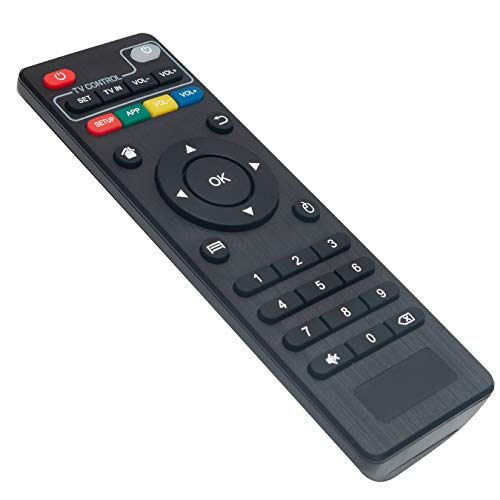
If you are dealing with a user who finds even ten buttons to be too many, the Tek Pal is a minimalist dream. It features a very limited number of buttons, focusing exclusively on power, volume, and channel switching. It is the perfect solution for someone who simply wants to turn on the news and change the channel without any risk of error.
This remote is particularly popular in assisted living environments or small apartments where the TV setup is intentionally kept basic. Its bright, clear labels are excellent for users with vision impairments, and the physical size is large enough to prevent it from getting lost in couch cushions. It is designed for maximum ease of use above all else.
The trade-off is that it lacks the versatility to control more than just the TV itself. If your setup involves a separate cable box or a sound system, you will likely need to keep another remote nearby for those specific functions. However, for pure simplicity, nothing else on the market compares to this design.
SofaBaton U2: Best for Consolidating Devices
The SofaBaton U2 is for the senior who enjoys technology but finds the sheer volume of remotes on the coffee table overwhelming. It uses a scroll wheel and a small OLED screen to help navigate between different devices, which keeps the face of the remote clutter-free. It is a modern, sleek solution that feels much more high-end than a standard plastic remote.
This remote is an excellent choice for a house where the entertainment system has grown over time. It can learn commands from almost any infrared remote, meaning you can consolidate your TV, soundbar, and streaming box into one interface. The app-based setup makes it easier to manage than traditional button-heavy universal remotes.
Because of the screen and the scroll wheel, there is a slightly steeper learning curve than with a basic big-button remote. It is best suited for seniors who are comfortable with minor tech interactions or who have a family member nearby to assist with the initial configuration. If you want a clean, modern look that handles everything, this is the premium choice.
One For All Contour: Best for Ergonomic Design
The One For All Contour stands out because of its shape; it is designed to fit naturally in the palm of the hand. For seniors who experience hand fatigue or arthritis, the comfortable grip can make a significant difference in daily usage. The buttons are soft, responsive, and spaced well enough to avoid accidental presses.
This remote is very effective for households that prioritize comfort and durability. The buttons are arranged in a logical, intuitive way that mimics the layout of many original manufacturer remotes, reducing the need to relearn how to operate the TV. It is a versatile, reliable option that feels sturdy and well-constructed.
While it is a universal remote, it is not as complex as the high-end systems, making it a great "middle-of-the-road" choice. It is easy to program and provides a familiar experience that most people can adapt to within minutes. If you are looking for a comfortable, reliable remote that isn’t overly complicated, this is a fantastic option.
Key Features to Prioritize for Senior Users
When shopping for a remote, start by looking for tactile feedback, which means the button clicks or provides a physical sensation when pressed. This is crucial for users who may have diminished sensitivity in their fingertips. Additionally, look for high-contrast labeling, such as white text on black buttons, to ensure the remote is readable in various lighting conditions.
Consider the physical size and weight of the remote as well. A remote that is too small can be easily lost, while one that is too heavy may be difficult to hold for extended periods. Ideally, look for a remote that is roughly the size of a standard smartphone, which provides enough surface area for large buttons while remaining portable.
Finally, prioritize simplicity of function over the number of features. Most seniors only use four or five buttons regularly: Power, Volume Up/Down, and Channel Up/Down. Any remote that hides these essential functions behind sub-menus or "mode" buttons is likely to cause frustration rather than solve it.
How to Program Universal Remotes for Seniors
Programming a remote is often the most intimidating part of the process, but most modern universal remotes use a simple "code entry" system. You will find a list of codes in the manual corresponding to your TV brand; simply hold the "Setup" button, enter the code, and test the power button. If the TV turns off, you have successfully paired the device.
If you don’t have the manual, many remotes now feature an "auto-scan" function. You point the remote at the TV and hold the power button while the remote cycles through potential signals. Once the TV turns off, you release the button, and the remote locks in the correct frequency.
For seniors who live alone, it is a great idea for a family member to perform this setup before giving them the remote. Once the remote is programmed, you can often use a piece of tape or a label to mark the most important buttons. Taking these steps ensures that the user can start enjoying their shows immediately without any technical hurdles.
Troubleshooting Common Remote Connectivity Issues
If a remote stops working, the first and most common culprit is a dead battery. Even if the remote feels fine, replace the batteries with a fresh set before assuming the device is broken. It is a simple step, but it resolves the vast majority of "connectivity" issues in a home environment.
Next, check for physical obstructions between the remote and the TV’s infrared receiver. If the remote is being kept in a cabinet or if there is a soundbar blocking the bottom of the TV, the signal might not be reaching the sensor. Simply moving the TV slightly or rearranging items on the shelf can often restore full functionality.
If the remote still fails to work, try resetting it to its factory settings and starting the programming process over. Sometimes, a remote can lose its "memory" if the batteries are changed too slowly or if it is dropped. If these steps do not work, it is usually a sign that the remote’s internal hardware has reached the end of its life.
Selecting the right remote is a small change that can make a massive difference in the daily quality of life for a senior. By prioritizing clear buttons, ergonomic shapes, and simple functions, you can eliminate the stress of technology and focus on enjoying the content. Choose the option that best fits your specific household needs and enjoy a more relaxed television experience.
