7 Best USB Hubs With Labeled Ports for Organization
Struggling with cable clutter? Discover our top 7 USB hubs with labeled ports, designed to streamline your workspace and keep your devices perfectly organized.
Does your desk look like a tangled nest of mystery cables that you are afraid to unplug? Adding a labeled USB hub is one of the simplest ways to transform a chaotic workstation into a streamlined, stress-free zone. These seven options provide the organization you need to keep your home office running smoothly without the guesswork.
Anker 7-Port USB 3.0 Hub With Individual Switches


If you manage a household where multiple family members share one computer station, you know the frustration of unplugging the wrong device. Anker’s 7-port hub solves this by offering individual power switches for every single port.
Because each port is clearly controlled, you can leave your printer, webcam, and external hard drive plugged in while only activating the one you need. This saves energy and prevents your computer from constantly searching for idle devices.
The build quality is sturdy enough to handle the daily wear and tear of a busy family office. While it takes up a bit more desk real estate, the peace of mind gained from knowing exactly what is drawing power is worth the footprint.
Sabrent 4-Port USB 3.0 Hub With Power Indicators

For those living in smaller apartments where every inch of desk space is precious, the Sabrent 4-port hub is a compact champion. It is small enough to tuck behind a monitor or sit discreetly on a side table without creating clutter.
The inclusion of individual LED power indicators is a game-changer for quick visual confirmation. You can glance at the hub and instantly see which devices are live, which is particularly helpful if you have a mix of charging cables and data drives.
Keep in mind that with only four ports, this is best suited for light users or secondary setups. It is an affordable, no-nonsense solution that focuses on reliability rather than excessive features.
Atolla Powered USB Data Hub With Port Labeling

Managing a creative workspace often involves a revolving door of SD cards, drawing tablets, and specialized peripherals. Atolla’s powered hub is designed for these high-demand scenarios, ensuring your devices get consistent power even when multiple items are active.
The thoughtful design includes individual switches and clear, easy-to-read labels. This is especially useful if you are prone to forgetting which port houses your backup drive versus your mouse receiver.
Because it is a powered hub, it provides the stability needed for external hard drives that might otherwise disconnect on unpowered models. It is a slightly larger investment, but the reliability for data-heavy tasks is unmatched.
Cateck Aluminum 6-Port Hub With Status Lights
If you prefer your tech to blend into a modern home aesthetic, the Cateck aluminum hub offers a sleek, professional look. The aluminum casing isn’t just for style; it also helps with heat dissipation during long work sessions.
The 6-port layout is a "Goldilocks" size for many home offices—not too big, but enough to handle a keyboard, mouse, printer, and a few charging cables. The status lights are soft, meaning they won’t distract you if you work late into the night.
While the aluminum finish is durable, be careful with it on glass desks as it can slide if not positioned correctly. It is a fantastic choice for those who want a blend of high-end aesthetics and everyday utility.
TP-Link UH700 High-Speed Hub With Port Labels
TP-Link is a household name for a reason, and their UH700 model brings that same reliability to your desk. This hub is built for speed, making it an excellent choice if you frequently transfer large photo or video files between drives.
The ports are well-spaced, which is a major advantage if you have bulky USB drives that tend to block adjacent slots. The clear labeling ensures that even if you haven’t used the hub in weeks, you’ll know exactly where to plug in your hardware.
This model is slightly bulkier than others, so it is best for permanent desk setups rather than travel. If you have the space, the performance and organizational clarity make it a top-tier contender.
UGreen 7-Port USB 3.0 Hub With LED Indicators

UGreen has mastered the art of the functional, budget-friendly hub. Their 7-port model is a workhorse that fits into almost any home budget while providing the same level of organization as more expensive competitors.
The LED indicators are bright and clear, allowing you to monitor your connection status from across the room. It is a great solution for a household with teenagers who are constantly swapping out gaming controllers and headsets.
While the plastic construction is lighter than aluminum options, it is surprisingly resilient. It is the perfect "entry-level" hub for someone looking to organize their desk without spending a premium.
RSHTECH 10-Port USB Hub With Individual Buttons
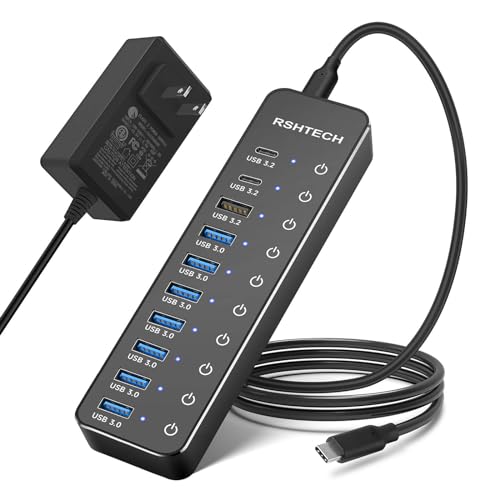
Do you have a "power user" in the house with a massive array of peripherals? The RSHTECH 10-port hub is the ultimate organizational tool for anyone juggling a complex setup.
With ten ports, you can permanently assign every single device in your workstation to its own switch. It effectively turns your USB hub into a control panel for your entire digital life.
Because of its size, this unit is best suited for large desks or home studios. It is an investment in long-term organization that eliminates the need to ever reach behind your computer case again.
Why Labeled Ports Improve Your Cable Management
Labeled ports do more than just help you find the right plug; they reduce the physical stress on your computer’s motherboard. By keeping devices organized, you avoid the "cable spaghetti" that leads to accidental tugs and broken connections.
When every device has a designated, labeled home, you are less likely to pull the wrong cord when cleaning or rearranging. This simple habit preserves the longevity of your hardware and your sanity.
- Prevents accidental disconnects: You won’t accidentally unplug your hard drive while reaching for your mouse.
- Reduces cable tension: Organized cables stay in place, meaning less strain on the ports themselves.
- Simplifies troubleshooting: If a device fails, you know immediately which port it is connected to.
Key Factors to Consider When Selecting USB Hubs
When shopping for a hub, start by counting your devices and adding two extra ports for future growth. There is nothing more annoying than buying a hub that is full the moment you plug it in.
Consider whether you need a "powered" hub, which plugs into a wall outlet, or a "bus-powered" one that draws energy from your computer. If you use external hard drives, always choose a powered hub to avoid data corruption or connection drops.
- Space: Measure your desk area; don’t buy a 10-port hub if you only have room for a 4-port device.
- Port Spacing: Look for wide gaps between ports if you use thick, oddly shaped thumb drives.
- Cable Length: Ensure the cord connecting the hub to your computer is long enough to reach your desk surface.
How to Safely Maintain Your USB Hub Connections
Treat your USB hub like any other household appliance by keeping it free of dust and debris. A quick puff of compressed air every few months will prevent dust from interfering with your data connections.
Always use the individual switches to "power down" devices before physically unplugging them if possible. This simple step prevents electrical surges and keeps your sensitive hardware, like external drives, functioning for years.
Never force a cable into a port if it feels tight, as this can bend the internal pins and ruin the hub. If a port stops working, label it as "dead" with a piece of tape to avoid future frustration until you can replace the unit.
Organizing your workspace doesn’t have to be a complicated or expensive endeavor. By choosing a hub with labeled, switchable ports, you gain control over your tech and create a more efficient environment. Start with your most used devices, and you will quickly wonder how you ever managed without this simple upgrade.