

7 Best Glossy Brochure Papers for Craft Fair Flyers
Choose the perfect finish for your craft fair flyers. We review the 7 best glossy papers to ensure your designs pop and leave a lasting impression on visitors.
Preparing for a craft fair means your flyers need to catch eyes from across a crowded room while surviving the journey in your craft tote. Choosing the right glossy paper transforms a simple printout into a professional-looking marketing piece that reflects the quality of your handmade goods. This guide breaks down the best paper options to ensure your brand stands out without breaking your budget.
HP Professional Glossy: Best for Laser Printers


If you run a home office with a standard color laser printer, you know the struggle of finding paper that doesn’t melt or jam. HP Professional Glossy is specifically engineered to handle the high heat of laser fusers without curling or bubbling.
It offers a smooth, professional finish that makes logos and product photos look crisp and vibrant. Because it’s designed for laser technology, you won’t deal with the toner flaking issues that often plague standard copy paper.
Keep in mind that this paper is thicker than standard printer sheets, so you may need to adjust your printer’s "heavy paper" setting. It’s a reliable workhorse for crafters who need a stack of flyers ready in minutes.
Epson Premium Glossy: Top Choice for Inkjets

For those who rely on high-quality inkjet printers to capture the intricate details of their handmade jewelry or textiles, Epson Premium Glossy is a gold standard. It features a special coating that prevents ink from bleeding, ensuring your images remain sharp.
This paper is particularly effective for small-batch printing where color accuracy is paramount. Whether you are in a small apartment or a dedicated studio, the drying time is relatively quick, which helps prevent accidental smudges during your packing process.
While it is priced higher than generic brands, the visual impact is significant. If your craft fair flyers rely heavily on high-resolution photography, this investment is well worth the cost.
Hammermill Glossy Paper: Best Value for Bulk

Preparing for a large-scale event often means printing hundreds of flyers, and the cost of paper adds up quickly. Hammermill Glossy offers a fantastic balance between professional quality and affordability, making it ideal for bulk printing.
This paper is versatile enough to work well in both laser and inkjet printers, which is a huge plus if you share a printer with other family members. It provides a clean, bright white background that makes your text pop without the premium price tag.
It is slightly thinner than specialty photo papers, which makes it easier to fold for brochures or trifolds. If you need to print a large volume on a tight budget, this is your go-to choice.
Canon Photo Paper Plus: Superior Color Depth

When your craft projects involve rich colors or deep textures, you need a paper that can handle high saturation. Canon Photo Paper Plus is designed to provide a wide color gamut, making your flyers look more like high-end art prints than simple handouts.
This paper has a substantial feel that signals quality to potential customers the moment they pick it up. It is particularly great for crafters who sell fine art or detailed illustrations, as the gloss finish adds a subtle depth to the imagery.
Be aware that this paper is heavier and may take up more storage space in your craft bins. For high-impact, limited-run flyers, the color reproduction here is hard to beat.
Brother BP71GLTR Glossy: Best for Sharp Text
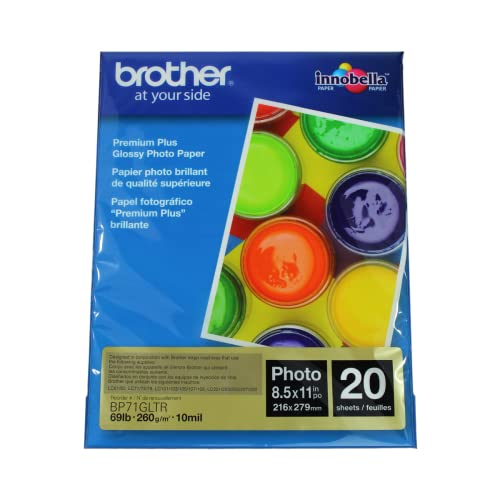
If your flyers are heavy on information—like workshop schedules or detailed pricing lists—you need a paper that keeps text razor-sharp. Brother BP71GLTR is excellent at preventing ink feathering, which keeps your fonts crisp and legible.
This paper is specifically formulated to work seamlessly with Brother’s inkjet systems, but it performs admirably with most other brands as well. The surface is smooth and resistant to light, ensuring that your contact information remains easy to read under bright event lights.
It’s a fantastic choice for those who value clarity and professional layout over flashy imagery. You’ll find that even small, fine-print details remain readable, which is vital for building trust with new customers.
Staples Premium Glossy: Reliable Daily Option

Sometimes you don’t need a specialty brand; you just need a reliable product you can grab on your way home from running errands. Staples Premium Glossy is a solid, accessible option that performs consistently across most home printers.
It provides a good level of shine and decent color reproduction for standard marketing flyers. It is also one of the easiest papers to find in stock, making it a great "last-minute" solution when you realize you’ve run out of supplies the night before a fair.
While it may not have the archival quality of high-end photo papers, it is perfectly adequate for flyers that are intended to be read and eventually recycled. For the busy crafter, the convenience of local availability is a major advantage.
Koala Inkjet Glossy: Best for Craft Projects
Koala paper is a favorite among the crafting community because it is designed with creative, high-color projects in mind. It handles heavy ink loads exceptionally well, which is perfect if your flyer design includes bold, full-bleed graphics.
This paper often comes in various sizes, allowing you to print custom-sized flyers or postcards without needing to trim them down. It’s a great choice for those who like to customize their branding materials to match their specific aesthetic.
Because it is designed for crafters, the coating is quite durable and holds up well against the wear and tear of being handed out at a busy fair. If you are looking for a paper that feels like it was made for a DIY business, this is a strong contender.
Understanding Paper Weight and Brochure Durability
Paper weight, measured in grams per square meter (GSM), dictates how "sturdy" your flyer feels in the hand. For a standard flyer, a weight between 120 and 160 GSM provides a professional feel without being too thick to fold.
If your flyer is meant to be a trifold brochure, aim for the lower end of that range to prevent the paper from cracking at the creases. Thicker paper (over 200 GSM) is better suited for postcards or business cards that need to withstand being tossed into a purse.
Always check your printer’s manual to see the maximum paper weight it can handle. Forcing a printer to pull paper that is too thick can lead to internal jams or damage to the rollers.
Choosing Between Matte and Glossy Paper Finishes
Glossy paper is the clear winner when you want your colors to appear vibrant and your images to have a "pop." It reflects light, which creates a high-contrast look that catches the eye of passersby in a dim convention center.
However, matte paper is often a better choice if your flyer contains a lot of text, as it eliminates the glare that can make reading difficult under overhead lights. Matte also hides fingerprints better, which is a consideration if your flyers will be handled by dozens of people.
Consider your brand identity: a sleek, modern brand often benefits from the shine of glossy paper, while a rustic or organic brand might find a matte finish more authentic. You can also mix and match, using glossy for product photos and matte for your informational text.
Tips for Preventing Smudging on Glossy Prints
The most common frustration with glossy paper is the dreaded ink smudge that happens when the print isn’t fully dry. To combat this, adjust your printer settings to "High Quality" or "Photo" mode, which slows down the printing speed and allows more time for ink absorption.
If you are printing a large batch, try to feed the sheets one by one or in very small groups rather than loading the entire tray. This prevents the wet surface of one page from rubbing against the back of the page above it.
Finally, give your prints at least 15 to 30 minutes to air dry completely before stacking or folding them. Spreading them out on a clean, flat surface in a well-ventilated area is the best way to ensure they stay pristine for your big day.
Finding the right glossy paper is all about balancing your printer’s capabilities with the visual needs of your craft fair display. By selecting a paper weight and finish that complements your design, you can ensure your flyers look professional and inviting. Take a moment to test a few sheets before your next event, and you’ll be ready to impress every customer who walks by your booth.

