

7 Best Washable Silicone Keyboard Covers for Easy Cleaning
Keep your laptop hygienic with our top 7 washable silicone keyboard covers. These durable, easy-to-clean shields protect against spills, dust, and daily wear.
We have all experienced that sudden spike of panic when a cup of coffee tips toward a laptop or a stray crumb finds its way deep into the keys. A high-quality silicone keyboard cover acts as a simple, affordable insurance policy for your most essential home office tools. These seven options will help you protect your investment while keeping your workspace hygienic and stress-free.
CaseBuy Ultra-Thin Keyboard Cover for MacBook


If you work in a shared household where multiple family members use the same laptop, you know how quickly keys can collect dust, hair, and oil. The CaseBuy cover is designed for those who want protection without feeling like they are typing on a thick rubber mat. Its ultra-thin profile ensures that the backlight of your keys still shines through clearly.
Because this cover is so thin, it doesn’t interfere with the closing mechanism of your MacBook, which is a common concern for many users. It is essentially a "set it and forget it" solution for busy parents or students who need a quick wipe-down after a long day of school or work.
The bottom line here is that you are paying for a low-profile experience that prioritizes aesthetics. While it may show wear slightly faster than thicker, industrial-grade alternatives, the price point makes it an easy item to replace when it finally loses its grip.
Mosiso Silicone Keyboard Skin for Apple Laptops
Protect your MacBook keyboard with this ultra-thin silicone cover. It shields against spills and dust while ensuring comfortable typing, and is washable for easy maintenance. Compatible with various MacBook Air and Pro models.

Mosiso is a go-to brand for many because they offer a wide variety of colors and patterns that can help brighten up a dull home office desk. If you are a renter trying to personalize a workspace without making permanent changes, these skins provide a splash of personality. They are crafted from soft, flexible silicone that feels pleasant under the fingertips during long typing sessions.
One of the biggest advantages of the Mosiso skin is its precision molding; each key is individually shaped to fit specific MacBook models. This prevents the "sliding" sensation that cheaper, generic covers often suffer from. It stays put even if you are a heavy-handed typist or if you move your laptop from the desk to the kitchen table frequently.
Keep in mind that while these skins are durable, the printed colors may fade slightly after months of intense, daily cleaning. For the price, however, they offer a great balance of style and functional protection against liquid spills and debris.
Kuzy Keyboard Cover for MacBook Pro and Air

If your household includes young children who love to "help" with your work, you need a cover that is slightly more robust. Kuzy covers are engineered to be a bit thicker than the ultra-thin market leaders, providing a more substantial barrier against accidental liquid splashes. This extra thickness gives them a bit more weight, helping them stay anchored firmly to the keyboard deck.
The material is highly durable and can withstand repeated washings without losing its shape or elasticity. If you are someone who eats lunch at your desk, this is a practical choice because it is easy to remove, rinse under the sink, and dry in seconds. It is a reliable, no-nonsense tool that does exactly what it promises.
While the added thickness might make the keyboard feel slightly different under your fingers, most users adjust within an hour of typing. It is a smart trade-off if you prioritize spill protection over a perfectly invisible look.
UPPERCASE Premium Ultra-Thin Keyboard Protector
Protect your MacBook with this ultra-thin, translucent keyboard cover. Crafted from premium TPU, it preserves your laptop's elegance, allows backlighting to shine through, and offers a near-invisible typing experience. Compatible with M-series MacBook Pro and Air models (US ANSI layout).

UPPERCASE focuses on the "premium" feel, using high-grade silicone that feels almost like a second skin. This is an excellent option for minimalist home offices where you don’t want your equipment to look cluttered. The transparency is top-tier, ensuring that your laptop’s original design remains the star of the show.
What makes this protector stand out is its resistance to yellowing over time. Many clear silicone covers start to look dingy after a few months, but the material used here maintains its clarity quite well. It’s a great choice for professionals who want to maintain a clean, polished look in their home office.
Remember that because it is so thin, it requires careful handling during the initial application to ensure no air bubbles are trapped. Once it is on, however, it provides a seamless experience that feels like it was part of the laptop from the factory.
Moshi ClearGuard Keyboard Protector for Mac

Moshi is well-known in the tech accessory world for high-quality materials, and their ClearGuard is no exception. It is made from a high-precision, non-toxic engineering-grade thermoplastic urethane. This material is significantly thinner than standard silicone, which allows for a more responsive typing experience that feels almost identical to the bare keys.
This is a premium product, so expect to pay a bit more than you would for a generic bulk pack. However, the durability and the fact that it is hand-washable make it a long-term investment rather than a disposable accessory. It is perfect for those who are tired of buying cheap covers that stretch out and lose their fit after a few weeks.
If you are a professional who types thousands of words a day, the comfort provided by the ClearGuard is well worth the extra cost. It is one of the few covers that truly bridges the gap between protection and performance.
GMYLE Silicone Skin for Apple Magic Keyboard
Protect your Apple Magic Keyboard (US layout, MLA22L/A-A1644) with this ultra-thin, transparent silicone cover. It safeguards against spills, dust, and debris while maintaining a comfortable typing feel and easy cleaning.
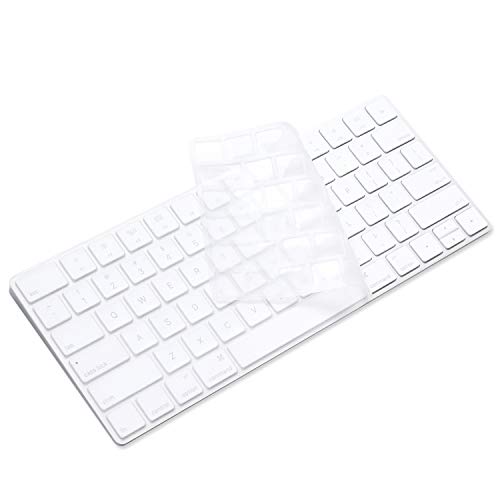
Not everyone uses a laptop; many of us rely on desktop setups with the Apple Magic Keyboard. GMYLE offers a great solution for these external keyboards, which are notoriously difficult to clean once dust gets under the scissor switches. This skin covers the entire surface, effectively sealing off the gaps between keys.
This is particularly useful for homeowners with pets, as cat or dog hair can easily migrate into the crevices of an external keyboard. The skin is easy to lift off and shake out, or you can give it a quick scrub with mild soap. It keeps your desktop looking pristine and prevents the keys from becoming shiny or oily over time.
Because this skin is designed for a stationary keyboard, you don’t have to worry about it interfering with a laptop lid. It sits flat and stays secure, making it a functional upgrade for any home office workstation.
Fintie Keyboard Cover for Desktop Keyboards
Fintie provides a more universal approach, often catering to various keyboard layouts beyond just the standard Apple options. If you have a household with multiple types of equipment—perhaps a mix of Windows and Mac machines—Fintie offers flexibility. They focus on providing a snug fit that protects against the everyday grime of a busy family home.
These covers are often sold in multi-packs, which is a fantastic value for larger households. You can keep one on your main workstation and have a backup ready for the kids’ computer or a guest room setup. They are easy to maintain and provide a consistent level of protection across different devices.
The trade-off is that they may not be as "custom-molded" as the more expensive brands. However, for the average homeowner looking for practical, affordable protection, they are a highly reliable workhorse.
How to Measure Your Keyboard for a Perfect Fit
Before you click "buy," you must identify your exact laptop model or keyboard version. Most manufacturers print the model number on the bottom of the device; cross-reference this with the product description provided by the cover manufacturer. Do not rely on visual appearance alone, as even subtle changes in key layout between years can render a cover useless.
- Check the Function Row: Ensure the cover matches your specific layout, especially if you have a Touch Bar versus physical function keys.
- Verify the Enter Key Shape: The "Enter" key shape varies significantly between international and US layouts.
- Look for Model Compatibility: Always search using your specific model number (e.g., A2338) rather than just the marketing name of the laptop.
Taking thirty seconds to verify these details will save you the frustration of a return. A well-fitted cover should lie completely flat without buckling or lifting at the corners.
Essential Tips for Cleaning Silicone Covers
To keep your cover in top shape, you don’t need fancy cleaning solutions. Simply remove the cover and wash it under warm, running water using a tiny drop of mild dish soap. Gently rub the surface with your fingers to remove oils and dust, then rinse thoroughly.
- Avoid Harsh Chemicals: Never use bleach, alcohol, or abrasive scrubbers, as these can degrade the silicone and cause it to lose its grip.
- Air Dry Completely: Always let the cover air dry completely on a flat surface before putting it back on your keyboard.
- Don’t Rush the Process: Placing a damp cover back on your keyboard can trap moisture against the sensitive electronics, which is the exact opposite of what you want.
If the cover becomes sticky over time, a light dusting of cornstarch can sometimes restore its original texture. However, if it remains tacky or loses its shape after a deep clean, it is likely time to let it go.
Signs It Is Time to Replace Your Keyboard Skin
Even the best silicone covers have a lifespan, especially in high-use environments. The most obvious sign is when the cover no longer sits flat; if the edges are curling or the center is bubbling, it is time for a replacement. A loose cover is not only annoying to type on but can also trap debris underneath, which defeats the entire purpose.
Another sign is the loss of clarity or the appearance of permanent "oily" patches that no longer wash away. Over time, the natural oils from your skin can break down the silicone material, leading to a cloudy appearance that hides your keyboard’s backlight. Finally, if you notice the cover sliding around while you type, the adhesive properties of the silicone have likely worn out.
Replacing a keyboard skin is a small price to pay for the continued health of your computer. Think of it as a low-cost maintenance item, similar to changing the air filter in your home.
Investing in a quality silicone keyboard cover is one of the easiest ways to extend the life and cleanliness of your computer. By choosing the right fit for your specific device and keeping up with a simple cleaning routine, you can protect your hardware from the inevitable accidents of daily life. Choose the option that best fits your household habits, and enjoy a cleaner, more worry-free typing experience.
