

8 Best Silent Click Wireless Mice for Shared Living Spaces
Discover the 8 best silent wireless mice for shared spaces. Improve productivity and maintain peace with these top-rated, noise-reducing ergonomic designs.
Working in a shared living space often means competing with the rhythmic, distracting sound of traditional mouse clicks. Finding a silent wireless mouse can significantly improve the harmony of your home office or communal desk setup. This guide explores the best options to help you maintain focus without disturbing those around you.
Logitech MX Master 3S: The Ultimate Silent Choice


When you work long hours at a desk shared with a partner or roommate, you need a tool that doesn’t add to the ambient noise of the room. The MX Master 3S is widely considered the gold standard because it offers 90% quieter clicks compared to its predecessors while maintaining a premium feel. It is a heavy-duty device designed for those who spend their entire day navigating complex spreadsheets or editing media.
The ergonomic, high-arch design is excellent for preventing wrist strain, making it a smart investment for anyone dealing with home office fatigue. However, its size can be a drawback if you have a smaller desk or need to store your gear in a crowded drawer. You are paying for top-tier build quality and features like the MagSpeed scroll wheel, which is a game-changer for productivity.
If you have the budget and the desk real estate, this is the most reliable long-term choice. It is built to last through years of daily use, making the higher upfront cost a reasonable trade-off for longevity.
Razer Pro Click Mini for Precision Quiet Clicking
Boost productivity with silent, tactile clicks and HyperScroll technology for effortless navigation. This compact wireless mouse connects to 4 devices and features 7 programmable buttons for ultimate efficiency.

If you value a compact form factor but refuse to sacrifice the tactile precision of a high-end sensor, this mouse fits the bill perfectly. It is designed to bridge the gap between office productivity and the high-performance standards usually reserved for gaming hardware. The buttons are engineered to be exceptionally quiet, allowing you to click away during late-night projects without waking anyone in the next room.
The "Mini" in the name is accurate; it is highly portable and slides easily into a laptop sleeve or a small organizer. Because it uses a high-quality optical sensor, it tracks smoothly on almost any surface, including glass or wood, which is helpful if you move between the dining table and a dedicated desk.
Just keep in mind that the smaller size might feel cramped if you have larger hands. It is a fantastic choice for apartment dwellers who need to pack up their workspace quickly at the end of the day.
Logitech M650 Signature: Best for Small Hands

Finding a mouse that fits comfortably is often a struggle for those with smaller hands, and the M650 Signature addresses this by offering a specific "small" version. It features SilentTouch technology, which effectively dampens the click sound without making the button feel "mushy" or unresponsive. This is a common complaint with cheaper silent mice, but Logitech manages to keep the feedback crisp.
The side buttons are customizable, allowing you to map shortcuts that speed up your daily browser tasks or document editing. It runs on a single AA battery that lasts for months, meaning you won’t have to worry about cables cluttering your workspace.
This is an ideal "set it and forget it" device for students or remote workers who want a reliable, no-nonsense mouse. It hits the sweet spot between affordability and the refined experience of a premium brand.
Keychron M3 Wireless: Top Performance for Gaming

Many people use their home computer for both work and gaming, and the Keychron M3 is designed to handle both roles with ease. While it is marketed as a performance mouse, its silent operation makes it surprisingly well-suited for a shared office environment. The weight is impressively light, which helps reduce hand fatigue during marathon sessions.
Its dual-connectivity options—allowing you to switch between 2.4GHz wireless and Bluetooth—make it versatile for users who toggle between a desktop and a laptop. You don’t have to worry about latency issues, as the wireless connection remains stable even in crowded signal environments.
The aesthetic is slightly more aggressive than a standard office mouse, but the performance benefits are undeniable. It is a great choice if you prioritize function and speed over a purely minimalist look.
Arteck 2.4G Wireless Mouse: Best Budget Option
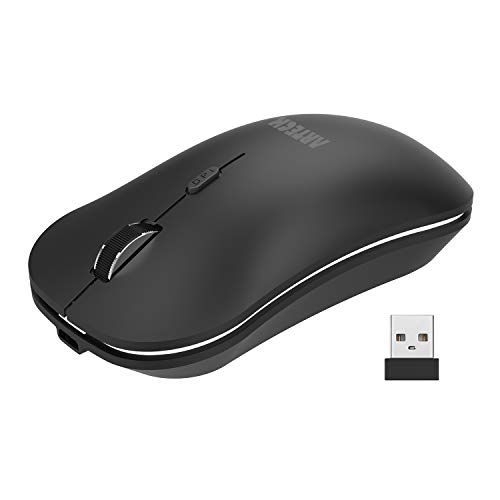
If you are setting up a workspace on a strict budget or need a spare mouse for a guest, the Arteck 2.4G is a practical solution. It is incredibly simple, relying on a small USB receiver that plugs into your computer to establish a stable connection. While it lacks the advanced software features of more expensive models, it delivers on its primary promise: silence.
The slim profile makes it easy to toss into a bag, and the battery life is surprisingly robust for the price point. It isn’t built for heavy-duty professional editing, but for web browsing and administrative tasks, it performs perfectly well.
You should consider this if you are a renter who doesn’t want to invest in expensive peripherals that might get lost or damaged during a move. It provides the quiet environment you need without breaking the bank.
Jelly Comb Slim Silent Mouse: Best for Travel
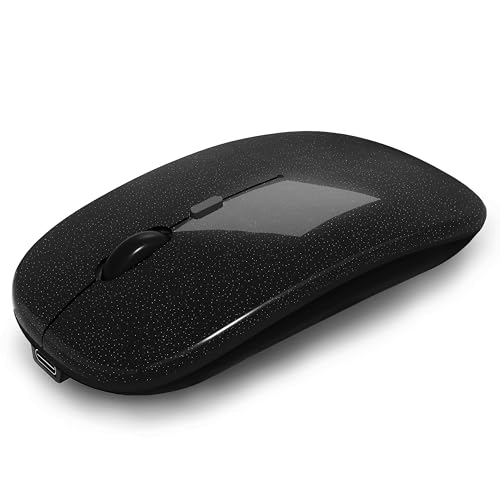
For those who treat every coffee shop or library as their office, the Jelly Comb Slim is an excellent companion. Its incredibly thin, flat profile means it won’t create an unsightly bulge in your laptop case or carry-on. The silent switches are consistently quiet, ensuring you remain a polite neighbor in shared public or home spaces.
The rechargeable battery is a major plus, as it eliminates the need to carry spare AA batteries during travel. You can simply plug it into your laptop’s USB port to charge while you work, ensuring you are never caught with a dead device.
Because of its slim design, it lacks the ergonomic contouring of larger mice, so it’s best used for shorter periods of time. It is the ultimate convenience item for the mobile professional.
Microsoft Bluetooth Mouse for Office Efficiency
Microsoft’s entry into the silent mouse category is all about clean, minimalist design and seamless integration with Windows. It connects via Bluetooth, which frees up your computer’s USB ports for other devices like external drives or webcams. The design is understated and fits perfectly into any professional or home office setup.
The tracking is smooth, and the build quality feels solid despite its lightweight construction. It is a reliable, "just works" kind of device that doesn’t demand much attention or maintenance.
If you prefer a mouse that blends into the background of your desk rather than acting as a statement piece, this is the one. It is a highly practical choice for anyone who values consistency and simplicity in their daily routine.
HP 280 Silent Wireless Mouse: Best Reliability
HP has a long history of producing reliable office hardware, and the 280 Silent Wireless Mouse continues that tradition. It is built to withstand the rigors of daily use, with a sturdy chassis that feels like it can survive a few accidental drops. The silent clicking mechanism is integrated well, providing a consistent feel that doesn’t degrade over time.
It is a mid-sized mouse, making it a good "middle ground" option for those who find small mice too tiny and large ergonomic mice too bulky. The battery life is excellent, often lasting over a year with standard usage, which is a huge benefit for homeowners who prefer low-maintenance tech.
This is a smart choice for a family computer or a shared desk where multiple people might be using the mouse throughout the day. It is durable, quiet, and consistently performs its job without fuss.
How to Choose the Right Silent Mouse for Your Desk
When choosing a silent mouse, consider your primary use case first. If you are a designer or programmer, look for models with extra buttons and high-precision sensors, like the MX Master 3S. If you are a casual user or student, a simpler, more portable option like the Jelly Comb or Microsoft Bluetooth Mouse will likely serve you better.
- Hand Size: Ensure the mouse dimensions match your grip style; a mouse that is too small can cause cramping, while one that is too large can be difficult to maneuver.
- Connectivity: Decide if you need a USB dongle (2.4GHz) for instant, lag-free connection or Bluetooth for a cleaner, cable-free desk.
- Power: Think about whether you prefer rechargeable batteries or replaceable ones; rechargeables are better for the environment, but replaceable ones can be swapped instantly.
Don’t be swayed solely by brand names or complex software suites. The "best" mouse is the one that disappears into your workflow, allowing you to focus on your tasks without the distraction of noise or discomfort.
Maintenance Tips for Keeping Your Mouse Clicking
To keep your silent mouse performing at its best, make it a habit to wipe down the surface and the sensor lens once a month. Dust and debris can accumulate near the optical sensor, which leads to "jittery" cursor movement that can be incredibly frustrating during focused work. A simple microfiber cloth is all you need.
Avoid using harsh chemical cleaners, as these can strip the coating off the mouse buttons or damage the silent switch dampeners. If you use a rechargeable mouse, try to charge it before it hits zero percent to preserve the overall health of the internal battery.
Finally, keep your desk surface clean; a clean mousepad or desk mat prevents the mouse feet from wearing down prematurely. Proper care ensures that your silent mouse remains a quiet, helpful partner in your home for years to come.
Investing in a silent wireless mouse is a small change that yields big results for your daily peace of mind. By prioritizing your specific physical needs and desk constraints, you can easily find a model that keeps your workspace quiet and productive. Choose the option that fits your routine best and enjoy a more harmonious home environment.
