

7 Best Compact Battery Backups for Small Desk Setup
Optimize your workspace with our top 7 compact battery backups. Discover reliable, space-saving power solutions designed to keep small desk setups running.
A sudden power flicker can turn a productive workday into a frustrating loss of unsaved files and interrupted projects. Whether you are working from a cramped apartment nook or a dedicated home office, a compact battery backup acts as a vital safety net for your essential electronics. Selecting the right unit ensures your gear stays protected without crowding your limited workspace.
APC Back-UPS 600VA: Best for Basic Office Gear
Safeguard your electronics with the APC UPS Battery Backup. This 600VA unit provides essential power during outages and protects against surges with 7 outlets, including a convenient USB charging port.


If you are a student or a remote worker juggling a single monitor and a laptop, the APC Back-UPS 600VA is a classic, no-nonsense choice. It is designed to sit discreetly under a desk or tucked against a wall, providing enough power to let you save your work and shut down safely during an outage.
This unit focuses on simplicity, offering a straightforward interface that doesn’t require a degree in engineering to operate. While it lacks the advanced features found in high-end gaming models, its reliability for standard office equipment is well-regarded.
Bottom line: It is the ideal "set it and forget it" solution for those who prioritize basic protection for a simple computer setup.
CyberPower CP685AVR: Top Pick for Small Desks

For those living in older homes where power fluctuations are common, the CyberPower CP685AVR offers a great balance of size and performance. It features Automatic Voltage Regulation (AVR), which corrects minor power sags and surges without needing to drain the internal battery.
The compact footprint makes it perfect for tight desk layouts where floor space is at a premium. It provides enough outlets to cover your PC, monitor, and perhaps a desk lamp, keeping your essential workflow stable during stormy weather.
Bottom line: Choose this if you need consistent power quality in a small space without paying for unnecessary extras.
Tripp Lite ECO650UPS: Energy Efficient Backup

If you are conscious about your household’s energy consumption, the Tripp Lite ECO650UPS is designed with efficiency in mind. It includes "ECO" outlets that automatically cut power to peripheral devices—like printers or speakers—when your main computer is turned off.
This feature is particularly helpful for renters who pay for their own electricity and want to avoid "vampire" power drain. It is a smart, practical way to keep your desk setup lean while ensuring your primary hardware remains protected.
Bottom line: This is an excellent pick for eco-conscious users who want to reduce their electricity footprint while maintaining reliable backup power.
Amazon Basics 600VA: Budget Friendly Protection

When you are setting up a home office on a strict budget, the Amazon Basics 600VA offers an accessible entry point into surge protection and battery backup. It provides the essential coverage needed to prevent data loss during a blackout, which is the primary concern for most household users.
While the build quality is more utilitarian compared to premium brands, it fulfills its purpose for light-duty office tasks. It is a sensible choice for a secondary desk or a child’s study station where high-end features are not required.
Bottom line: This is the most practical choice for those who need basic, functional protection without spending a premium.
APC Back-UPS Connect: Best for Networking Gear
Many people forget that their internet connection is often the first thing to drop when the power flickers. The APC Back-UPS Connect is specifically designed to keep your modem and router running, ensuring you stay connected during short outages.
Its unique, vertical design is perfect for placing on a shelf next to your networking equipment. Instead of worrying about your computer, this unit focuses on keeping your home network alive so you can continue working on a tablet or phone.
Bottom line: Invest in this if keeping your Wi-Fi active is more important to your routine than keeping your desktop computer running.
CyberPower EC550G: Compact Eco-Friendly Design
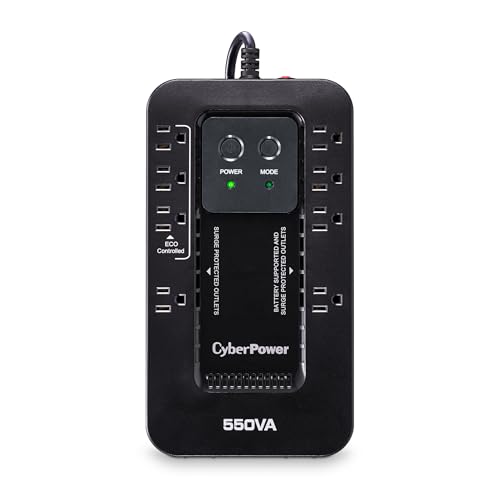
The CyberPower EC550G is another strong contender for those who appreciate space-saving, energy-efficient designs. It is small enough to fit on a shelf or in a drawer, yet powerful enough to handle the demands of a modern home office setup.
Like other eco-friendly models, it features power-saving outlets that help lower your utility bills. It is a reliable, quiet performer that won’t distract you while you are trying to focus on deep work.
Bottom line: This is a great middle-ground option that balances size, energy efficiency, and reliable surge protection for everyday use.
Tripp Lite AVR550U: Reliable Voltage Regulation

If your home suffers from frequent "brownouts"—where the lights dim but don’t go out—the Tripp Lite AVR550U is your best defense. The built-in voltage regulation ensures that your sensitive electronics receive a steady flow of power, preventing internal damage over time.
It is a durable, heavy-duty unit that feels solid and well-built, giving you peace of mind that your equipment is safe. While it occupies a bit more space than the ultra-compact models, the added protection is worth the trade-off.
Bottom line: Prioritize this model if you live in an area with unstable electrical grids and need to protect expensive hardware.
How to Calculate Your Total Desk Power Needs
To choose the right backup, you must first understand the total wattage of your equipment. Add up the wattage ratings found on the back of your computer, monitor, and any other peripherals plugged into the unit.
Most home office setups pull between 200 and 400 watts, which fits well within the capacity of the 550VA to 650VA models listed here. Always aim for a unit that provides about 20-30% more capacity than your total load to ensure the battery isn’t working at its absolute limit.
Bottom line: Don’t guess; check the labels on your devices to ensure you aren’t overloading your backup unit.
Understanding Runtime vs. Battery Capacity
A common misconception is that a bigger battery will keep your computer running for hours. In reality, these compact units are designed to provide "bridge time"—usually 5 to 15 minutes—which is just enough to save your files and shut down.
Runtime is directly tied to how much power your devices are consuming at that exact moment. If you are running a high-performance computer and a large monitor, your runtime will be significantly shorter than someone using a low-power laptop.
Bottom line: View these units as a safety net for a graceful shutdown, not as a long-term power source for working through an outage.
Essential Maintenance Tips for Battery Longevity
Your battery backup is not a permanent fixture; the internal lead-acid battery will eventually degrade. Most units last between three to five years, depending on the temperature of your room and how often the battery is cycled.
Keep your unit in a cool, well-ventilated area away from direct heat sources to extend its lifespan. Periodically test the unit using the self-test button to ensure the battery is still holding a charge, and replace the battery module when the unit’s alarm indicates it is time.
Bottom line: Treat your battery backup as a consumable item that requires a simple check-up every few years to remain effective.
Investing in a compact battery backup is a proactive step toward protecting your digital life and hardware from the unpredictability of the power grid. By choosing a unit that fits your specific needs and maintaining it properly, you ensure that your home office remains a reliable place to work. A little preparation now will save you from the stress of lost data and damaged equipment down the road.

