

7 Best Tv Remotes With Tilt Sensors For Easy Control
Discover the top 7 TV remotes featuring intuitive tilt sensors. These devices offer seamless motion-based navigation for a superior, effortless viewing experience.
We have all spent those frustrating minutes digging through couch cushions, only to find a remote that makes navigating complex streaming menus feel like a chore. Upgrading to a controller with tilt-sensor technology can transform your living room by turning simple wrist movements into precise on-screen actions. This guide explores the best options to help you reclaim your entertainment time with seamless, intuitive control.
LG Magic Remote: Best for Intuitive Navigation


If you have ever felt like you are fighting your TV’s interface just to find a movie, the LG Magic Remote is a game-changer. It functions much like a computer mouse, using a gyroscopic tilt sensor to move an on-screen cursor wherever you point. This is particularly helpful for families who juggle multiple streaming apps and need to type passwords or search for titles quickly.
The learning curve is minimal, as the natural pointing motion feels intuitive even for those who aren’t "tech-savvy." It works exceptionally well in smaller apartments where you might be sitting closer to the screen, allowing for rapid navigation without endless button clicking.
However, keep in mind that this remote is proprietary to LG TVs. If you aren’t planning to upgrade your display, this won’t be a standalone purchase option for you. The bottom line: if you own a compatible LG set, the Magic Remote is the single best upgrade you can make for your daily comfort.
Apple TV Siri Remote: Precision Motion Control
Navigate your Apple TV 4K with the Siri Remote's touch-enabled clickpad for precise control and voice commands with Siri. Recharge quickly via the USB-C port.

For households that prioritize a clean, minimalist aesthetic, the Apple TV Siri Remote offers a refined experience. Its touch-enabled clickpad combined with motion sensors allows for fluid scrolling through long lists of content. If you have a large library of digital movies, the ability to "flick" through your collection with a tilt of the wrist is a genuine time-saver.
The remote is crafted from high-quality aluminum, which feels sturdy in the hand but can be a bit slippery if your coffee table is crowded. It is a fantastic choice for those who already live within the Apple ecosystem, as the integration is seamless and requires almost no setup.
One trade-off is the remote’s slim profile; it is so small that it can easily slide between cushions or get lost under a rug. If you have a busy household with children, I highly recommend investing in a silicone case with a bright color to keep track of it.
NVIDIA Shield TV Remote: Best for Media Lovers
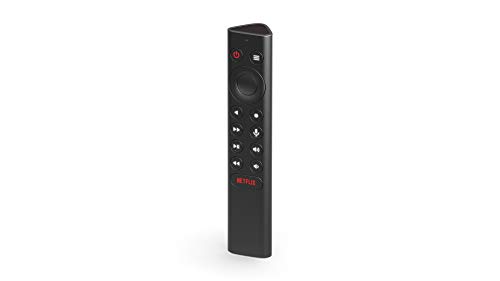
The NVIDIA Shield remote is designed for the serious media enthusiast who wants a controller that feels substantial and reliable. It features motion-activated backlighting, which is a massive help during movie nights when you don’t want to turn on the overhead lights. The tilt sensor here is used to wake the remote, ensuring you can see the buttons the moment you pick it up.
This remote is shaped like a triangular prism, which prevents it from rolling off the arm of a sofa or a narrow side table. It is heavier than most, providing a sense of durability that suggests it can withstand the occasional drop on a hardwood floor.
Because it is optimized for the Android TV platform, it offers a robust set of controls that feel snappy and responsive. It is a premium choice, but for those who spend hours catching up on shows, the ergonomic design and backlighting are worth the investment.
Roku Voice Remote Pro: Advanced Gesture Support
Control your Roku TV and players effortlessly with hands-free voice commands and a lost remote finder. Enjoy backlit buttons for easy use and a rechargeable battery that lasts for months.

The Roku Voice Remote Pro is the perfect "middle ground" for families who want smart features without a high price tag. It includes a "lost remote finder" feature, which is a lifesaver if you have a household where things tend to go missing often. The motion-sensing capabilities allow for quick wake-up times and easy navigation through Roku’s straightforward interface.
One of the most practical features is the rechargeable battery, which saves you from the constant cycle of buying and disposing of AA batteries. It is a small detail, but over the lifespan of the remote, it is both eco-friendly and cost-effective.
This remote works with most modern Roku devices, making it a great upgrade for renters who might have a basic Roku stick but want a more premium feel. It is simple, reliable, and gets the job done without any unnecessary complexity.
SofaBaton U2 Universal: Best for Multi-Device
Control all your entertainment devices with one universal remote. Features include backlit buttons for easy use in any light and customizable macros for one-press command execution. Setup is simple via the SofaBaton app.

If your living room has a TV, a soundbar, a Blu-ray player, and a gaming console, you know the pain of managing a "remote graveyard." The SofaBaton U2 is a universal solution that uses motion and tilt sensors to switch between your devices automatically. It centralizes your entire entertainment center into one sleek, manageable unit.
Setting up a universal remote can be tedious, but the SofaBaton app makes the process manageable for the average homeowner. Once configured, you can control your entire setup with a single device, which is a huge win for small living spaces where storage is at a premium.
While it lacks the ultra-slick interface of a brand-specific remote, it makes up for it in pure utility. If you are tired of juggling four different remotes just to watch a movie, this is the most practical solution on the market.
Sony Premium Backlit Remote: Best for Precision
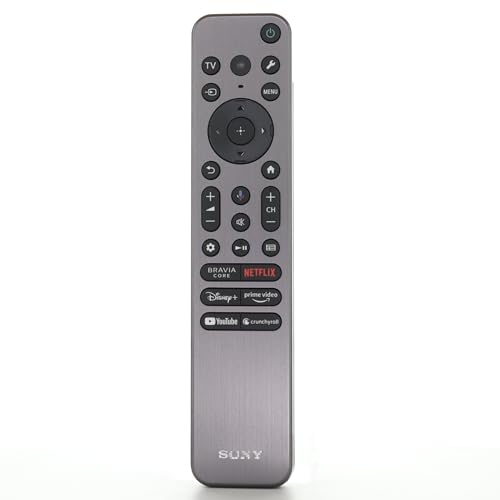
Sony’s premium remotes are often overlooked, but they offer some of the most precise motion control in the industry. Designed for their high-end Bravia line, these remotes use motion sensors to illuminate the buttons the instant you lift them. This is an essential feature for older adults or anyone who struggles with small, unlit buttons in a dark room.
The build quality is excellent, with a tactile button layout that makes it easy to find controls by feel. It is a larger remote, which makes it harder to lose, though it may feel a bit bulky if you have smaller hands.
If you are a Sony TV owner, I strongly suggest using the remote that came with your set before buying an aftermarket one. You might find that the factory-included premium remote already has the motion sensitivity you need.
Samsung SolarCell Remote: Best Eco-Friendly Pick
Samsung has taken a clever approach to the remote control by integrating a solar panel on the back. It uses ambient light from your windows or overhead bulbs to keep the battery charged, meaning you may never need to replace a battery again. The tilt sensors are used to wake the remote and optimize power management.
This remote is incredibly thin and lightweight, making it very comfortable to hold for long periods. It is also made from recycled materials, which is a nice bonus for the environmentally conscious homeowner.
While the design is minimalist, it can be a bit too "button-light" for those who prefer dedicated physical keys for every function. However, for a modern household that values sustainability and clean design, it is a brilliant piece of engineering.
How Tilt Sensors Improve Your TV Experience
Tilt sensors are not just a gimmick; they are designed to solve the problem of "dead time" when using a remote. By detecting when you lift or move the remote, these sensors can instantly wake the device from sleep mode. This eliminates the "first click" delay where you have to press a button twice just to wake the controller up.
Furthermore, tilt sensors enable "air mouse" functionality, allowing you to point at the screen rather than clicking through endless rows of icons. This is significantly faster for searching for content or navigating complex settings menus.
For anyone who feels like their TV interface is sluggish, a remote with tilt sensors can make the entire system feel faster and more responsive. It essentially bridges the gap between your physical movement and the digital content on your screen.
Key Features to Consider Before You Purchase
- Compatibility: Always check if the remote is universal or tied to a specific brand, as proprietary remotes often offer better integration but less flexibility.
- Backlighting: If you frequently watch TV in the dark, prioritize remotes that use motion sensors to trigger backlights.
- Ergonomics: Consider the size and weight; a heavier, larger remote is harder to lose, while a smaller one is more portable but easier to misplace.
- Power Source: Decide between rechargeable batteries, solar power, or traditional disposables based on your household’s waste preferences.
- Lost-Remote Features: If you have children or a busy house, look for remotes with a "find my remote" feature that emits a sound.
Troubleshooting Tips for Motion-Sensing Remotes
If your remote stops responding to motion, the first step is usually a simple recalibration. Most remotes with tilt sensors need to be placed on a flat surface for a few seconds to "zero out" the internal gyroscope. If that doesn’t work, ensure the remote is not sitting near high-interference devices like metal speakers or other wireless hubs.
Sometimes, a simple firmware update via the TV’s settings menu can resolve motion-sensing bugs. If you notice the cursor is drifting on the screen, check the batteries; low power is the most common cause of erratic sensor behavior.
Finally, keep the sensor lens clean if your remote uses an infrared-based motion tracking system. A quick wipe with a microfiber cloth can often restore the precision you had when the remote was brand new.
Finding the right remote is about balancing your specific household habits with the technology that makes your life easier. Whether you prioritize eco-friendly charging, multi-device control, or simple, intuitive pointing, there is a solution that will stop you from digging through the couch cushions. Choose the option that fits your daily routine, and enjoy a much smoother way to navigate your favorite shows.
