

7 Best Ambidextrous Wireless Mice for Left-Handed Users
Finding the perfect mouse as a left-handed user is challenging. Here are 7 top ambidextrous wireless mice offering ergonomic comfort and precision for all.
Finding a computer mouse that fits your natural grip as a left-handed user can transform your daily productivity and reduce wrist strain. While many mice are designed exclusively for right-handers, the ambidextrous market has matured significantly to offer professional-grade tools for everyone. This guide breaks down the most reliable wireless options to help you find the perfect fit for your home office or gaming setup.
Logitech G Pro Wireless: Best Overall Performance


When you share a home office with family members, you need a tool that adapts to everyone’s needs regardless of their dominant hand. The Logitech G Pro Wireless is a favorite because it features removable side buttons, allowing you to customize the layout to your specific preference. It’s a clean, unobtrusive design that fits well in both minimalist apartments and dedicated home offices.
The sensor performance here is top-tier, meaning you won’t experience the frustrating cursor lag that often plagues cheaper wireless hardware. While it carries a premium price tag, the build quality is sturdy enough to withstand years of daily use by multiple household members. It is an investment in comfort that pays off by preventing the repetitive strain often caused by poorly shaped peripherals.
Bottom line: If you want one high-quality mouse that works for every person in the house, this is your best bet.
Razer Viper Ultimate: Top Pick for Competitive Gaming
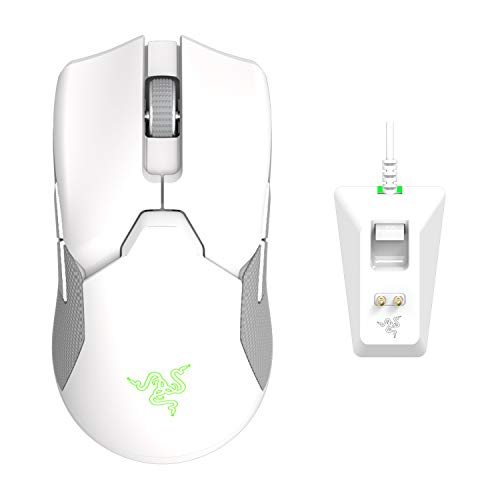
If your gaming setup is your primary escape after a long day of chores, you need a mouse that keeps up with fast-paced action. The Razer Viper Ultimate is incredibly lightweight, which reduces fatigue during long sessions. It also features optical switches that are less prone to the "double-clicking" issues that eventually ruin cheaper mice.
The included charging dock is a game-changer for keeping your desk organized. Instead of hunting for a charging cable when the battery runs low, you simply set the mouse on its base, keeping your workspace clear of clutter. It’s a thoughtful design choice for those living in smaller homes where every inch of desk space matters.
Bottom line: This is the gold standard for speed and convenience, assuming you’re willing to pay for the premium charging ecosystem.
SteelSeries Sensei Ten: Best Ambidextrous Comfort

Many users find that modern "gaming" mice feel too aggressive or angular for everyday tasks like spreadsheet management or web browsing. The SteelSeries Sensei Ten offers a classic, rounded shape that feels natural in the palm, making it ideal for those who spend hours at a desk. It provides a neutral grip that is easy on the wrist, regardless of your hand size.
While this is technically a wired-first design, it remains a staple for left-handers who prioritize ergonomics over wireless freedom. If you don’t mind a cable, the comfort level here is hard to beat for the price. It’s a reliable, no-nonsense choice for a home office where function always comes before flash.
Bottom line: Choose this if you prioritize a comfortable, familiar shape over the convenience of a wireless connection.
Logitech G903 Lightspeed: Best for Power Users
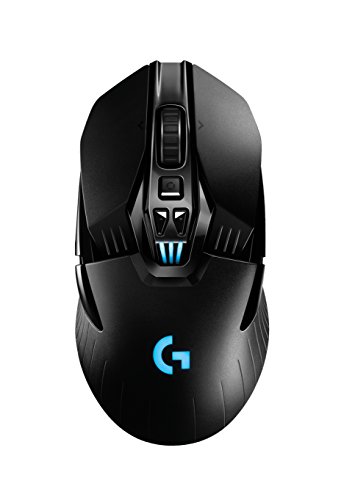
For those who treat their computer like a command center, the Logitech G903 offers an abundance of programmable buttons. You can map these buttons to automate repetitive household tasks, like opening budget spreadsheets or launching communication apps. It feels substantial in the hand, which many users prefer for stability.
The wireless connection is rock-solid, ensuring you never lose responsiveness during critical tasks. It also supports wireless charging mousepads, which allows you to keep the mouse powered up indefinitely without ever plugging it in. This is a significant advantage for those who hate managing cables or battery maintenance.
Bottom line: This is a heavy-duty tool for users who want maximum control and don’t mind a larger, more complex device.
Razer Atheris: Best Portable Option for Travel
Boost productivity with silent, tactile clicks and HyperScroll technology for effortless navigation. This compact wireless mouse connects to 4 devices and features 7 programmable buttons for ultimate efficiency.

If you are a student or a remote worker who frequently moves between the kitchen table and the coffee shop, the Razer Atheris is a perfect companion. It is compact enough to slide into a laptop sleeve without creating a bulge, yet it remains comfortable enough for extended work sessions. Its small footprint makes it ideal for shared living spaces where you need to pack your gear away quickly.
The battery life is impressive, often lasting for months on a pair of standard AA batteries. You don’t have to worry about carrying proprietary charging cables, which is a huge relief when you’re already juggling chargers for your phone and laptop. It’s a practical, low-maintenance solution for the mobile professional.
Bottom line: This is the most practical choice for those who need a reliable mouse that can travel anywhere in a backpack or drawer.
Corsair M55 RGB Pro: Best Value for Lefties

Finding a high-quality ambidextrous mouse on a budget can be challenging, but the Corsair M55 RGB Pro hits the sweet spot. It is lightweight, reliable, and features a simple design that doesn’t overwhelm the user with unnecessary buttons. It’s a great "starter" mouse for someone who wants to upgrade from a basic office peripheral without breaking the bank.
Because it’s so affordable, it’s a low-risk purchase for a household with kids or teenagers who might be rough on equipment. It provides the essential features of a professional mouse—like adjustable sensitivity—without the premium cost of top-tier gaming models. You get a durable tool that handles daily browsing and light gaming with ease.
Bottom line: This is the best value option for those who want professional features at a price that won’t strain the household budget.
Zowie FK2: Best Minimalist Design for Precision
Sometimes, you just want a mouse that does one thing perfectly: track your movement without interference. The Zowie FK2 is famous for its simple, low-profile design that avoids the "gamer" aesthetic entirely. It is a favorite among professionals who prefer a clean, distraction-free environment for their work.
The build is incredibly durable, designed to withstand years of heavy use. It doesn’t rely on complex software to work, meaning you can plug it into any computer and it will perform consistently every time. It’s a great choice for a shared family computer where you don’t want to deal with complicated driver installations.
Bottom line: If you value simplicity and reliability above all else, the Zowie FK2 is a timeless, precision-focused choice.
Key Ergonomic Factors for Left-Handed Users
- Symmetry: Ensure the mouse has a true mirror-image shape so your pinky and thumb rest comfortably.
- Button Placement: Look for mice with side buttons on both sides or those that allow you to disable one set to prevent accidental clicks.
- Weight: Lighter mice are generally better for preventing wrist fatigue during long periods of use.
- Surface Texture: A matte finish usually provides better grip for sweaty hands than glossy plastic.
Choosing the right mouse is about listening to your body; if your wrist hurts after an hour of work, your current shape isn’t working for you. Don’t be afraid to try a different size if your hand feels cramped or overly stretched.
Battery Life and Wireless Connectivity Standards
- 2.4GHz Wireless: This is the gold standard for lag-free performance, using a small USB dongle that stays in your computer.
- Bluetooth: Great for laptops and travel, though it may have slightly more input lag than dedicated wireless dongles.
- Charging Habits: Consider whether you prefer rechargeable internal batteries or standard AA/AAA batteries that you can swap out.
- Power Efficiency: Check for "sleep modes" that turn the sensor off when the mouse isn’t moving, which saves battery life for months.
Always keep a spare set of batteries in your desk drawer if you choose a non-rechargeable model. It prevents those mid-project interruptions that can be incredibly frustrating.
How to Customize Buttons for Ambidextrous Mice
Most modern mice come with companion software that lets you remap every button on the device. For a left-handed user, this means you can swap the "left-click" and "right-click" functions to match your natural index finger position. You can also assign the side buttons to common tasks like "Back" in your web browser or "Undo" in your creative apps.
Take the time to set up these profiles once, and you will save countless hours over the lifetime of the device. Most software allows you to save these profiles directly to the mouse, so your settings stay the same even if you plug it into a different computer. It’s a small bit of effort that makes your daily digital life significantly more efficient.
Investing in a quality ambidextrous mouse is a simple way to improve your daily comfort and efficiency at the computer. Whether you prioritize the high-performance features of a gaming mouse or the minimalist reliability of a standard office tool, there is an option that fits your specific needs. By choosing the right tool for your routine, you can eliminate unnecessary strain and make your time at the desk much more enjoyable.
