

7 Best Webcams With Large Lens Covers for Privacy
Prioritize your digital security with our top 7 webcam picks featuring integrated lens covers. Discover reliable, high-quality options for total privacy.
When you’re working from the kitchen table or joining a quick video call in your bedroom, the last thing you want to worry about is whether your camera is still active. A physical lens cover provides the ultimate peace of mind, turning a digital concern into a tangible, mechanical reality. These seven webcams offer that vital layer of security without sacrificing the video quality you need for your daily routine.
Logitech C920s Pro: Best All-Around Privacy Choice


If you are looking for a reliable workhorse that fits into any home office setup, the C920s Pro is a classic for a reason. It is the webcam equivalent of a sturdy, well-made kitchen knife—it does exactly what it promises every single time you need it.
The physical privacy shutter is simple, sliding securely over the lens when you aren’t on a call. It is perfect for families sharing a common computer where you want to ensure the camera is off without needing to unplug it entirely.
While it lacks some of the bells and whistles of newer, more expensive models, its consistent 1080p performance is hard to beat. For most homeowners, this is the most practical, no-nonsense choice that balances cost with long-term durability.
Razer Kiyo Pro: Top Pick for High-End Streaming

Maybe you are setting up a dedicated desk in a small apartment or a corner of your living room for content creation or high-stakes presentations. The Razer Kiyo Pro offers a level of image clarity that makes you look professional even in less-than-ideal lighting.
It comes with a separate, attachable lens cover that clips firmly onto the front of the unit. While it isn’t built-in, the cover is robust and provides a complete blackout, ensuring no light reaches the sensor when you are finished for the day.
This is a premium option, so consider if you truly need the high-end sensor before investing. If your daily routine involves frequent client-facing video calls, the jump in quality is well worth the extra shelf space and cost.
Anker PowerConf C200: Best for Home Office Use
Experience sharp 2K video and crystal-clear audio with AI noise cancellation. This webcam features adjustable field of view and a built-in privacy cover for seamless, secure video calls.

When your home office space is tight, every square inch on your monitor matters. The Anker PowerConf C200 is a compact, rectangular powerhouse that sits unobtrusively on top of your screen without blocking your view.
The built-in privacy cover is integrated directly into the housing, sliding horizontally with a satisfying click. It is incredibly convenient to use, especially if you find yourself jumping between private personal time and professional meetings throughout the day.
The image quality is sharp, and the built-in microphones are surprisingly capable for their size. It is a fantastic choice for renters who need a portable, easy-to-store solution that doesn’t require a complex setup process.
NexiGo N60 1080P: Best Budget Privacy Webcam
Capture crisp 1080p HD video with the NexiGo N60 webcam, featuring a built-in noise-canceling microphone for clear audio. Its plug-and-play design ensures easy setup across various devices, and the included privacy cover offers added security.

Not everyone needs a professional-grade studio setup to look good on a casual family video call. If you are watching your budget or just need a basic camera for occasional use, the NexiGo N60 offers incredible value without cutting corners on privacy.
It features a simple, effective plastic cover that snaps over the lens. It is lightweight and easy to mount on everything from thin laptop screens to thicker desktop monitors.
Keep in mind that at this price point, you won’t get advanced autofocus or low-light optimization. However, for a student or a casual user, it provides a clean, clear image that is a significant step up from most built-in laptop cameras.
Microsoft Modern Webcam: Best for Teams Meetings

If your daily life revolves around Microsoft Teams or corporate video conferencing, this camera is designed to integrate seamlessly into that ecosystem. Its design is clean and minimalist, fitting perfectly into a modern, organized home office.
The privacy shutter is a physical cover that slides down, clearly indicating whether you are visible to others. It’s a very tactile design that removes any guesswork during those frantic moments before a meeting starts.
It is purpose-built for stability and ease of use, meaning you won’t have to fiddle with drivers or settings. If you want a "plug it in and forget about it" experience, this is a very strong contender for your workspace.
Dell UltraSharp WB7022: Best for Professionalism
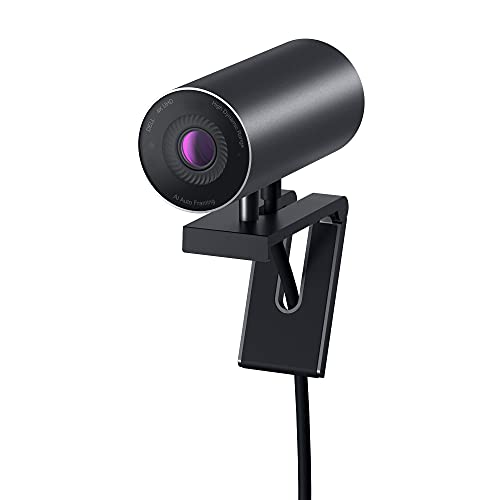
For those who treat their home office like a boardroom, the Dell UltraSharp offers a sophisticated, high-end look and feel. It is a sleek, magnetic device that feels substantial and premium the moment you take it out of the box.
The privacy cover is magnetic and attaches to the front of the camera, giving it a very clean, flush appearance when not in use. It is a brilliant design choice for those who value aesthetics as much as they value functionality.
Be aware that because it is magnetic, you’ll want to keep track of the cover so it doesn’t get lost on a cluttered desk. It is a luxury item, but for the serious professional, the build quality and image fidelity are top-tier.
Vitade 960A Pro: Best for Low-Light Environments
If your home office is tucked into a basement or a room with poor natural light, you know how grainy video can look. The Vitade 960A Pro includes a built-in ring light that helps brighten your face without the need for additional desk lamps.
The privacy cover is a simple, effective flap that protects the lens from dust and prying eyes. It is a practical addition that keeps the camera lens clean, which is essential for maintaining image quality over time.
This camera is slightly larger than others on the list because of the integrated light, so ensure you have enough clearance on your monitor. It is a great "all-in-one" solution for anyone who doesn’t want to deal with separate lighting equipment.
Why Physical Lens Covers Are Essential for Safety
Digital security is important, but physical security is undeniable. Even if you have strong passwords and updated software, a physical barrier is the only way to be 100% certain that your camera is not transmitting video.
- Peace of Mind: It removes the anxiety of wondering if you accidentally left your camera active.
- Dust Protection: A covered lens stays free of the dust and oils that can degrade image quality over time.
- Visual Confirmation: You can see at a glance that your privacy is protected, which is far more reliable than a small software status light.
For families with children or shared living spaces, a physical cover is a non-negotiable safety feature. It is a simple, low-tech solution to a high-tech problem that saves you from having to remember to disable software settings.
Key Factors to Consider When Buying a New Webcam
Before you make your purchase, take a look at where the camera will actually live. If you have a thin laptop screen, look for a mounting clip that is adjustable and has a soft, non-slip grip to prevent damage.
- Space: Measure your monitor bezel to ensure the camera doesn’t obscure your view.
- Lighting: If your room is dark, look for cameras with large sensors or integrated lighting.
- Connectivity: Check if your computer has a USB-A or USB-C port, or if you will need an adapter.
Don’t be swayed by high resolution alone; frame rate and color accuracy often matter more for daily calls. Think about how often you will be moving the camera—if you travel frequently, look for a compact, durable model that can handle being packed in a bag.
How to Properly Clean and Maintain Your Lens Cover
Your lens cover is a high-touch area, so it will inevitably collect fingerprints and oils. Use a dry, soft microfiber cloth to gently wipe the cover and the lens area, avoiding harsh chemicals that could damage the plastic or the delicate lens coating.
- Avoid Compressed Air: High-pressure air can force dust inside the camera housing.
- Check the Hinge: If your cover is a slider, ensure it moves freely and isn’t catching on debris.
- Storage: If you have a magnetic cover, store it in a dedicated spot on your desk so it doesn’t get scratched.
Regular maintenance ensures that when you do slide the cover open for a meeting, your image remains crisp and clear. A few seconds of cleaning once a week is all it takes to keep your equipment in top shape for years.
Investing in a webcam with a physical lens cover is one of the smartest, simplest upgrades you can make for your home office. By choosing a model that fits your specific lighting and space needs, you get both the professional quality you want and the privacy you deserve. Pick the option that best matches your daily routine, and enjoy the peace of mind that comes with knowing your space is truly your own.
