7 Best Keyboard Keycap Puller and Cleaning Sets
Keep your mechanical keyboard pristine with our top 7 cleaning kits. Discover the best tools for safe keycap removal, dust extraction, and deep sanitization.
Maintaining a clean keyboard is one of the most overlooked aspects of home office hygiene, yet it significantly impacts your daily typing comfort. Whether you are a remote worker or a student, a buildup of dust and debris can lead to sticky switches and a sluggish feel. Investing in a simple maintenance kit ensures your hardware remains responsive and sanitary for years to come.
Glorious PC Gaming Race Keycap Puller Tool
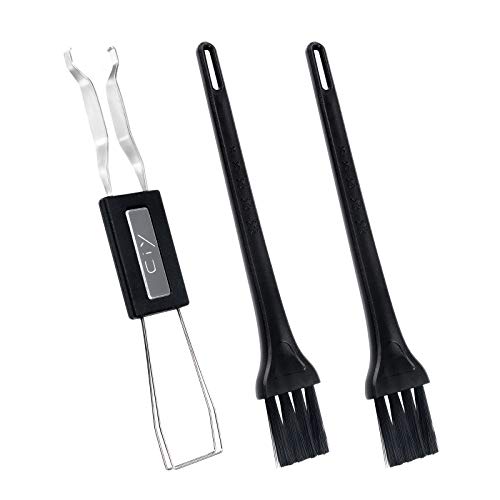

If you share a workspace or have a bustling household, you know how quickly crumbs and hair find their way under your keys. The Glorious PC Gaming Race puller is a staple for those who value simplicity and effectiveness without unnecessary bells and whistles. Its design is straightforward, focusing on a wide-grip handle that makes repetitive tasks feel much less tedious.
The primary advantage here is the wire-loop construction, which is significantly gentler on your keycaps than the plastic "ring" style pullers found in budget kits. Because the wires can flex, they slide easily under the corners of the keycap, reducing the risk of scratching the sides of your keys. This is particularly important if you have invested in high-quality ABS or PBT plastic caps.
For the average homeowner, this tool is an exercise in minimalism. It occupies almost no space in a desk drawer, making it perfect for those living in apartments or shared spaces where storage is at a premium. The bottom line: it is a reliable, no-nonsense tool that prioritizes the safety of your hardware over flashy aesthetics.
Ducky Wire Keycap Puller for Mechanical Boards

When you are maintaining a keyboard that serves as the centerpiece of your home office, you want a tool that feels substantial in your hand. The Ducky wire puller is widely respected for its ergonomic grip, which provides extra leverage when you are pulling stubborn keys. It is a favorite among enthusiasts, but its practical benefits translate well to any household.
The build quality here is a step up from generic options, featuring a sturdy handle that prevents the tool from slipping during use. If you have larger hands or find that small, fiddly tools cause hand fatigue, the Ducky puller offers a more comfortable, controlled experience. It is designed to last through dozens of deep cleans without the wire loops losing their shape.
While it is slightly more expensive than a basic plastic puller, the longevity makes it a smart investment for your home. You won’t need to replace it every time you move or upgrade your setup. It is a classic example of paying a little more upfront to avoid the frustration of inferior tools later.
Razer Universal Keycap Puller and Cleaning Kit

For those who prefer an all-in-one approach, the Razer kit is a convenient solution that bundles a puller with specialized brushes. This is an excellent choice for households where space is tight and you don’t want a collection of individual cleaning gadgets scattered across your desk. It keeps everything you need in one compact, manageable package.

The inclusion of a soft-bristled brush is a game-changer for daily maintenance. Before you even think about pulling keys, a quick swipe across the surface can remove surface dust that would otherwise fall into the switches. It is the perfect tool for a quick "reset" of your workspace at the end of a long work week.
However, consider that universal kits sometimes prioritize quantity over the specific durability of the puller itself. If you find yourself pulling keycaps daily, you might eventually want to upgrade the puller component, but for the occasional deep clean, this kit hits the sweet spot of value and utility. It is a practical choice for busy families who need a quick, effective cleaning solution.
Havit Mechanical Keyboard Cleaning Tool Set
If your desk is a high-traffic area—perhaps a shared family computer or a gaming station used by multiple people—the Havit set offers a comprehensive approach to hygiene. This set often includes not just a puller, but also specialized brushes and even tweezers to reach deep into the switch housing. It turns a chore into a more systematic process.
The benefit of having a dedicated set of brushes is that you can tackle different types of debris, from fine dust to heavier particles. Using the right tool for the right job prevents you from pushing dirt deeper into the board. It is a methodical way to ensure your keyboard stays in top shape, especially if you have pets or live in a dusty environment.
While this set takes up more drawer space than a simple wire puller, the trade-off is a much cleaner keyboard. It is a great option for homeowners who appreciate having a "kit" rather than loose tools. If you have the storage room, the added functionality makes deep cleaning significantly faster and more thorough.
Qisan Wire Keycap Puller for Cherry MX Switches
The Qisan wire puller is a fantastic budget-friendly option that doesn’t compromise on the safety of your keyboard. It features a simple, compact design that is perfect for those who want a reliable tool without the premium price tag. It is a favorite for students and apartment dwellers who need to save money while still protecting their gear.
The wire loops are thin enough to fit between closely packed keys, which is a major advantage if you have a compact 60% or 75% keyboard. Many cheaper pullers are too bulky to fit between keys, but the Qisan model slides in easily. This makes the entire process of removing your keys much smoother and less prone to accidental slips.
Don’t let the low price fool you into thinking it’s a "disposable" product. As long as you treat the wires with care and don’t force them, this tool can last for years. It is a perfect example of how you don’t need to spend a fortune to get a high-performing tool that does exactly what it is supposed to do.
Keychron Premium Stainless Steel Keycap Puller
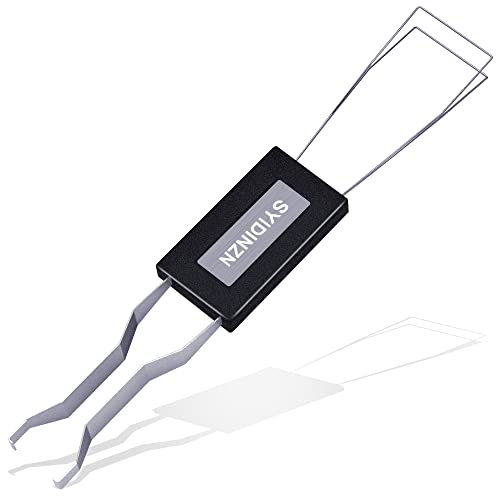
If you value durability above all else, the Keychron stainless steel puller is worth considering for your home office. This tool is built to withstand heavy use and feels much more "premium" than plastic-handled alternatives. It is a solid, one-piece tool that won’t break or bend, making it a "buy it for life" kind of purchase.
The stainless steel construction provides a satisfying weight and balance that makes it easy to maneuver. If you are someone who enjoys the tactile nature of mechanical keyboards, you will likely appreciate the build quality of this tool. It is also very easy to wipe clean after use, ensuring that you aren’t transferring oils or grime back onto your board.
While it is on the higher end of the price spectrum for a puller, the cost is justified by its near-indestructible nature. It is an excellent choice for a permanent home office setup where you want tools that match the quality of your equipment. It offers peace of mind knowing that your primary maintenance tool will never let you down.
Akko Multi-Functional Keycap Puller and Brush
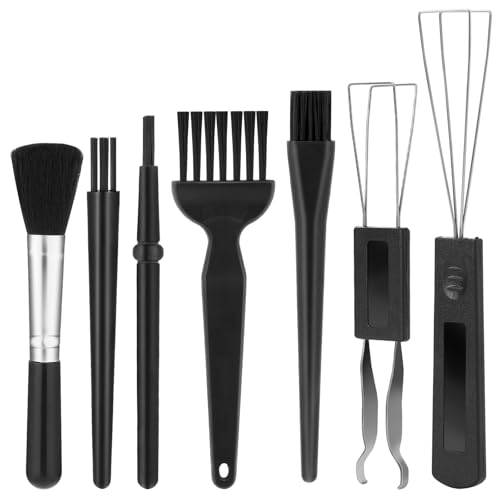
The Akko multi-functional tool is a clever piece of engineering that combines a puller and a brush into one compact, integrated unit. This is ideal for minimalists or those living in small spaces who want to keep their desk clutter-free. It is essentially a "Swiss Army knife" for keyboard maintenance.
Having the brush attached directly to the handle means you can switch between pulling and cleaning in seconds. This efficiency is great when you are doing a quick clean before a meeting or a gaming session. It reduces the number of items you have to keep track of, which is a huge plus for anyone who struggles with desk organization.
Because it is a multi-purpose tool, it is slightly more complex than a simple wire puller, but it remains very intuitive to use. It is a great middle-ground option for those who want a bit more functionality without the bulk of a full cleaning kit. It is a smart, space-saving choice for any modern workspace.
How to Safely Remove Keycaps Without Damage
Removing keycaps is a delicate process that requires patience rather than force. Always use a wire-loop puller, as plastic "ring" pullers can scratch the sides of your keys or even snap the stems if you aren’t careful. The goal is to pull straight up, maintaining an even pressure across the keycap.
Before you start, take a photo of your keyboard layout so you don’t have to guess where the keys go when you put them back. Wiggle the puller slightly to ensure the wires are fully seated under the cap, then lift vertically. Avoid pulling at an angle, as this puts unnecessary stress on the switch stem and can lead to broken components.
If a key feels stuck, stop immediately and check the alignment of your puller. Never try to pry a keycap off with a screwdriver or a knife, as these will permanently damage the plastic and the switch housing. Taking your time here is the single best way to ensure your keyboard remains in pristine condition for years.
Essential Tips for Deep Cleaning Your Keyboard
A deep clean is more than just removing keys; it’s about refreshing the entire surface. Once the keys are off, use a can of compressed air to blow out the dust and debris from between the switches. Always hold the can upright to avoid spraying liquid propellant onto your electronics.
For the keycaps themselves, a warm soak in soapy water is the most effective method. Use a mild dish soap and let the caps soak for about 15–20 minutes, then scrub them gently with a soft brush if needed. Ensure they are completely dry—I mean bone dry—before putting them back on the board to prevent any moisture damage to the switches.
When cleaning the keyboard base, use a microfiber cloth lightly dampened with isopropyl alcohol. This will disinfect the surface and remove the oils that accumulate from daily use. Never spray liquid directly onto the keyboard; always spray the cloth first to prevent fluid from seeping into the internal circuitry.
Maintaining Your Keyboard for Longevity and Feel
Consistency is the secret to a keyboard that feels new for years. You don’t need to do a full deep clean every month, but a quick brush-off every few weeks prevents the buildup that leads to mechanical failure. Keeping your workspace free of food and drinks is the most effective "maintenance" you can perform.
Think of your keyboard as a high-performance tool that requires occasional care to function at its best. If you notice a key starting to feel "sticky" or unresponsive, address it immediately rather than waiting for a full cleaning cycle. Often, a quick spot-clean can resolve the issue before it becomes a major problem.
Ultimately, the best maintenance routine is the one you actually stick to. Whether it’s a quick brush-down on Friday afternoons or a full deep clean once a quarter, find a rhythm that works for your schedule. Your fingers—and your keyboard—will thank you for the extra attention.
Keeping your keyboard clean is a simple habit that pays off in both hygiene and typing performance. By choosing a reliable wire-loop puller and following a consistent cleaning schedule, you protect your investment and improve your daily workspace experience. Remember that a little bit of regular maintenance is always better than a major repair later on.