

7 Best Voice-activated Tv Remotes For Easy Control
Discover the top 7 voice-activated TV remotes. We review the best options for effortless hands-free control, simplifying your home entertainment experience.
Finding the right voice-activated remote can transform a cluttered, frustrating living room into a streamlined space where technology finally works for you. After two decades of helping families set up their homes, I know that the best remote is the one that disappears into your routine without requiring a manual. This guide will help you cut through the marketing noise to find a reliable control solution that fits your specific household needs.
Apple TV Siri Remote: Best for Seamless Navigation
Navigate your Apple TV 4K with the Siri Remote's touch-enabled clickpad for precise control and voice commands with Siri. Recharge quickly via the USB-C port.


If you’ve ever fumbled with a traditional remote while trying to scrub through a long movie, you know how frustrating imprecise buttons can be. The Siri Remote features a touch-enabled clickpad that makes navigating through streaming apps feel as intuitive as using a smartphone. It’s a fantastic choice for families who want a premium feel without the clutter of extra buttons.
The integration with the Apple ecosystem is its biggest strength. If you already use an iPhone or iPad, the remote’s voice recognition feels snappy and conversational. However, keep in mind that the metallic finish can be a bit slippery for small children, and it is a premium-priced accessory.
Bottom line: If you are already invested in Apple hardware, this is the most polished navigation experience you can buy.
Roku Voice Remote Pro: Top Pick for Compatibility
Control your Roku TV and players effortlessly with hands-free voice commands and a lost remote finder. Enjoy backlit buttons for easy use and a rechargeable battery that lasts for months.

Many of us have a mix of older TVs and newer streaming sticks, which often leads to a "remote graveyard" on the coffee table. The Roku Voice Remote Pro is designed to bridge that gap by working with nearly every Roku device ever made. It’s an ideal solution for renters who move frequently and need one device that works regardless of the television provided by the landlord.
One of its most practical features is the "lost remote" finder, which triggers an audible chime when you use the mobile app. No more digging through sofa cushions when you’re already running behind for a movie night. It also features a rechargeable battery, saving you from the endless cycle of buying AA batteries.
Bottom line: This is the most versatile, stress-free option for households that value reliability over flashy aesthetics.
Amazon Alexa Voice Remote Pro: Best for Fire TV
Never lose your remote again with the Alexa Voice Remote Pro's built-in finder. Enjoy backlit, customizable buttons and integrated TV controls for effortless navigation and smart home management.

If your household relies on Alexa for everything from checking the weather to turning off the lights, this remote is a natural extension of your home. It includes customizable shortcut buttons, allowing you to jump directly into your most-used apps like Netflix or Prime Video with a single tap. It is a massive upgrade for anyone who finds the standard Fire TV remote too basic.
The remote also features a built-in backlight, which is a lifesaver for those who prefer watching movies in a dark room. While it is specifically built for the Fire TV ecosystem, it offers a level of tactile control that many other voice remotes lack.
Bottom line: For Alexa-heavy homes, the added convenience of backlight and shortcuts makes this a high-value, practical upgrade.
Chromecast Voice Remote: Best for Google TV Users

For those who prioritize discovery and personalized recommendations, the Chromecast remote is a standout performer. It is compact, lightweight, and fits perfectly in smaller hands, making it an excellent choice for apartments or shared living spaces where counter space is at a premium. The Google Assistant integration is arguably the most accurate in the industry for searching across multiple platforms at once.
Because it is so small, you’ll want to be mindful of where you store it, as it can easily slide under furniture. It doesn’t have the heavy-duty feel of more expensive remotes, but it balances that with a very accessible price point.
Bottom line: This is a great, budget-friendly choice that prioritizes smart search functionality over physical heft.
Nvidia Shield TV Remote: Best for Gaming Setups
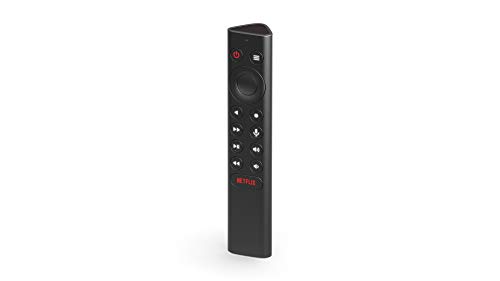
Gaming households often have unique needs, requiring a remote that can handle both media playback and high-speed navigation. The Nvidia Shield remote is triangular in shape, which prevents it from sliding off uneven surfaces and makes it surprisingly ergonomic to hold during long sessions. It includes motion-activated backlighting that kicks in the moment you pick it up.
While it is a bit more expensive than a standard streaming remote, the build quality is rugged enough to handle the wear and tear of a busy living room. It’s a specialized tool, but for those who use their TV as a central entertainment hub for gaming and media, it’s worth the investment.
Bottom line: If your TV setup is a high-traffic zone for gaming, this durable, well-designed remote is worth every penny.
SofaBaton U2 Universal Remote: Best for All Devices
Control all your entertainment devices with one universal remote. Features include backlit buttons for easy use in any light and customizable macros for one-press command execution. Setup is simple via the SofaBaton app.

If you are tired of juggling three or four different remotes to manage your soundbar, TV, and gaming console, the SofaBaton U2 is your best friend. This device uses a scroll wheel and a small OLED screen to help you switch between devices seamlessly. It’s the perfect "peacekeeper" for families who want to simplify their entertainment setup into one single controller.
The setup process requires a bit of patience, as you’ll need to map your specific devices via the companion app. However, once it is programmed, it provides a level of control that proprietary remotes simply cannot match. It’s a smart choice for homeowners who want to hide their extra remotes in a drawer.
Bottom line: This is the best solution for the "one remote to rule them all" goal, provided you are willing to spend time on the initial setup.
Caavo Control Center: Best for Multiple Inputs
For the home theater enthusiast who has a complex setup involving cable boxes, Blu-ray players, and game consoles, the Caavo Control Center is a unique solution. It acts as a hub that connects all your devices to your TV, allowing you to control everything through one interface. It’s excellent for households where non-tech-savvy family members struggle to switch between "HDMI 1" and "HDMI 2."
While it requires an upfront investment and a bit of cable management behind your media console, it removes the "input" headache entirely. It is essentially a smart bridge that makes complex systems feel like a simple streaming app.
Bottom line: If you have a complicated AV setup, this is the most effective way to unify your controls for the whole family.
How to Sync Your Voice Remote to Your Television
Syncing a new remote is usually a straightforward process, but it requires a bit of preparation. Most modern remotes use Bluetooth to communicate with your TV, meaning you’ll need to be within a few feet of the device during the pairing process. Always ensure your TV’s software is updated before attempting to sync, as outdated firmware is the most common cause of pairing failure.
- Check the batteries: Ensure they are fresh, even if the remote came with them pre-installed.
- Clear the path: If your remote uses infrared (IR) for power or volume, make sure there isn’t a soundbar blocking the TV’s receiver.
- Follow the on-screen prompts: Most streaming devices will automatically detect the remote if you hold the "Home" and "Back" buttons simultaneously.
Bottom line: Don’t rush the process; if it doesn’t pair on the first try, restart your TV and try again with the remote closer to the receiver.
Troubleshooting Common Voice Recognition Glitches
Voice recognition isn’t perfect, and environmental factors in your home play a huge role in performance. If your remote isn’t "hearing" you correctly, consider the background noise in your room. A loud air conditioner or a dishwasher running nearby can interfere with the remote’s microphone, leading to frequent errors.
- Speak clearly and at a normal pace: You don’t need to shout, but enunciating helps the software process commands.
- Check for obstructions: Ensure the microphone hole on the remote isn’t blocked by a protective case or debris.
- Privacy settings: Double-check that you have granted the necessary permissions in your TV’s settings menu for voice search to function.
Bottom line: Most "glitches" are actually just environmental interference; move away from loud appliances if you find your remote is struggling.
Essential Features to Check Before You Purchase
Before you click "buy," take a moment to assess your household’s daily habits. If you have young children, look for a remote that is durable and doesn’t have too many tiny, removable parts. If you have a large family, consider a remote with a "lost device" feature, as remotes have a way of disappearing in busy households.
- Backlighting: Essential if you watch TV in a dim room.
- Rechargeable vs. Battery: Rechargeable is better for the environment, but standard batteries are easier to swap in a pinch.
- Custom Buttons: Look for these if you want to launch your favorite apps without using voice commands.
Bottom line: Prioritize features that solve your specific daily frustrations rather than buying the most expensive model on the shelf.
Choosing the right voice-activated remote is about balancing your technical needs with the reality of your daily life. Whether you need a simple, durable remote for a kids’ playroom or a sophisticated hub for a complex home theater, there is an option that will make your time in front of the screen much more enjoyable. Pick the one that feels right for your family, keep your setup simple, and enjoy the convenience of controlling your home with just a few words.
