

7 Best Made in USA Wired Keyboards for Typing
Discover the top 7 American-made wired keyboards. We analyze durability, switch quality, and ergonomic design to help you find the perfect typing companion.
Finding the right keyboard can transform your daily desk work from a source of fatigue into a genuinely satisfying tactile experience. While wireless options clutter our drawers with batteries and charging cables, a reliable wired connection offers unmatched consistency for the home office. This guide explores seven premium keyboard options that prioritize durability and typing performance for your household.
Unicomp Model M: The Classic Clicky Typing Legend


If you grew up using the heavy-duty beige keyboards of the nineties, the Unicomp Model M will feel like a long-lost friend. It is the spiritual successor to the legendary IBM Model M, utilizing the same "buckling spring" mechanism that provides a distinct, satisfying click with every keystroke.
This keyboard is built like a tank, making it an excellent choice for a busy household where the home office might double as a family hub. Because it is heavy and sturdy, it won’t slide around on a shared kitchen table or a crowded desk.
However, keep in mind that the "click" is loud. If you share an apartment or work near a bedroom, your family members will definitely hear you typing. It is a tool for those who value heritage and tactile feedback over modern, silent aesthetics.
Datadesk SmartBoard: Ergonomic Design for Comfort
When you spend hours drafting emails or managing household finances, your wrists often pay the price for poor posture. The Datadesk SmartBoard features a unique, curved layout designed to keep your hands in a more natural position during long sessions.
This board is particularly useful for homeowners who struggle with repetitive strain or discomfort after a long day of work. The layout effectively reduces the need to reach or twist your wrists, which can prevent long-term fatigue.
Because of its unconventional shape, it does take a few days to get used to the key placement. If your workspace is limited, note that the curved design takes up more desk real estate than a standard rectangular unit.
Kinesis Advantage2: Best for Heavy Typing Loads
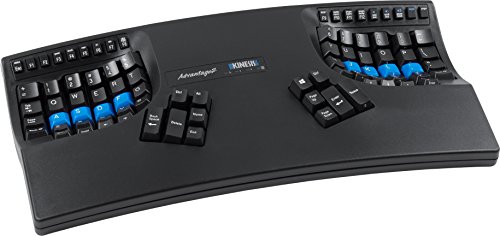
The Kinesis Advantage2 looks like it belongs in a spaceship, featuring two concave key wells that separate your hands entirely. By placing the keys in "bowls," it minimizes the distance your fingers travel to reach every letter.
This is the gold standard for heavy typists, such as writers or data analysts, who spend upwards of eight hours a day at their desks. It is an investment piece, but for those with chronic wrist pain, it can be a genuine life-saver.
The learning curve is steep, and you will likely feel slow for the first week of use. For a household with multiple users, this is likely not the best "family" keyboard, as most guests will find it impossible to navigate.
Matias Tactile Pro: Precision Mechanical Switches

The Matias Tactile Pro is a favorite among those who miss the feel of the original Apple Extended Keyboard. It uses specialized ALPS-inspired switches that offer a crisp, tactile "bump" that tells your brain exactly when the key has been registered.
This keyboard is a fantastic middle ground between the extreme ergonomics of the Kinesis and the standard layout of a basic office board. It provides a premium, professional feel that makes typing feel effortless and rhythmic.
It is a great choice for a home office where you want a high-quality experience without needing a specialized layout. Be aware that like the Unicomp, it is quite loud, so it is best suited for a private office rather than a shared living space.
Das Keyboard 4 Professional: Premium Build Quality

The Das Keyboard 4 Professional is designed for the minimalist who wants a high-end, industrial look without any unnecessary frills. It features a sleek aluminum top panel and dedicated media controls, including a very satisfying oversized volume knob.
This is a versatile choice for a household where the desk is used for both work and media consumption. The volume knob is a surprisingly helpful feature for quickly muting meetings or adjusting music volume during a chore-filled Saturday.
It is a heavy, well-constructed unit that feels like it will last for decades. While it lacks backlighting, its clean lines and robust build make it a staple for any serious home office setup.
Topre Realforce R2: Ultimate Tactile Experience

Topre switches are unique because they use a hybrid design—a rubber dome over a capacitive spring. This results in a typing feel that is incredibly smooth, quiet, and satisfyingly "thocky" rather than "clicky."
If you live in an apartment with thin walls or share an office with a spouse, this is arguably the best keyboard you can buy. It provides a high-end mechanical feel without the harsh noise that typically accompanies premium boards.
The price point is high, which makes it a significant investment for any home budget. However, for those who value a quiet, luxurious typing experience, the cost is justified by the sheer comfort provided during long work sessions.
Happy Hacking Keyboard: Compact Layout Excellence

The Happy Hacking Keyboard (HHKB) is the ultimate choice for those living in small apartments or using minimal desk space. It uses a 60% layout, meaning it strips away the number pad and function keys to leave only the essentials.
Because of its compact size, it is incredibly easy to store in a drawer or move between a desk and a coffee table. It is a favorite among programmers and writers who want to keep their mouse closer to their hands to improve ergonomics.
The layout requires a bit of memorization, as you will need to use "layers" to access keys like arrows or F-keys. It is not for everyone, but if you value a clean, uncluttered workspace, this is a top-tier solution.
Why Wired Keyboards Still Outperform Wireless Units
- Zero Latency: Wired connections ensure your keystrokes register instantly, which is vital for quick data entry.
- No Battery Anxiety: You never have to worry about your keyboard dying in the middle of an important project or a late-night deadline.
- Reliability: Wireless signals can sometimes be interrupted by other household electronics; a cable provides a rock-solid, interference-free connection.
- Cost Efficiency: You aren’t paying for expensive batteries or complex Bluetooth chipsets, meaning more of your money goes into the actual build quality and switches.
Key Factors to Consider for Your Typing Comfort
When choosing a keyboard, start by evaluating your desk size. If you have a small pull-out tray, a full-sized board with a number pad might be too large, making a compact or "tenkeyless" model more practical.
Consider the noise level of your environment next. If your office is near a nursery or a shared living room, prioritize silent switches over loud, clicky ones to keep the peace in your home.
Finally, think about your primary use case. If you are doing heavy data entry, a keyboard with a dedicated number pad is non-negotiable, regardless of the aesthetic appeal of smaller, minimalist boards.
Essential Tips for Cleaning Your Mechanical Keyboard
- Unplug First: Always disconnect the cable before cleaning to avoid accidental inputs or electrical shorts.
- Use Compressed Air: Turn the keyboard upside down and use a can of compressed air to dislodge crumbs and dust from between the keys.
- Keycap Removal: Use a dedicated keycap puller to remove the plastic caps; you can soak these in warm, soapy water to remove oils and grime.
- Surface Maintenance: Wipe the keyboard chassis with a lightly dampened microfiber cloth; never spray liquid cleaner directly onto the keys or into the switches.
Investing in a high-quality wired keyboard is one of the most effective ways to improve your daily productivity and physical comfort at home. By selecting a model that balances your specific space constraints and noise requirements, you can create a workspace that feels professional and inviting. Remember that the best tool is the one that fits your unique routine, so prioritize long-term durability over fleeting trends.
