

7 Best Extra-Large Display Tv Remotes for Seniors
Simplify TV navigation with our top 7 extra-large remote picks for seniors. These user-friendly devices feature big buttons for effortless, clear control.
Finding the right remote control can turn a frustrating evening of television into a relaxing, stress-free experience for seniors. As we age, dexterity and vision changes often make standard, cluttered remotes difficult to navigate effectively. This guide highlights the best extra-large display options to help you regain control of your entertainment setup with ease.
RCA RCR312W Big Button Universal Remote Control


If you have ever felt overwhelmed by a remote with fifty tiny, identical buttons, the RCA RCR312W is a breath of fresh air. It focuses on the essentials—volume, channel, and power—without the fluff that often confuses users.
The buttons are oversized and high-contrast, making them easy to identify even in lower lighting conditions. It is a fantastic choice for those living in smaller apartments who want a straightforward, no-nonsense device that just works.
Keep in mind that while this remote is very affordable, it lacks the advanced macro capabilities of high-end models. For most seniors, however, the simplicity of this design is its greatest strength.
Flipper Big Button Remote for Simple TV Control
Simplify TV control with the Flipper Big Button Remote. Its large, color-coded buttons and customizable favorites list make it ideal for seniors and those with vision impairments. This universal remote controls TVs and cable boxes, but does not support streaming devices.

The Flipper remote is widely considered the gold standard for seniors who find modern technology intimidating. It physically limits the number of buttons available, preventing accidental channel changes or settings adjustments that can be hard to reverse.
This remote is particularly helpful for seniors with cognitive impairments or those who simply want a "set it and forget it" solution. It allows you to lock in your favorite channels so that you never have to scroll through hundreds of options again.
The trade-off here is the initial setup time, which requires a bit of patience to program correctly. Once finished, it provides a level of peace of mind that few other remotes can match.
GE Universal Remote Control With Large Buttons

GE has designed this remote with a focus on ergonomics and visibility, making it a perfect fit for a busy household. The buttons are not just large; they are also spaced out significantly to reduce the risk of pressing the wrong command.
This model is compatible with most major TV brands, making it a versatile choice for homeowners who might have different television sets in the bedroom and living room. It strikes a great balance between functionality and ease of use.
The build quality is sturdy enough to survive the occasional drop onto a hardwood floor or carpet. It is a reliable, mid-range option that prioritizes durability over fancy aesthetics.
Tek Pal Large Button TV Remote for Seniors
The Tek Pal is designed specifically for those who struggle with fine motor skills or tremors. It features a very limited interface that removes the "menu" and "input" buttons entirely, which are common sources of frustration for many users.
Because it is so simplified, it is an excellent choice for assisted living environments or shared spaces where multiple people might use the TV. It eliminates the risk of someone accidentally changing the TV’s internal settings.
Be aware that because it lacks advanced buttons, you will need a different remote if you ever need to perform a deep system update on your television. For daily viewing, however, it is arguably the most user-friendly option on this list.
SofaBaton U2 Universal Remote With OLED Display
Control all your entertainment devices with one universal remote. Features include backlit buttons for easy use in any light and customizable macros for one-press command execution. Setup is simple via the SofaBaton app.

If you want a large-button experience that doesn’t sacrifice modern convenience, the SofaBaton U2 is a unique contender. It features a small OLED screen that helps you navigate between different devices, like a soundbar or a streaming box.
This is ideal for a tech-savvy senior who enjoys streaming services but needs a clearer way to see what they are doing. The buttons are tactile and responsive, providing a satisfying click that confirms a command has been registered.
While it has a steeper learning curve than the Flipper or Tek Pal, it offers much more flexibility for complex home theater setups. It is a premium investment that rewards the user with a cleaner, more organized coffee table.
Philips Universal Remote With Backlit Buttons

Visibility is often the biggest hurdle for seniors, especially when watching movies in a darkened room. The Philips Universal Remote addresses this with a bright backlight that illuminates the buttons clearly when pressed.
The layout is intuitive, mimicking the standard remotes that many of us grew up using, but with much larger, easier-to-read text. It feels substantial in the hand, which is helpful for those who prefer a remote with a bit of weight to it.
This is a great "middle-of-the-road" choice that provides enough buttons for basic streaming navigation without becoming cluttered. It represents a solid investment in both comfort and utility.
One For All Contour Universal Remote Control
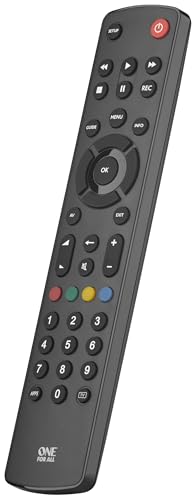
The One For All Contour is designed with a sleek, curved shape that makes it very comfortable to hold for extended periods. If you suffer from arthritis, the ergonomic grip can make a noticeable difference in your comfort.
The buttons are color-coded and logically grouped, which helps users learn the layout quickly through muscle memory. It is a very durable unit that feels like it can handle the wear and tear of daily use in a busy family home.
While it is slightly larger than some other models, the size is a benefit for those who struggle with small, fiddly controls. It is a dependable, well-rounded remote that gets the job done without any unnecessary complexity.
Key Features to Look for in Senior-Friendly Remotes
When shopping, prioritize high-contrast labels over fancy design elements. White text on black buttons—or vice versa—is significantly easier to read than light gray on silver.
Consider the physical feedback of the buttons. You want a remote that provides a tactile "click" or a physical depression so the user knows they have successfully pressed the button.
Finally, check the battery compartment. A remote that uses standard AA or AAA batteries is often easier for seniors to maintain than those requiring specialized coin-cell batteries.
How to Program Your New Universal Remote Easily
Most universal remotes come with a code list, but the "auto-search" function is usually the most efficient method. Simply turn on your TV, hold the setup button, and let the remote cycle through frequencies until the TV responds.
If you find the process frustrating, don’t hesitate to ask a family member or a neighbor to handle the initial pairing. Once the remote is programmed, you rarely need to touch the settings again.
Keep your instruction manual in a dedicated drawer or folder near the TV. Even if you don’t need it today, having it handy for a future battery change or TV upgrade will save you a lot of headache.
Tips for Keeping Remote Buttons Visible and Clean
Over time, the natural oils from our hands can make buttons sticky or cause the labels to fade. A quick wipe with a slightly damp microfiber cloth once a month is usually enough to keep the surface clean.
Avoid using harsh chemical cleaners, as these can strip the labels off the buttons over time. If a button gets particularly dirty, a cotton swab with a tiny amount of isopropyl alcohol is a safe, effective alternative.
If the labels do start to fade, you can use small, high-contrast stickers to mark the most important buttons. This is a simple, low-cost way to extend the life of your remote and keep it usable for years to come.
The right remote control can significantly improve your daily quality of life by removing unnecessary barriers to your favorite shows. By focusing on button size, high-contrast labels, and simple layouts, you can find a device that feels like a natural extension of your hand. Choose the option that best fits your specific needs, and enjoy a more relaxed, accessible home entertainment experience.
