

7 Best Hdmi Cables For Small Apartment Entertainment Centers
Optimize your small space with these 7 top-rated HDMI cables. Discover compact, durable, and high-speed options perfect for any minimalist entertainment setup.
Creating a seamless entertainment setup in a small apartment often comes down to the quality of the connections behind your display. While it is tempting to overlook the cables, choosing the right ones ensures your devices communicate without signal drops or annoying flickering. This guide helps you navigate the technical clutter to find reliable, space-appropriate solutions for your home.
Zeskit Maya 8K HDMI Cable: Best Overall Choice


When you want a "set it and forget it" solution for a main living room TV, the Zeskit Maya is the gold standard. It is fully certified for 48Gbps, meaning it handles 4K at 120Hz or even 8K content without breaking a sweat.
For apartment dwellers who upgrade their gaming consoles or streaming boxes frequently, this cable offers the most longevity. You won’t need to replace it when you eventually upgrade to a newer, higher-resolution television.
The build is robust, yet the cable remains flexible enough to snake through tight entertainment center shelves. It is the best investment for someone who wants to avoid troubleshooting signal issues during a movie night.
Monoprice Certified Premium: Best Budget Pick

If you are setting up a secondary bedroom TV or a monitor in a home office, you don’t need to overspend. Monoprice has built a reputation on providing "Certified Premium" cables that actually meet their advertised speeds at a fraction of the cost of big-box store brands.
These cables are thinner than most high-end options, which is a massive advantage when you are dealing with cramped cord-management trays. They are easy to bend and tuck away behind a wall-mounted TV or a small media console.
Don’t let the low price tag fool you into thinking they are low quality. They are perfectly capable of handling standard 4K HDR content, making them the most practical choice for the budget-conscious renter.
AudioQuest Pearl HDMI: Best for Audiophiles

If your entertainment center includes a dedicated soundbar or a high-end receiver, the signal path matters for audio clarity. The AudioQuest Pearl is designed with solid long-grain copper conductors that minimize internal interference.
While it is a more expensive option, it is intended for those who prioritize their home theater’s sound profile. It’s an excellent choice if you have a small space where you want to maximize the performance of your audio equipment without adding bulky external processors.
Just keep in mind that this cable is slightly stiffer than others due to its shielding. Ensure you have enough depth behind your media cabinet to accommodate the slightly larger connector heads.
Belkin Ultra HD Cable: Best for Apple TV Users

Apple TV users often deal with specific handshake issues where the device and the television struggle to sync. The Belkin Ultra HD cable is designed to be highly compatible with Apple’s ecosystem, ensuring that HDR and Dolby Vision settings trigger immediately.
Because this cable is specifically engineered for high-speed data transfer, it eliminates the "black screen" moments that often plague cheaper, uncertified cables. It is a reliable choice for any household that relies on a single, high-quality streaming box.
It is a bit pricier, but the peace of mind is worth it if you are tired of restarting your streaming device. It is a premium, polished product that fits well in a minimalist, modern apartment setup.
AmazonBasics High-Speed: Best Value Multipack
Experience stunning visuals with this 6-foot Ultra High Speed HDMI 2.1 cable, supporting 8K@60Hz and 4K@120Hz. Enjoy seamless plug-and-play connectivity for gaming consoles, TVs, and monitors with its durable, corrosion-resistant design.
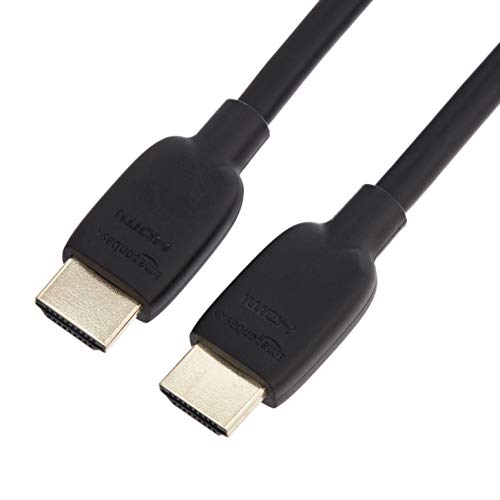
Managing cables for a small apartment often means connecting a TV, a game console, and a soundbar all at once. Buying an AmazonBasics multipack is the most efficient way to standardize your connections without making multiple trips to the store.
These cables are basic, functional, and perfectly adequate for 1080p or standard 4K streaming. They aren’t designed for the bleeding edge of gaming technology, but they are more than enough for daily Netflix and YouTube viewing.
The best part about these is the ease of replacement. If one gets damaged while you are rearranging your furniture, you have a spare ready to go in your junk drawer.
Rocketfish 4K Ultra HD: Best for Tight Spaces

Small apartments often feature "floating" shelves or very shallow media consoles where space is at a premium. The Rocketfish cables are known for their compact connector heads, which allow you to plug devices in even when the port is right up against a wall.
These cables are also highly flexible, making them ideal for routing through small cable management holes in furniture. If you have ever struggled to get a stiff cable to bend around a corner, you will appreciate the design here.
They are widely available and offer a great balance between build quality and physical form factor. They are a smart choice for anyone who values a clean, clutter-free look in a tight living area.
Anker Ultra High Speed: Best Durable Braided Cord
If you have a household with pets or children, you know that cables take a beating. The Anker Ultra High Speed cable features a nylon-braided exterior that resists fraying and tangling far better than standard plastic-coated cords.
This durability is essential if you frequently move your devices or if your cables are exposed in a high-traffic area of your apartment. They are built to withstand the physical stress of being pulled or bent repeatedly.
While the braided exterior makes the cable slightly thicker, it is much easier to keep organized. A few velcro ties on these cords will keep your entertainment center looking professional and tidy for years.
Understanding HDMI Specifications and Versions
When shopping for cables, you will see terms like "High Speed," "Premium," and "Ultra High Speed." Essentially, these labels tell you how much data the cable can carry; "Ultra High Speed" is the current standard for 4K and 8K gaming.
Avoid worrying about version numbers like 2.0 or 2.1, as manufacturers often use these terms inconsistently. Focus instead on the "Certified" label, which indicates that the cable has been tested to meet specific performance standards.
For most apartment setups, an "Ultra High Speed" cable is the safest bet for future-proofing. It ensures you won’t have to swap out cables if you buy a new TV or console in the next few years.
How Cable Length Impacts Small Space Setup
In a small apartment, the biggest mistake is buying a cable that is too long. Excess length creates a "cable nest" behind your TV, which collects dust and makes it impossible to move your furniture for cleaning.
Measure the distance between your devices carefully, then add a foot or two for slack. You want enough room to pull the device out for maintenance, but not so much that you have coils of wire sitting on the floor.
If you have a wall-mounted TV, consider a shorter cable to keep the connection behind the screen clean. Shorter cables are also slightly more reliable, as there is less chance for signal degradation over the length of the wire.
Managing HDMI Cables for a Cleaner Living Room
A clean entertainment center starts with effective cable management. Use velcro ties rather than plastic zip ties, as they are reusable and won’t damage the cable casing if you need to rearrange your setup later.
For apartments where you cannot modify the walls, use adhesive cable clips to route wires along the back of your furniture legs. This keeps the cords out of sight and prevents them from being tripped over or pulled.
Finally, label your cables near the plug ends with small pieces of masking tape. When you inevitably need to unplug a device, you will thank yourself for knowing exactly which cord goes to the soundbar and which goes to the console.
Investing in the right HDMI cables is a small but significant step toward a frustration-free entertainment experience. By choosing cables that match your specific space and device needs, you can eliminate clutter and ensure a reliable picture every time you sit down to watch. Keep your setup simple, organized, and properly connected to get the most out of your home.

