

7 Best Clip-on Webcams for Laptop Use for Clarity
Upgrade your video calls with our top 7 clip-on webcams. We compare clarity, mounting ease, and value to help you find the perfect match for your laptop setup.
Whether you are jumping onto a morning school board meeting or catching up with family across the country, a grainy video feed can be a major source of frustration. Upgrading your laptop’s built-in camera is one of the most cost-effective ways to improve your daily digital presence. This guide breaks down the best clip-on webcams to help you find the right balance of clarity, price, and ease of use for your specific home setup.
Logitech C920s Pro: The Gold Standard for Clarity


If you are tired of the washed-out, blurry look of standard laptop cameras, the Logitech C920s Pro is the reliable workhorse that set the industry standard. It offers a crisp 1080p resolution that is more than sufficient for professional Zoom calls or casual chats with relatives.
This model is particularly favored for its plug-and-play simplicity, which is a lifesaver for busy households where tech support isn’t always available. It clips securely onto almost any laptop lid or monitor, providing a stable base that won’t shift during long meetings.
The bottom line here is consistency. While it lacks some of the flashy AI features found in newer models, its color accuracy and autofocus reliability make it the smartest choice for the average homeowner who just needs a camera that works every single time.
Razer Kiyo Pro: Best for Low-Light Environments
Many home offices are tucked into corners or spare bedrooms that lack optimal natural lighting. If your workspace is dim, the Razer Kiyo Pro is a standout choice because it features a high-performance sensor designed to handle low-light conditions with grace.
Unlike cheaper cameras that introduce "noise" or grain when the lights go down, the Kiyo Pro maintains a clean, smooth image. It is a bit bulkier than other options, so keep that in mind if you have a slim, lightweight laptop that you frequently move between the kitchen table and your desk.
This is an excellent investment for those who work late hours or live in apartments with limited window access. You won’t need to purchase extra bulky lighting equipment, keeping your desk clutter-free and your video feed professional regardless of the time of day.
Insta360 Link: AI-Powered Tracking for Meetings

For those who move around during presentations or need to show off a physical whiteboard, the Insta360 Link offers a sophisticated motorized gimbal. It uses AI to track your movement, ensuring you stay perfectly framed even if you pace while you talk.
This camera is undeniably a premium product, and it carries a higher price tag than a standard webcam. However, for a household where multiple family members share a workspace for diverse tasks—from remote teaching to creative demonstrations—the versatility is unmatched.
It is compact enough to store in a desk drawer when not in use, which is a huge plus for renters living in smaller spaces. If you value high-end automation, this is the most capable tool on the market for keeping a dynamic, professional appearance.
Microsoft Modern Webcam: Simple Business Utility

Sometimes, the best tool is the one that stays out of your way. The Microsoft Modern Webcam is designed specifically for those who prioritize a streamlined, professional look without unnecessary bells and whistles.
It features a built-in privacy shutter, which is a must-have for peace of mind in a shared household or a busy family home. The image quality is clean and natural, avoiding the over-saturated look that plagues many budget cameras.
This is a fantastic option for students or professionals who need a reliable, no-nonsense camera that integrates perfectly with Windows environments. It is a modest, practical choice that delivers professional results without complicating your daily routine.
Anker PowerConf C200: Best Budget 2K Resolution
Experience sharp 2K video and crystal-clear audio with AI noise cancellation. This webcam features adjustable field of view and a built-in privacy cover for seamless, secure video calls.

If you want the sharpness of a 2K resolution without the professional-grade price tag, the Anker PowerConf C200 is a brilliant value proposition. It offers a significant jump in detail compared to standard 1080p cameras, making it great for presentations where clarity is key.
The adjustable field of view is a handy feature for home offices, allowing you to narrow the frame if you don’t want your entire room visible to your colleagues. It also includes a physical privacy cover, ensuring your privacy is maintained when you aren’t on camera.
This camera is small and highly portable, making it an ideal companion for a laptop that travels between the office and the kitchen island. For the price, you are getting an impressive level of detail that makes even the most budget-conscious home setup look high-end.
Dell UltraSharp WB7022: Superior Image Quality
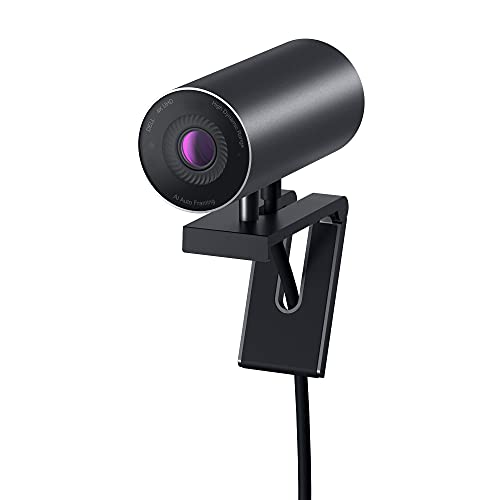
The Dell UltraSharp WB7022 is built for those who demand the absolute best image quality for their home office. It uses a large 4K sensor that captures stunning detail and handles high-contrast lighting—like a bright window behind you—better than almost any other webcam.
While it is certainly an investment, the build quality is sturdy and professional. It features a magnetic mount that is incredibly easy to snap onto your laptop or an external monitor, providing a clean, minimalist aesthetic that fits well in a modern home.
This is the right choice if your daily work involves high-stakes client calls or if you simply appreciate top-tier technology. It is a "buy it once, keep it for years" product that justifies its cost through sheer performance and durability.
NexiGo N60: Best Affordable 1080p Web Camera
Capture crisp 1080p HD video with the NexiGo N60 webcam, featuring a built-in noise-canceling microphone for clear audio. Its plug-and-play design ensures easy setup across various devices, and the included privacy cover offers added security.

Not everyone needs a professional-grade studio setup, and the NexiGo N60 proves that you can get a solid, clear image for a very modest price. It is the perfect entry-level solution for kids doing homework or adults who only need a camera for the occasional social call.
It features a wide-angle lens, which is helpful if you need to fit two people into the frame at once. While it doesn’t have the advanced low-light performance of more expensive models, it is more than capable in a well-lit room.
This camera is the definition of practical. It is affordable enough that you won’t worry about it getting bumped or damaged in a high-traffic area of the house, and it provides a reliable, clear enough image for everyday communication.
Essential Specs to Check Before Your Purchase
When shopping for a webcam, don’t get distracted by marketing buzzwords. Focus on these three pillars:
- Resolution: 1080p is the sweet spot for most; 4K is only necessary for high-end professional work.
- Field of View (FOV): A 65-78 degree FOV is ideal for one person; 90+ degrees is better for groups.
- Mounting: Ensure the clip is compatible with your laptop’s screen thickness, especially if you have a thin ultrabook.
Always check if the camera requires specific software to unlock its full potential, as some models are "plug and play" while others require a driver download. Finally, consider if you need a built-in microphone, though a dedicated headset or desk mic will almost always sound better.
How to Position Your Webcam for Better Lighting
Even the most expensive camera will look grainy if your lighting is poor. The golden rule is to always have your primary light source—a window or a lamp—in front of you, never behind you.
If you are working in a room with a window, sit facing it to let natural light illuminate your face evenly. If you are working at night, place a desk lamp slightly above your eye level to avoid harsh shadows under your eyes and nose.
Avoid relying on the overhead "big light" in your room, as it creates unflattering shadows. A simple, inexpensive ring light or a soft-glow desk lamp can transform your video quality far more than a camera upgrade ever could.
Maintaining Lens Cleanliness for Crisp Video
It sounds simple, but a smudge on your lens is the number one cause of blurry, "foggy" video. Because webcams are often touched when adjusting their position, they pick up oils from your fingers very quickly.
Keep a microfiber cloth near your desk and give the lens a gentle wipe before every important meeting. Never use paper towels or tissues, as these can leave tiny scratches on the delicate lens coating over time.
If you live in a house with pets or high dust levels, consider keeping the privacy shutter closed when the camera is not in use. This protects the glass from dust buildup and keeps your lens pristine for your next call.
Investing in a quality webcam is a small step that significantly elevates your daily communication. By balancing your budget with your specific lighting and space constraints, you can ensure your video feed is always professional and clear. Choose the option that fits your current routine, keep your lens clean, and you will be ready for any meeting that comes your way.
